Growth feels exciting until QuickBooks starts slowing decisions instead of supporting them. Reports stop matching, inventory numbers raise questions, and finance teams spend hours fixing entries. That moment signals a shift: the business has outgrown entry-level tools, yet the gap goes unnoticed until margins tighten and opportunities slip.
Disconnected spreadsheets, isolated apps, and repeated reconciliations create hidden losses. Teams chase data across systems instead of acting on insights. This is where Odoo ERP for small business changes the trajectory. This guide breaks down what matters is the investment, timing, comparisons with other ERP software for small business, potential risks, and how to identify the right fit without guesswork.
Disconnected spreadsheets, isolated apps, and repeated reconciliations create hidden losses. Teams chase data across systems instead of acting on insights. This is where Odoo ERP for small business changes the trajectory. This guide breaks down what matters is the investment, timing, comparisons with other ERP software for small business, potential risks, and how to identify the right fit without guesswork.
Odoo stands out among ERP solutions for small businesses due to its flexible architecture and cloud-first approach. As a Cloud ERP for small business, it replaces scattered tools with a connected system that aligns finance, sales, inventory, and operations.
For companies scaling in competitive markets, adopting an ERP system for small businesses is no longer optional. It marks the shift from reactive management to controlled, insight-driven growth by positioning Odoo as the best ERP for small business teams aiming to protect margins and unlock sustainable ROI.
What Is an ERP System and Why Does It Matter for Small Businesses?
An ERP system for small businesses connects finance, sales, inventory, operations, and HR within one platform. Instead of juggling separate tools, teams work from a shared source of information. This clarity reduces confusion, shortens decision cycles, and keeps departments aligned as the company grows.
ERP software for small business differs from large-enterprise platforms in scope and cost. It focuses on what growing teams need, faster setup, lower investment, and flexibility without long deployment cycles. That makes ERP solutions for small businesses practical for companies that need control without complexity.
The problem this solves is simple but costly: disconnected data. Spreadsheets, standalone apps, and repeated reconciliations create errors, delays, and missed opportunities. Without visibility, leaders rely on guesswork instead of facts. Odoo ERP for small business removes these gaps by connecting workflows across departments, so information flows without friction.
This approach fits businesses moving beyond early-stage operations such as product companies managing inventory, manufacturers handling production, distributors tracking stock across locations, and service firms balancing projects and billing. Once teams cross 15–20 employees, coordination becomes harder. An ERP system for small businesses brings order, visibility, and control at the stage where growth starts to strain existing tools.
The Biggest Risks of Not Using an ERP System for a Growing Small Business
Growth without an ERP system for small businesses does not fail overnight which erodes control step by step until revenue, margins, and decision-making start slipping. The risks are measurable, and they compound as teams expand.
- Inventory chaos hits first. Without connected systems, stock levels fall out of sync with sales. Orders get confirmed without availability, leading to cancellations and lost trust. Slow-moving items pile up, tying capital that could drive growth. Teams depend on physical counts to fix mismatches, which delays operations. Odoo ERP for small business addresses this by aligning inventory, sales, and procurement in one flow, reducing guesswork.
- Financial blind spots follow. Without ERP software for small business, profit and loss visibility lags behind operations. Month-end closes stretch into weeks, and leadership relies on outdated numbers. Cash flow becomes unpredictable, increasing risk during expansion phases.
- Spreadsheet dependency introduces silent damage. Multiple versions circulate, formulas break, and audit trails disappear. Errors go unnoticed until they impact reporting or compliance. This weakens trust in data across departments.
- Disconnected tools multiply inefficiencies. When systems like QuickBooks operate separately from CRM and inventory tools, teams enter the same data repeatedly. This slows execution and increases inconsistencies across records.
- Scaling limits eventually stop growth. Processes that support 10 employees collapse under the pressure of 40. Coordination gaps widen, reporting fragments, and operational delays increase.
- The financial impact is direct. Losses from stockouts, excess inventory, reporting delays, and human errors accumulate faster than expected. In comparison, adopting ERP solutions for small businesses especially a Cloud ERP for small business that introduces control, visibility, and consistency. The shift from fragmented systems to an integrated platform changes ROI from reactive recovery to planned growth, positioning the business for sustained expansion.
When Should a Small U.S. Business Switch from QuickBooks to an ERP System?
The switch from QuickBooks to an ERP system for small businesses is not about size but about complexity. When operations outgrow basic accounting, delays and hidden costs begin to surface. The signals are easy to spot if you know where to look.
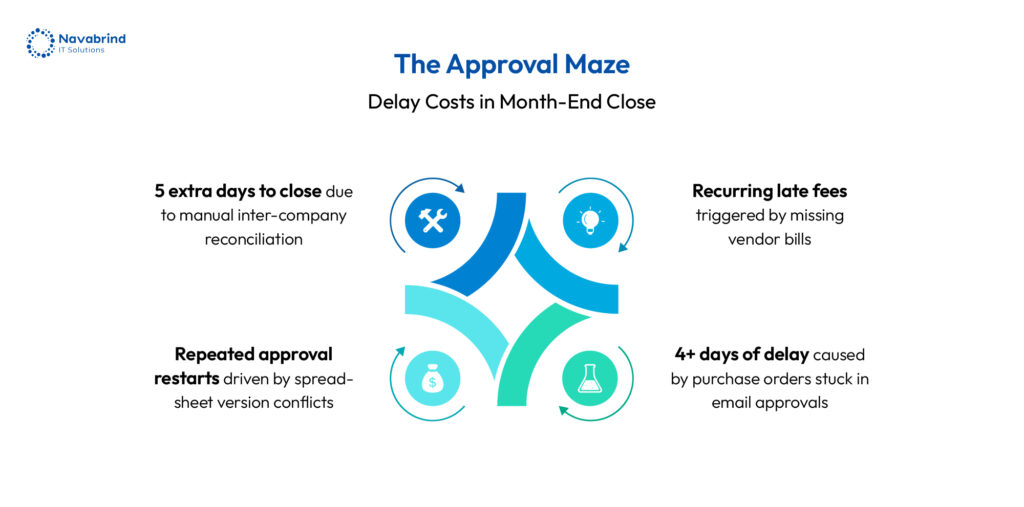
If inventory lives in spreadsheets alongside QuickBooks, control is already slipping. When month-end close stretches beyond five business days, finance is reacting instead of guiding decisions. Teams juggling four or more disconnected tools face constant duplication, errors, and misalignment. If stock levels or job costs aren’t visible when needed, planning turns into guesswork. When customer orders sit in email threads or spreadsheets, execution slows and accountability fades. Reporting that depends on exports and pivot tables signals a lack of system-driven insight. Hiring someone just to move data between systems is the clearest indicator that processes are breaking under growth.
Many businesses delay this shift, assuming existing tools can stretch further. That delay comes at a cost which is missed revenue, rising operational overhead, and reduced visibility across departments. By the time issues become urgent, recovery demands higher effort and expense.
The right moment to adopt Odoo ERP for small business or similar ERP solutions for small businesses is during the growth phase when teams expand, transactions increase, and coordination becomes complex. A Cloud ERP for small business replaces fragmented workflows with connected operations, enabling faster decisions, tighter control, and a clear path to scalable ROI.
The difference is structural. QuickBooks focuses on accounting. Odoo ERP for small business connects finance, sales, inventory, operations, and people within one platform. That shift transforms how decisions are made by moving from isolated data to connected workflows across the company.
QuickBooks still fits early-stage setups with service-focused businesses with under 10 employees, low transaction volume, and minimal operational complexity. In that phase, accounting remains the priority, and lightweight tools can support day-to-day needs.
Once operations expand, limitations surface quickly. This is where ERP software for small business becomes essential. The transition to ERP solutions for small businesses like Odoo does not require starting from scratch. Data from QuickBooks are based on customers, vendors, and financial records can be migrated into Odoo with a structured approach, preserving historical information and continuity.
Adopting a Cloud ERP for small business shifts the business from tracking numbers to managing operations end-to-end. That difference defines why Odoo stands out as the best ERP for small business teams aiming to scale without operational friction.
How Odoo ERP Helps Small U.S. Businesses Eliminate Spreadsheet Dependency
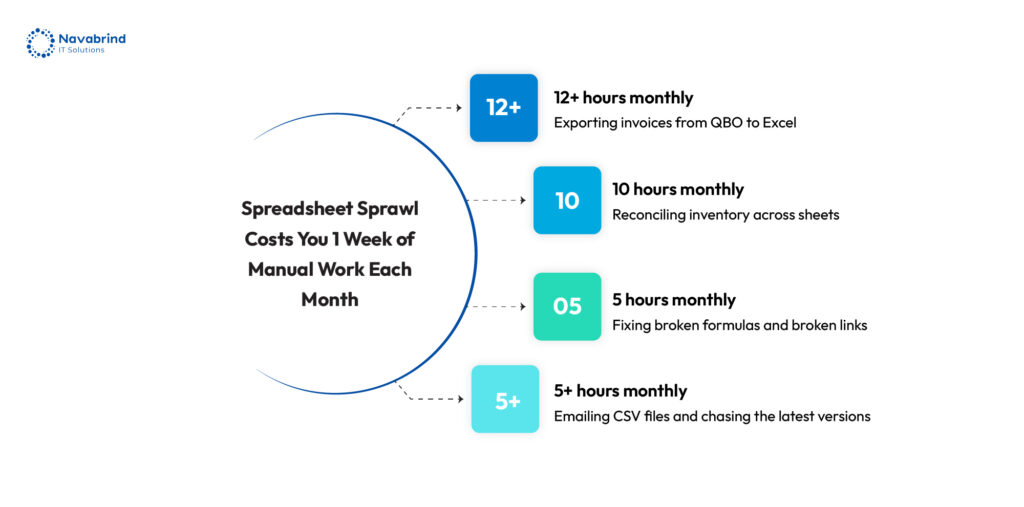
Spreadsheets feel like a quick fix. Teams start with Excel or Google Sheets to track inventory, sales, and operations because setup takes minutes. As the business grows, those sheets multiply, versions conflict, formulas break, and no one fully trusts the numbers. This spreadsheet trap is flexibility at the start, confusion at scale. An ERP system for small businesses replaces that fragility with control.
Odoo ERP for small business removes spreadsheet dependency by replacing scattered trackers with connected applications. Inventory sheets shift to Odoo Inventory, giving stock visibility across locations. Sales pipelines in Sheets move into CRM, where leads, deals, and activities stay aligned. Invoicing no longer depends on separate files of Odoo Accounting connecting billing with sales and finance. Project task lists transition into Odoo Project, linking timelines with resources. HR checklists move into Odoo HR, organizing employee data and onboarding workflows. These ERP solutions for small businesses eliminate duplication and reduce errors across departments.
Consider a purchase order lifecycle. In spreadsheets, requests move through emails, approvals get lost, and stock updates happen after delays. In Odoo, the request triggers a purchase order, approval follows defined roles, inventory updates as goods arrive, and accounting records the transaction instantly. Each step connects without gaps.
Auditability changes the game. With ERP software for small business, each action is recorded, traceable, and reportable. A Cloud ERP for small business creates accountability, reduces risk, and replaces scattered data with a reliable system that supports consistent growth.
Is Odoo the Best Cloud ERP for Small Manufacturing Businesses?
Manufacturing businesses don’t run on accounting alone. They depend on bill of materials, work orders, routing, and quality checks to keep production aligned with demand. Generic tools fail to manage this complexity, which is why a dedicated ERP system for small businesses becomes essential at the growth stage.
Odoo addresses these needs with a complete manufacturing suite. Odoo ERP for small business includes bill of materials management, work order tracking, routing control, and quality checkpoints within one environment. Production, inventory, and procurement stay connected, reducing delays and improving output consistency without relying on external tools.
A Cloud ERP for small business delivers clear advantages for manufacturers. There’s no dependency on on-premise servers or heavy IT infrastructure. Production teams gain visibility into shop floor activity as it happens, enabling faster adjustments. Vendor and procurement workflows stay aligned with demand, preventing stock imbalances. Lot and serial number traceability strengthens quality control and compliance, which becomes critical as operations scale.
Compared to alternatives like Fishbowl Inventory, Katana, and NetSuite, Odoo offers broader functionality within a single platform. Fishbowl focuses on inventory, Katana targets smaller production setups, and NetSuite leans toward larger enterprises with higher investment levels. Odoo positions itself between simplicity and scale, making it a strong contender among ERP solutions for small businesses.
The verdict depends on business needs. Odoo stands out as the best ERP for small business when manufacturers require flexibility, connected workflows, and cost control during growth. For highly complex, multi-entity operations with enterprise-level requirements, alternatives like NetSuite may align better.
How Much Does Odoo ERP Cost for a Small Business in the U.S.?
Odoo follows a flexible pricing model, making it an Affordable ERP for small business teams evaluating long-term value. There are two editions: Community (no license fee) and Enterprise (subscription-based, per user/month). Enterprise unlocks full functionality, support, and cloud hosting—critical for scaling operations.
Typical cost breakdown:
- Software license: $0 (Community) or as per the cost determined by Odoo on their website (Enterprise)
- Implementation services: $10,000–$30,000 based on workflows, modules, and customization
- Training: included in some projects or billed separately
Ongoing support: monthly retainer or on-demand assistance
Compared to NetSuite and SAP Business One, Odoo presents a lower entry point. NetSuite involves higher subscription tiers and longer deployments. SAP Business One requires heavier upfront investment and infrastructure planning. Odoo balances capability with cost, positioning itself among ERP solutions for small businesses that prioritize growth without financial strain.
Affordable does not mean limited. You’re investing in connected operations—finance, sales, inventory, and production within a single ERP system for small businesses. The return shows up in reduced hours spent reconciling data, fewer operational errors, and delayed hiring for administrative roles. A Cloud ERP for small business like Odoo converts operational inefficiencies into measurable ROI, making cost a growth lever rather than an expense.
What to Look for When Evaluating ERP Solutions for Small Businesses:
Choosing the right ERP solutions for small businesses comes down to how well the system supports growth without adding friction. The first factor is usability and implementation speed. If teams struggle to adopt the system, productivity drops and ROI gets delayed. ERP software for small businesses should feel intuitive from day one, with a rollout timeline that matches business urgency.
- A flexible structure matters next. Businesses should pay for what they use and expand capabilities as operations grow. This prevents unnecessary spending and keeps the system aligned with evolving needs.
- Deployment approach plays a critical role. A Cloud ERP for small business removes dependency on physical servers and reduces IT overhead, making access easier across locations. Hosted and on-premise options may suit companies with strict data control requirements, though they come with added maintenance responsibility.
- Compliance and support are non-negotiable for U.S. businesses. Tax regulations, payroll requirements, and financial reporting standards demand a system that aligns with local laws and offers reliable support when needed.
- Integration capability defines how well the ERP fits into the existing ecosystem. Connections with platforms like Shopify, Amazon, and payment gateways ensure operations stay connected without duplication.
- Vendor experience is the final filter. A provider with a proven track record in your business size and domain reduces implementation risk and improves long-term success with your ERP system for small businesses.
What a Successful Odoo Implementation Looks Like for a Small U.S. Business
A successful rollout of Odoo follows a focused, time-bound plan. For a growing company, implementation takes around 6–14 weeks, depending on scope and readiness. The goal is not to deploy everything at once, but to activate what drives immediate impact. Most businesses begin with 2–3 critical areas like sales, inventory, and accounting then expand into CRM, purchasing, or HR as operations mature. This phased approach reduces disruption and accelerates ROI.
- Consider a 25-person product distributor. Before adopting Odoo ERP for small business, operations rely on QuickBooks, spreadsheets, email threads, and shared folders. Orders are tracked in one place, inventory in another, and invoicing happens separately. Reporting takes hours, and data inconsistencies slow decision-making.
- After implementation, the shift is immediate. Orders, inventory, invoicing, and reporting operate within one connected system. Teams access a single dashboard for daily operations, reducing confusion and delays. This is where ERP software for small business transforms execution from fragmented processes to coordinated workflows.
- Success is measured through outcomes. Order processing time drops, inventory accuracy improves, reporting becomes faster, and staff hours spent on data handling decline. A Cloud ERP for small business enables visibility and control, turning operational complexity into a system that supports consistent, scalable growth.
Frequently Asked Questions
1.When should a small U.S. business switch from QuickBooks to an ERP system?
The shift from QuickBooks to an ERP system for small businesses should happen when operations start stretching beyond accounting. If inventory is tracked in spreadsheets, reporting takes days, or teams rely on multiple disconnected tools, the system has reached its limit. Growth brings complexity with more transactions, more coordination, and higher risk of errors. Moving to Odoo ERP for small business during the growth phase enables better visibility, faster decisions, and tighter operational control before inefficiencies impact margins.
2.How much does Odoo ERP cost for a small business in the U.S.?
Odoo offers a flexible pricing model, making it an Affordable ERP for small business options. Costs include software (free Community or ~$24–$44 per user/month for Enterprise), implementation ($5,000–$30,000), and optional support. A small team of 5–15 users can expect a Year 1 investment between $7,000 and $35,000. This positions Odoo among ERP solutions for small businesses that balance capability with cost, delivering measurable returns through reduced errors, time savings, and improved efficiency.
3.What is the difference between QuickBooks and Odoo ERP for small businesses?
QuickBooks focuses on accounting, handling financial records and basic reporting. Odoo goes further by connecting finance, sales, inventory, CRM, and operations within one system. This makes ERP software for small business suitable for companies managing products, supply chains, or multiple workflows. As complexity increases, Odoo replaces disconnected tools with a unified platform, supporting growth without operational gaps.
4.Is Odoo ERP the best cloud ERP for small manufacturing businesses?
For manufacturers, a Cloud ERP for small business must handle bill of materials, work orders, and production planning. Odoo delivers these capabilities within one system, along with inventory and procurement integration. Compared to tools like NetSuite or Katana, Odoo offers a balance between functionality and cost. It fits small manufacturers seeking flexibility and control, though larger or highly complex operations may evaluate enterprise-focused platforms.
5.How does Odoo ERP help small U.S. businesses eliminate spreadsheet dependency?
Spreadsheets become unreliable as data grows. Version conflicts, formula errors, and lack of traceability create risk. Odoo ERP for small business replaces spreadsheets with connected applications like inventory, CRM, accounting, and projects within one system. This removes duplication, improves accuracy, and ensures that each action is recorded and traceable. As an ERP system for small businesses, it turns scattered data into a reliable operational backbone.
6.What are the biggest risks of not using an ERP system for a growing small business?
Without an ERP system for small businesses, risks increase across operations. Inventory mismatches lead to stockouts or excess stock. Financial visibility drops due to delayed reporting. Disconnected tools create duplicate work and errors. Spreadsheets introduce inconsistencies with no audit trail. As teams grow, these issues compound, limiting scalability. Adopting ERP solutions for small businesses like Odoo replaces fragmented processes with connected workflows, reducing risk and enabling consistent growth.
Schedule a conversation with us now!
Related Articles









 Post
Post