The Billion-Dollar Problem on Your Shelf
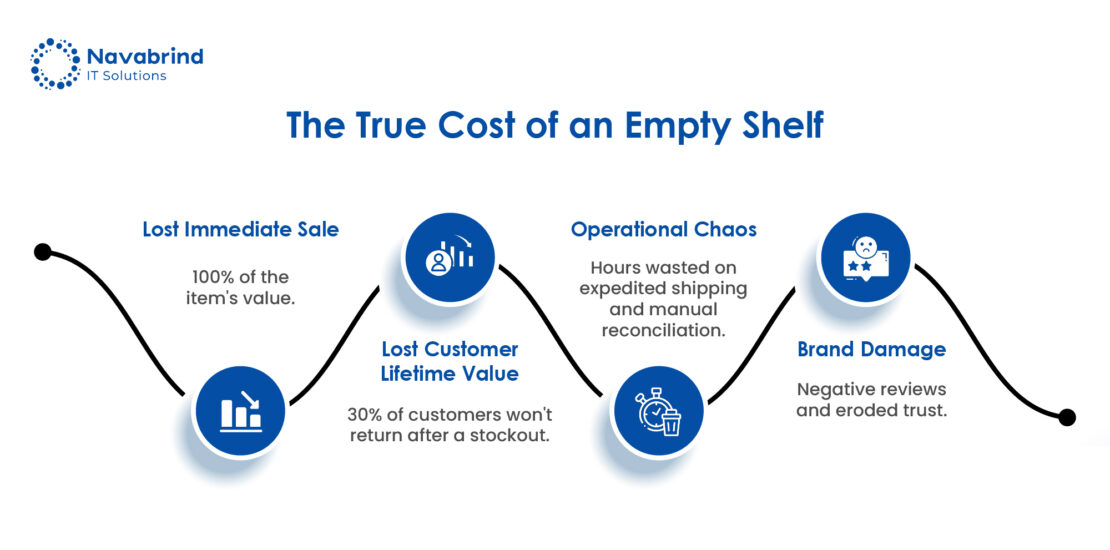
When a customer encounters an empty shelf or a “temporarily unavailable” notice online, the result is a lost sale. The long-term cost is greater. It is eroded trust and the permanent loss of that customer to a competitor. For US operations, this operational chaos translates into staggering financial waste, with industry reports indicating that stockouts cost retailers nearly 4% of annual sales.
Retailers are awash with information from their e-commerce sites, point-of-sale systems, and warehouse management software. The failure is the lack of intelligent, real-time synthesis. Disparate systems create siloed insights, leaving decision makers reacting to yesterday’s problems with fragmented data. The disconnect between online demand and physical shelf inventory is a weakness in traditional retail management.
Odoo 19 addresses this disconnect with integrated AI workflow automation, transforming a standard ERP for retail USA into a proactive nerve center. This isn’t just another software update; it’s a strategic shift. The platform functions as a unified ERP for managing online and offline retail in the USA, where AI workflow automation analyzes data to predict demand, automate replenishment, and prevent shortages.
This blog post demonstrates the workflow automation steps in Odoo 19 that empower retail and e-commerce businesses in the USA to cut stockouts by 50% or more. We will move beyond theory to showcase actionable workflows, from purchase order generation to safety stock adjustments that turn chaos into control, backed by the results achieved by US retailers.
Why You Can't Fix Stockouts with a Spreadsheet
The volume and velocity of data from an omnichannel operation overwhelms a manual system. The Odoo point-of-sale solution for US retailers, third-party marketplaces, and wholesale channels generates a stream of demand signals. Manually reconciling this data to forecast inventory is an exercise in hindsight, leaving you one step behind demand.
A platform like Odoo ERP in the USA consolidates sales transactions, returns, and warehouse movement in a single source. This consolidation is the prerequisite for accurate forecasting and defines the best ERP for omnichannel retail operations in the USA. Without this data layer, you are making decisions based on fragments of the whole picture.
True control comes from ERP control, where AI workflow automation analyzes the consolidated data stream to identify trends, predict seasonal spikes, and automatically trigger replenishment. This transforms your retail ERP from a system of record into a system of intelligence, preventing stockouts instead of documenting them after the fact.
Deep Dive: Three Pillars of Odoo 19's AI-Powered Stockout Defense
- Pillar 1: Omnichannel Demand Forecasting with AI
The first pillar transforms scattered data into a predictive signal. Odoo 19’s AI engine analyzes a data stream of historical sales from Odoo for e-commerce and the Odoo point-of-sale solution for US retailers, along with promotional calendars, seasonal trends, and market shifts. This process moves beyond simple averages, generating a dynamic, per-SKU forecast that recalibrates with transactions. This live intelligence is from an Omnichannel ERP, providing a view rather than a rearview mirror report.
- Pillar 2: Automated & Intelligent Replenishment
The system executes a calculation: the AI-generated forecast is combined with stock levels, supplier lead times, and dynamic safety stock buffers. The output is an automatic Purchase Order or internal transfer suggestion, ready for review. The AI workflow automation accounts for business realities, vendor reliability, minimum order quantities, and component relationships for kits. This eliminates the delay and error of manual replenishment, ensuring inventory aligns with projected demand without constant oversight.
- Pillar 3: Predictive Inventory Allocation & Sourcing
The third pillar optimizes inventory placement across your entire network. For businesses with multiple warehouses or stores, Odoo 19’s AI doesn’t just forecast what will sell, but where it will sell. It analyzes channel demand signals to suggest stock transfers, allocating inventory to its point of highest predicted velocity. For example, it can automatically route products from an underperforming retail location to your central e-commerce fulfillment hub ahead of a forecasted online sales surge. This capability makes it the best ERP for omnichannel retail operations in the USA, ensuring capital isn’t trapped in the wrong location and sales channels are optimally supplied.
Proof in Performance: A Case Study on Efficiency Gains
Our client was a growing retail and e-commerce business in the USA. As they scaled, managing inventory across their e-commerce stores and physical retail locations became a constant battle against conflicting data, leading to stockouts of bestsellers and costly overstock.
Before implementing a solution, their operation was defined by manual guesswork. Their purchasing team relied on disconnected spreadsheets and historical gut feelings to forecast demand, a process that was time-intensive and inaccurate. This reactive approach resulted in inefficiency; key items were out of stock during peak demand, harming sales and customer loyalty, while capital was tied up in inventory.
To solve this, the client engaged Navabrind IT Solutions, an expert Odoo ERP implementation partner in the USA to strategically configure Odoo 19. We ensured the AI workflow automation was tuned to our clients’ sales patterns and product categories, transforming the platform into a truly unified ERP for managing online and offline retail in the USA.
The intelligent ERP automation delivered a 50% reduction in stockouts within the first full quarter, ensuring popular items remained available. AI workflow automation slashed manual planning work, creating 30-50% efficiency gains for the purchasing team.
Predictive accuracy reduced overstock, freeing up working capital and improving cash flow. By having the right products in stock, the client captured previously lost demand.
Getting Started: Your Roadmap to AI-Driven Inventory
- Step 1: Audit and Consolidate Your Data
Your first action is to ensure that historical sales data from your Odoo ERP e-commerce platform, Odoo point-of-sale solution for US retailers, and other channels is consolidated within your ERP. This step transforms your system into a unified ERP for managing online and offline retail in the USA.
- Step 2: Launch with Your Critical SKUs
Begin by applying AI workflow automation to the vital 20% of products that drive 80% of your revenue. This focused approach allows you to validate the system’s forecasts, build internal trust with a manageable scope, and achieve rapid, visible wins in replenishment accuracy.
- Step 3: Configure, Trust, and Review
Collaborate with your Odoo ERP partner in the USA to configure parameters: dynamic safety stock levels, accurate supplier lead times, and procurement rules. The key is to shift from a manual override to a strategic review. Trust the ERP automation to generate purchase suggestions, and have your team review them using the system’s intelligent data.
- Step 4: Scale Systematically and Refine
Once the process is proven and your team is confident, systematically expand AI workflow automation across your whole product catalog. Refine the forecasting models using performance data and evolving sales patterns. This scaled deployment cements Odoo ERP for omnichannel retail operations in the USA.
The Affordability Equation
Odoo ERP remains an affordable ERP system for retail business in the USA. The AI workflow automation delivers a measurable return by cutting stockouts to capture more sales and reducing excess inventory to free up capital.
Beyond Inventory: The Ripple Effect of an Intelligent ERP
Stabilizing inventory with AI workflow automation creates positive ripples across your operation. A reliable, predictive stock foundation transforms other business functions from constant firefighting into areas of strategic advantage.
With product availability, your team can make accurate delivery promises. Your marketing department can launch targeted promotions and campaigns without fear of stockouts, knowing your ERP automatically adjusts procurement to meet forecasted demand spikes.
Reducing capital tied up in excess stock and dead inventory, coupled with revenue from recouping previously lost sales, strengthens your balance sheet. This financial clarity and control underscore the value of an affordable ERP system for retail businesses in the USA.
Your Odoo ERP in the USA ceases to be a passive system of record, logging transactions, and becomes a proactive system of intelligent action. It empowers departments from the warehouse using the Odoo point-of-sale solution for US retailers to the finance team planning budgets with certainty.
Stockouts plague retailers with 8-12% annual sales losses, but they’re eminently solvable through AI workflow automation embedded in modern ERP platforms like Odoo 19. Predictive demand forecasting analyzes sales velocity, seasonality, promotions, and external factors like weather or competitor pricing to generate accurate replenishment signals 50% better than traditional methods, automatically triggering purchase orders when safety stock thresholds are breached. Real-time inventory synchronization across POS, websites, and warehouses eliminates the “sold online, unavailable in-store” disconnect, while AI-driven supplier performance scoring prioritizes reliable vendors to prevent backorder cascades.
Beyond prediction, intelligent order orchestration represents the real game-changer: AI agents dynamically route incoming orders to optimal fulfillment centers based on stock levels, shipping costs, and delivery SLAs, reducing stockouts by 40-60% through proactive allocation rather than reactive firefighting. Dynamic pricing and promotional engines adjust offerings in real-time to balance demand across slow-moving items, preventing artificial shortages during peak periods, while automated backorder management communicates transparently with customers.
Stockouts aren’t inevitable; they’re a data problem solved by intelligent systems that turn historical chaos into predictive clarity. Retailers implementing AI workflow automation report 30-50% inventory efficiency gains and sustained customer retention, proving that the technology exists today to eliminate this persistent profit killer. Forward-thinking businesses prioritize these solutions now, transforming stockouts from operational headaches into competitive advantages that fuel predictable growth.
Frequently Asked Questions
1.How much does it cost to implement AI inventory automation in Odoo 19?
The investment to implement AI inventory automation in Odoo 19 is not a software license fee; it’s a combination of platform costs and expert services. Odoo ERP USA operates on a per-user subscription model and its inventory module can be easily customized to include AI workflows for forecasting and replenishment. Odoo’s subscription model makes it an affordable ERP system for retail businesses in the USA, as you pay for the capabilities and user seats you need.
A variable component of the cost of engaging with an expert Odoo ERP partner in the USA, like Navabrind IT Solutions. Our services include consultation, implementation, data migration, system configuration, process tailoring, integration, customization, support, and staff training. As an Odoo Gold Partner, we ensure your AI automation is tuned to your sales patterns, product categories, and supplier lead times.
The total cost is a function of your business’s complexity and scale, number of SKUs, sales channels, and required integrations. For a retail and e-commerce business in the USA, the combined subscription and implementation cost is offset by the returns: the reduction in stockouts and overstock, the reclamation of planning hours through ERP automation USA, and the resulting increase in sales and improved cash flow.
2. Can Odoo 19’s AI integrate with our existing e-commerce platform and POS?
Odoo 19’s AI features integrate with existing e-commerce platforms and POS systems through robust APIs, native connectors, and middleware support, enabling retailers to unify omnichannel operations without ripping out current infrastructure. The AI Assistant and automation studio pull real-time data from platforms like Shopify, WooCommerce, or custom POS via REST APIs and webhooks, powering intelligent workflows such as predictive inventory syncing, dynamic pricing across channels, and AI-driven order routing that prevents overselling between online carts and in-store sales. For example, barcode scans from third-party POS trigger Odoo AI for instant stock updates and demand forecasting, while e-commerce plugins (Shopee, Lazada, Amazon) feed sales data directly into Odoo’s AI agents for personalized recommendations and abandoned cart recovery—all without custom coding.
Even legacy systems benefit from Odoo’s flexible integration layer: Zapier/n8n no-code platforms bridge gaps for non-native POS/e-commerce, while Odoo 19’s multi-provider AI (ChatGPT, Gemini) processes external data streams for advanced use cases like voice assistants on WooCommerce sites or payment terminal syncs with Glory cash machines. Odoo implementation partners like Navabrind IT Solutions customize these connectors during implementation, ensuring secure, bidirectional data flow that maintains compliance (PCI-DSS, GDPR) and scales with growth, transforming disparate systems into an AI-orchestrated retail ecosystem. Implementation typically takes 2-4 weeks, yielding 30-50% faster fulfillment and unified customer views across channels.
Offline capabilities further enhance reliability: Odoo POS’s enhanced offline mode (dark theme, presets) syncs transactions post-reconnection, feeding AI models for continuous learning even during outages, while e-commerce APIs handle high-traffic surges independently. This makes Odoo 19 AI uniquely suited for hybrid retail environments, where businesses retain favored POS hardware while gaining enterprise-grade intelligence.
3.How long does it take to set up and see results from Odoo’s AI forecasting?
The initial setup of your Odoo ERP USA system, including inventory and sales modules, can be completed within 4-8 weeks with a qualified Odoo ERP partner like Navabrind IT Solutions. This phase includes data migration, configuring your chart of accounts, and setting up product catalogs and warehouses, configuring the ERP to manage online and offline retail in the USA.
The key to results is a focused rollout: starting with your 20% of SKUs that drive 80% of revenue. Your implementation partner will configure the forecasting models, safety stock parameters, and automation rules for these products. AI-generated purchase suggestions can be reviewed and validated within the first 1-2 months post-launch, with the system learning and refining its predictions with cycles.
You can expect to see preliminary efficiency gains, such as reduced time spent on manual ordering, within the first quarter. Measurable impacts on stockout rates become clearly evident in the second full quarter of operation. This is when enough time has passed for the ERP automation USA to execute multiple replenishment cycles based on its forecasts, and for you to compare in-stock performance against historical baselines.
4. What kind of data do I need to start, and is my historical data good enough?
To start AI workflow automation, you need clean, structured data from your core business processes, typically 3-6 months of sales transactions, inventory levels, customer orders, and basic supplier records pulled from your POS, ERP (like Odoo), or spreadsheets. Historical data doesn’t need to be perfect; even messy spreadsheets with consistent date/product/quantity columns work for initial pilots, as modern AI tools auto-clean 70-90% of inconsistencies like duplicates or missing fields during onboarding. Focus on volume over perfection, 1000+ sales records enable basic demand forecasting, while 6+ months enables accurate seasonal patterns for retail inventory workflows.
Your existing historical data is usually “good enough” for SMBs because AI workflow automation platforms like Odoo 19 use synthetic augmentation and transfer learning to bootstrap predictions from limited datasets, filling gaps with industry benchmarks. Start small: export recent Odoo sales/inventory CSVs, validate key fields (product ID, date, quantity, price), then test one workflow like low-stock alerts, AI refines accuracy over 2-4 weeks as it learns your patterns. If data gaps exist (e.g., no customer segmentation), begin with rule-based triggers enhanced by AI, scaling to full intelligence once 3 months of live data accumulates for 85%+ prediction reliability.
For optimal results, prioritize data hygiene upfront: deduplicate customers, standardize product SKUs, and tag high-value items—taking just 4-8 hours yields 40% better AI outputs from day one. Retailers often underestimate this; partners like Navabrind IT Solutions handle the cleanup during Odoo AI setup, turning “adequate” historical data into 30-50% efficiency gains through automated forecasting and order routing.
5. Can a small to mid-sized retail business benefit from AI workflows or is it only for large enterprises?
AI workflows are relevant for small and mid-sized retail businesses, not just large enterprises. Cloud-based AI workflow automation is now available as pay‑as‑you‑go services or features within tools such as POS, CRM, and ERP, so smaller teams can start with a few targeted automations, such as inventory alerts, basic demand forecasting, and AI chatbots, without large upfront investments or in‑house data science teams. Surveys show AI adoption among SMBs has jumped sharply, with most small businesses using AI to save time, reduce errors, and compete more effectively in marketing, customer service, and operations.
For a small to mid-sized retailer, AI workflow automation typically starts with practical use cases: chatbots to answer common questions and track orders, automated low‑stock alerts and reorders, AI-driven email/SMS campaigns based on customer behavior, and simple sales or lead follow‑up reminders. These workflows handle repetitive work in the background, responding to customers, syncing orders and inventory, routing issues to the right person, so a lean team can focus on buying, merchandising, and in‑store experience instead of firefighting back-office tasks. In that sense, AI workflows can be even more impactful for smaller retailers, because they amplify limited staff capacity and help them deliver “big‑brand” speed and personalization on a small‑business budget.
Schedule a conversation with us now!
Related Articles







 Post
Post