What Is ERP System Migration?
ERP migration refers to the shift from an existing platform to a refined environment that aligns with evolving business demands. This process extends beyond data transfer. It covers application logic, workflows, reporting frameworks, and user adoption. A well-planned ERP system migration ensures that historical records, operational rules, and business continuity remain intact without disruption. At its core, ERP data migration connects past transactions with present operations, creating a reliable foundation for growth.
Organizations initiate ERP migration due to expansion, outdated infrastructure, rising maintenance costs, or limited integration capabilities. Legacy systems restrict visibility, slow decision-making, and create data silos. A forward-looking ERP migration strategy addresses these gaps by aligning technology with operational scale and complexity.
The stakes in an ERP migration project plan remain significant. Data integrity determines reporting accuracy and compliance. Process alignment impacts productivity and execution speed. Workforce readiness influences adoption and long-term success. Ignoring ERP data migration best practices leads to data loss, downtime, and costly rework. A focused approach ensures continuity, reduces risk exposure, and positions the business for measurable performance gains.
Why Transactional Data Is the Backbone of Your Business
Transactional data captures the daily movement of a business that involves sales invoices, purchase orders, inventory logs, payroll records, returns, and financial entries. During ERP migration, this data forms the operational memory that keeps reporting, workflows, and decision-making aligned. ERP data migration ensures that each record retains context, relationships, and accuracy across the transition.
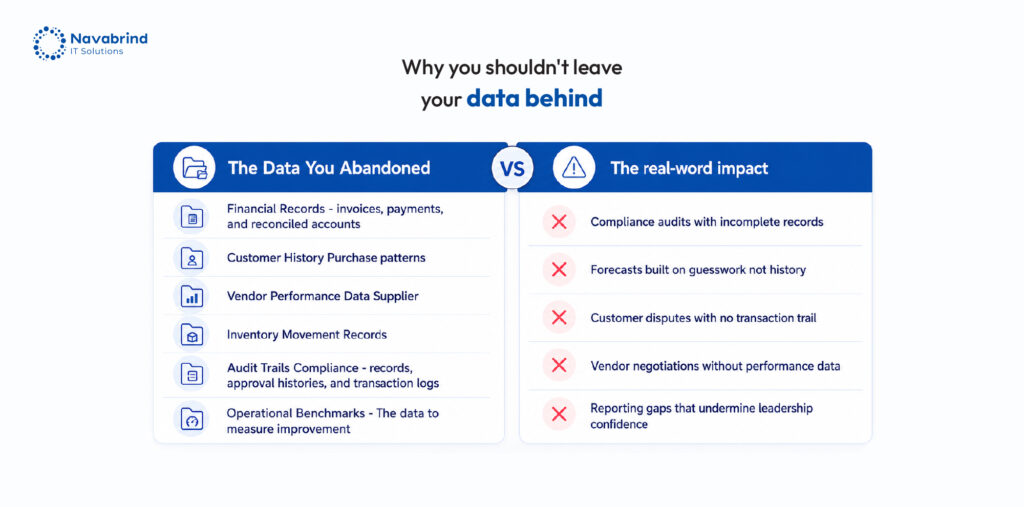
Historical records drive audits, financial validation, demand forecasting, and service continuity. Audit trails depend on complete datasets. Forecasting models rely on past buying patterns and inventory flow. Support teams use transaction history to resolve issues and maintain trust. Compliance requirements demand traceable and verifiable records. An ERP system migration without a disciplined ERP migration strategy risks breaking these connections.
When transactional data goes missing or becomes inconsistent, operations stall. Financial reports lose credibility. Inventory mismatches disrupt fulfillment. Payroll errors create compliance risks. Customer interactions suffer due to missing history. These gaps lead to revenue leakage and operational friction. Following ERP data migration best practices within a well-defined ERP migration project plan protects business continuity and preserves operational intelligence.
What Data Should Never Be Left Behind During an ERP Switch
ERP migration demands disciplined data selection. Missing records create reporting gaps, compliance exposure, and operational disruption. A well-defined ERP migration strategy identifies which datasets must move, validates relationships, and protects continuity through the ERP system migration lifecycle.
Customer master data and transaction history anchor sales, support, and revenue tracking. Vendor and supplier records sustain procurement cycles and payment accuracy. Financial history with general ledger, accounts receivable, and accounts payable that preserves audit trails and reporting integrity. Inventory and product catalog data maintain stock visibility and order fulfillment. Compliance records and audit logs support regulatory checks. Employee and payroll records safeguard compensation accuracy and statutory obligations. ERP data migration without these elements weakens decision-making and introduces risk.
Apply a tiered model within the ERP migration project plan to prioritize movement:
Tier 1 (Critical): Financial data, customer transactions, compliance records
Tier 2 (Important): Vendor data, inventory, product catalogs, payroll
Tier 3 (Archive): Legacy records retained for reference or legal needs
This framework guides sequencing, validation, and testing. Following ERP data migration best practices ensures data accuracy, traceability, and operational readiness from day one.
The Hidden Cost of Leaving Historical Data Behind
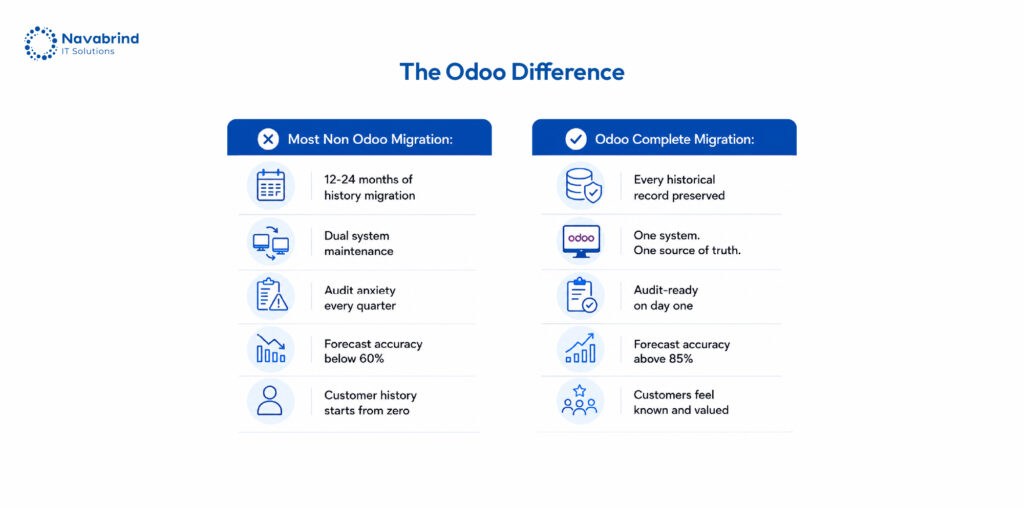
ERP migration without complete historical records creates immediate disruption. Teams lose visibility into past transactions, making issue resolution slow and inconsistent. Sales, finance, and operations begin working on assumptions instead of verified data. An ERP system migration that ignores history weakens execution from day one.
Compliance exposure rises when audit trails disappear. Financial records, tax filings, and regulatory documentation depend on traceable transactions. Missing data invites penalties, failed audits, and legal complications. ERP data migration must preserve record lineage to meet statutory requirements and maintain accountability.
Customer experience suffers when order history and interaction records vanish. Support teams cannot track past issues, purchase patterns, or commitments. This breaks continuity, damages trust, and impacts retention. A structured ERP migration strategy protects these relationships by retaining complete transaction context.
Re-entry costs escalate when organizations attempt to rebuild lost data. Reconstructing invoices, inventory logs, and financial entries demands time, resources, and validation cycles. Errors compound quickly, leading to further inconsistencies. ERP data migration best practices eliminate this burden through planned extraction, validation, and reconciliation.
Decision-making weakens without historical baselines. Forecasting models fail, reporting loses credibility, and leadership lacks direction. Industry research shows that poor ERP migration project plan execution can increase project costs by 30–50% due to rework, downtime, and data correction efforts.
Mistakes Companies Make During ERP Data Migration
- Delaying the start of data validation and cleanup
- Underestimating data volume
- Not clearing assigning data owners
- Skipping data audits
- Not engaging in post migration validation and reconciliation
How to Protect Business Data During ERP System Migration
ERP migration demands strict data protection at each stage. A disciplined ERP migration strategy reduces exposure, preserves integrity, and safeguards business continuity across the ERP system migration lifecycle.
Start with a resilient backup approach using the 3-2-1 rule: three copies of data, stored on two different media, with one copy offsite. This ensures recovery options in case of corruption, loss, or system failure during ERP data migration.
- Control access through role-based permissions. Limit who can view, edit, and transfer datasets during the transition. This reduces unauthorized changes and protects sensitive financial, customer, and employee records. Within the ERP migration project plan, define access hierarchies and enforce accountability.
- Maintain parallel system operation during cutover. Keeping the legacy platform active allows validation, comparison, and fallback if inconsistencies arise. This step strengthens confidence in data accuracy before full transition.
- Secure data in transit through encryption protocols. Protecting information during transfer prevents interception and breaches, especially when handling financial records and compliance data.Evaluate vendors with strict due diligence. Confirm data handling standards, security measures, and recovery capabilities. Include contractual clauses that define data ownership, access rights, and accountability.
How to Ensure Data Integrity During ERP Migration
- ERP migration succeeds when data integrity remains intact across each stage. A disciplined ERP migration strategy defines quality benchmarks before execution begins. Establish accuracy thresholds, completeness rules, and format standards to guide ERP data migration and prevent inconsistencies from entering the target system.
- Data profiling exposes duplicates, missing values, and structural gaps. Cleansing resolves these issues through normalization, standardization, and deduplication. This step strengthens reliability before movement within the ERP system migration process.
- Validation checkpoints anchor control across the lifecycle. Pre-migration validation confirms data readiness. Mid-migration checks track transformation accuracy and mapping consistency. Post-migration validation verifies that records align with defined benchmarks. These checkpoints reduce risk and maintain continuity.
- Reconciliation reports compare source and destination datasets. Financial balances, transaction counts, and record totals must match. Any variance signals gaps that require correction within the ERP migration project plan.
- User acceptance testing (UAT) with historical data ensures functional accuracy. Business users validate reports, workflows, and transactions against known outcomes, confirming that the migrated data supports daily operations.
ERP Data Migration Best Practices
- ERP migration demands early action. Data preparation cannot wait for later stages of the ERP system migration. Delayed planning compresses timelines, increases risk, and weakens validation. A disciplined ERP migration strategy starts data work alongside system design to maintain control from the beginning.
- Create a dedicated data migration team with defined ownership. Assign responsibility for extraction, cleansing, validation, and reconciliation. This structure strengthens accountability and ensures alignment across the ERP migration project plan.
- Adopt a phased approach pilot followed by rollout. A pilot run exposes data issues, mapping gaps, and process conflicts in a controlled environment. Insights from this stage guide adjustments before full-scale ERP data migration, reducing disruption.
- Document data mapping with accuracy. Field-to-field relationships, transformation rules, and dependencies must remain well recorded. This documentation supports validation, troubleshooting, and long-term maintainability.
- Establish a data governance framework after migration. Define ownership, validation rules, and audit controls to maintain data quality over time. Without governance, data degradation begins soon after deployment.
- Plan for legacy system decommissioning with intent. Retain required archives, ensure compliance access, and shut down redundant systems in a controlled manner. Following ERP data migration best practices protects continuity, accuracy, and operational stability.
Building Your ERP Migration Strategy & Project Plan
A disciplined ERP migration strategy defines direction, reduces risk, and protects data value across the ERP system migration lifecycle. A structured ERP migration project plan ensures controlled execution, validation, and continuity.
Phase 1: Discovery & Audit
Identify all data sources across finance, sales, procurement, HR, and operations. Map system dependencies and data flows. Classify datasets into critical and archivable categories. This step shapes ERP data migration priorities and prevents unnecessary transfer of redundant records.
Phase 2: Planning
Define migration scope, tools, and ownership. Assign data stewards responsible for accuracy and validation. Set timelines with buffer for data remediation, testing, and reconciliation. A strong plan anchors the ERP migration strategy and aligns teams on execution.
Phase 3: Cleanse & Prep
Remove duplicates, standardize formats, and enrich missing values. Resolve inconsistencies across systems. This stage ensures that ERP data migration carries forward reliable, usable information that supports reporting and operations.
Phase 4: Migration Execution
Run a pilot migration using a controlled data subset. Validate mappings, transformations, and outputs. Proceed with full ERP system migration using validation gates at each stage to confirm accuracy and completeness.
Phase 5: Post-Go-Live
Monitor data integrity, reconcile reports, and address discrepancies. Archive or retire legacy systems with compliance access retained. Following ERP data migration best practices secures long-term stability and data reliability.
Why Data Integrity Is the True Measure of ERP Migration Success
ERP migration success is defined by what moves forward with accuracy, context, and completeness not by the system launch itself. An ERP system migration delivers value only when historical data, financial records, and operational intelligence remain intact and usable from day one.
Data holds measurable business value. Treating ERP data migration as a technical task alone leads to gaps, inconsistencies, and lost insights. A disciplined ERP migration strategy protects this asset through validation, governance, and accountability. When data quality remains intact, reporting stays reliable, compliance requirements remain covered, and decision-making continues without disruption.
Ignoring ERP data migration best practices introduces risk that extends beyond the migration window. Data loss, broken audit trails, and unreliable forecasts create long-term operational setbacks. A structured ERP migration project plan ensures that data integrity, ownership, and traceability remain protected throughout the transition.
Before initiating any ERP migration, conduct a thorough data audit. Identify gaps, assess quality, and define priorities. This step sets the foundation for a successful ERP system migration and ensures that your data continues to drive business performance without compromise.
Frequently Asked Questions
1.What is the hidden cost of leaving historical data behind during ERP migration?
ERP migration without historical records leads to reporting gaps, compliance exposure, and operational disruption. Financial audits lose traceability, forecasting models fail, and customer interactions lack context. Rebuilding lost data increases costs and introduces errors. A disciplined ERP migration strategy prevents these risks by preserving complete data history.
2.Why is transactional data important when switching ERP systems?
Transactional data such as invoices, purchase orders, inventory logs, and payroll records that drive daily operations. During ERP system migration, this data maintains continuity across finance, sales, and support functions. ERP data migration ensures that past transactions remain accessible for reporting, compliance, and decision-making.
3.How do you protect business data during an ERP system migration?
Protecting data during ERP migration requires backups, controlled access, encryption, and parallel system validation. A strong ERP migration project plan defines ownership, secures data transfer, and maintains recovery options. Following ERP data migration best practices reduces risk and safeguards sensitive information.
4.What data should never be left behind during an ERP switch?
Critical datasets include customer records, vendor details, financial history (GL, AR, AP), inventory data, compliance logs, and employee payroll records. ERP data migration must retain these elements to ensure operational continuity and reporting accuracy.
5.How do businesses ensure data integrity during ERP migration?
Data integrity relies on defined quality benchmarks, profiling, cleansing, validation checkpoints, and reconciliation. User acceptance testing with historical data confirms accuracy. A structured ERP migration strategy ensures that migrated data remains complete, consistent, and reliable.
6.What are the biggest mistakes companies make during ERP data migration?
Common mistakes include late data preparation, migrating unclean data, underestimating data volume, unclear ownership, skipping audits, ignoring system dependencies, and stopping validation after go-live. A well-defined ERP migration project plan avoids these pitfalls and ensures stable outcomes.
Schedule a conversation with us now!
Related Articles









 Post
Post