The Need for Smooth Odoo Database Migration
If your outdated software, disparate applications, and an unsupported ERP begin to hinder work, you are no longer dealing with a minor technical issue, but a strategic pivot.
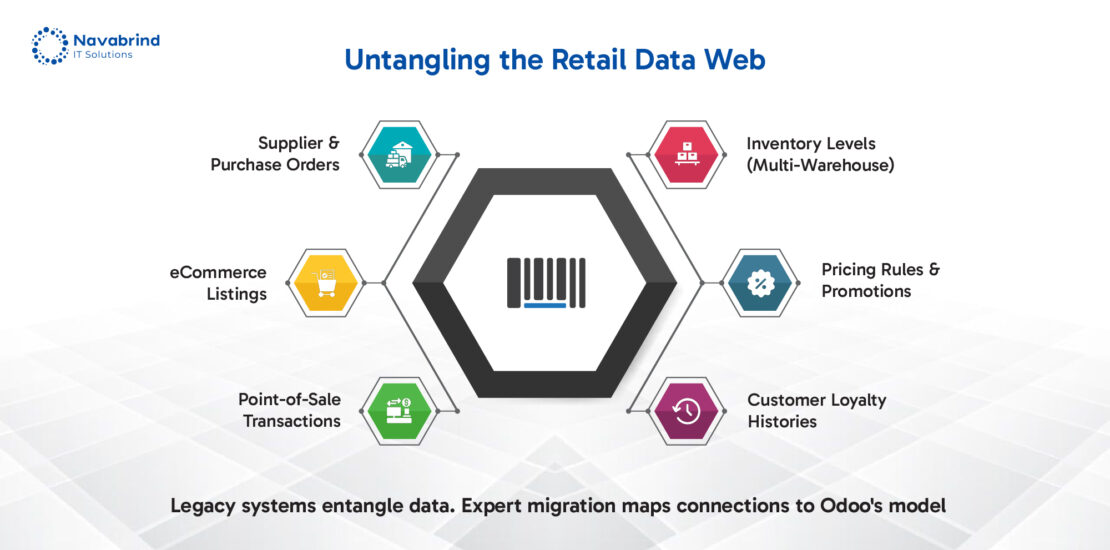
A standard Odoo database upgrade can become complex when legacy data structures clash with frameworks. An Odoo module migration demands careful validation to ensure business logic translates into the new environment. For retailers, a specialized Retail ERP migration to Odoo ERP requires transfer of inventory hierarchies, pricing rules, and customer loyalty data without disrupting daily commerce. Underestimating these intricacies risks severe business disruption.
If you are planning a full Odoo database migration or integrating specialized modules, you require a proven methodology. If you need Odoo migration help to navigate this transition, consider this your foundational blueprint.
Understanding Odoo Migration Types
Odoo Database Migration: A Strategic Pivot
An Odoo database migration involves fundamental shifts in your system’s architecture, moving from on-premise servers to the cloud, transitioning between hosting environments, and merging multiple databases.
The most common triggers for an Odoo database migration are:
Scalability Constraints: Your current infrastructure can’t handle increased user load, transaction volume, or data growth without degrading performance.
Disaster Recovery Demands: An on-premise setup lacks the automated backup and geo-redundancy required for business continuity.
Multi-Company Consolidation: Operating separate databases for subsidiaries or brands creates data silos and reporting inefficiencies. Consolidation centralizes control and provides an operational truth.
A full-scale migration re-platforms your data, requiring planning to preserve data integrity, reconfigure security protocols, and re-establish integrations. This complexity is amplified during a retail ERP migration to Odoo, where inventory layers, customer data, and point-of-sale histories should be migrated.
Attempting this migration as an internal IT task underestimates the technical debt and customizations embedded in a live database. Without expert handling, you risk prolonged downtime, data corruption, or crippled business logic.
If you need Odoo migration help, the decision hinges on recognizing that this is not an IT task, but a business project demanding specialized skill. As an Odoo Gold Partner, Navabrind IT Solutions can help you with your Odoo migration.
Odoo Database Upgrade: The Engine of Continuous Innovation
An Odoo database upgrade is the disciplined process of moving your system to a newer version, from Odoo 15, 16, 17, to the latest AI-powered Odoo 19. This is a foundational rebuild that installs new capabilities and enforces standards.
The version introduces schema changes, deprecates outdated features, and overhauls frameworks. Your existing data and logic should be transformed to align with these new structures without breaking functionality.
Custom modules require significant refactoring to comply with new APIs. Third-party apps may become incompatible, forcing you to find alternatives or commission new developments. Performance profiles shift, demanding optimization for updated processing engines and interface loads.
While a full-scale Odoo database migration changes your system’s environment, an upgrade revolutionizes its code. For retailers, navigating a Retail ERP migration to Odoo ERP through multiple version jumps adds layers of complexity, product catalog structures, pricing engines, and loyalty programs evolve between releases.
Attempting a data migration without expertise leads to broken processes, and extended operational paralysis. This strategic complexity is what defines a professional Odoo migration services that Navabrind IT Solutions provides. Experts don’t just run an installer; they analyze codes, test third-party integrations, and execute a staged transition that preserves business continuity.
Odoo module migration: The Precision Engine Work
Odoo module migration is the targeted transfer of business functions, like CRM, Sales, Inventory, or Accounting, between different versions or separate Odoo instances. Unlike a full platform migration, this is surgical precision work on the components that drive your daily revenue and operations.
A Sales module does not operate in isolation; it connects to customer data in CRM, inventory levels in Stock, and invoice records in Accounting. These touchpoints rely on API calls, field mappings, and workflow logic that can shift between versions. A standard Odoo database upgrade can break these links if modules aren’t realigned to new data structures and deprecated features.
Moving a complex inventory module requires translation of product attributes, warehouse hierarchies, and stock rules. An error in the migration logic can distort availability, disrupt sales channels, and erode customer trust.
It ignores the underlying codebase evolution and the nuanced business rules encoded within the modules. This operational risk is why a professional Odoo migration service employs a methodical approach: mapping data relationships first, refactoring custom code for the target environment, and validating the workflow post-transfer.
Retail ERP Migration to Odoo ERP: Unifying Your Commerce Engine
A retail ERP migration to Odoo ERP is a strategic consolidation of your retail operation.
Unlike a generic Odoo database upgrade or Odoo module migration, a retail transition demands synchronization of high-velocity, customer-facing processes. The challenges are retail-related:
- Promotional Engines: Complex buy-one-get-one, tiered discounts, and scheduled sales should transfer without altering historical transaction integrity or future campaign logic.
- Loyalty Ecosystems: Point balances, member tiers, and reward structures require migration to maintain customer trust and lifetime value.
- Real-Time Multi-Channel Sync: Inventory levels should be accurate and instantaneous across physical stores, online warehouses, and marketplace listings. A data lag here causes stockouts or oversells.
A standard Odoo database migration handles the foundational data layer, but retail requires an additional layer of business rule validation and process synchronization that generic approaches miss.
Attempting this consolidation with internal teams underestimates the intricacies of translating legacy retail logic into Odoo’s model. The risk is operational paralysis: promotions that fail to apply, loyalty programs that malfunction, and inventory data that is wrong.
A specialized Odoo migration service for retail treats your product catalogs, pricing rules, and customer data as interconnected, live systems.
Why You Need Help with Your Odoo Migration
Data Integrity Risks: The Unseen Threat
In an Odoo database migration or Odoo database upgrade, the failures are invisible on day one. They manifest as corrupted records, severed data relationships, and fragmented historical data, flaws that erode trust in your system.
A broken link between an invoice and its payment distorts financial reporting. Incomplete inventory transactions during a retail ERP migration to Odoo ERP can cause stock discrepancies, mispricing, and fulfillment errors.
Schema changes between versions can misalign field mappings. Custom code in an Odoo module migration may not translate cleanly, leaving orphaned data. Automated import scripts can fail on relational data, creating gaps that surface weeks later during an audit or quarterly close.
This silent degradation of data integrity is not a simple glitch; it is a fundamental compromise of your operational truth. Rebuilding these broken links after the fact is costly and disruptive than the original migration.
A professional Odoo migration service understands that preserving integrity is the objective. The process demands rigorous validation: pre-migration data audits, staged testing of record relationships, and post-migration reconciliation against the legacy system. It treats your data not as a commodity to be transferred, but as an asset to be guarded.
Module Compatibility Issues: The Hidden Fracture Points
Odoo module migration is a reintegration of business logic into a new architectural environment. When this fails, it’s due to silent compatibility breaks that a standard data transfer will not catch.
An Odoo database upgrade introduces new API versions, deprecates methods, or removes data fields that your modules depend on. Your Inventory or CRM logic call functions that no longer exist, or rely on database tables that have been restructured. New mandatory dependencies can also appear, requiring additional modules your system lacks.
A loyalty point calculation or a complex promo engine built for an older version can collapse under new API constraints, impacting customer transactions and revenue at the point of sale.
These are not errors; they are structural failures that cause modules to malfunction. They represent a threat to operational continuity that a basic Odoo database migration plan overlooks.
Resolving these issues demands more than debugging; it requires a proactive, code-level analysis to refactor, replace, or rebuild logic for the target environment. This is the definitive value of a professional Odoo migration service. Experts, such as Navabrind IT Solutions conducts a pre-migration compatibility audit, identifying these fracture points before they cause system-wide disruption.
Downtime and Business Disruption: The Operational Standstill
Planned or unplanned, downtime is not an IT metric during a migration; it is a suspension of business operations.
Sales channels desynchronize, causing online stores to sell stock that warehouse systems show as unavailable, resulting in stockouts and canceled orders. At physical locations, point-of-sale systems freeze, turning customer queues into lost revenue and damaged loyalty. Customer data gaps, such as incomplete loyalty points or purchase histories, erode trust at the point of transaction.
A rushed Odoo database upgrade or a poorly executed Odoo module migration can extend system unavailability beyond a scheduled window. When inventory or payment modules fail to initialize post-migration, recovery is not instant; it requires diagnosis and repair while the business remains offline.
A professional Odoo migration service defines success by minimizing this operational standstill. The strategy involves meticulous phased execution, comprehensive rollback plans, and rigorous pre-live testing, especially for commerce functions.
Performance Degradation Post-Upgrade: The Invisible Tax
An Odoo database upgrade can still fail if the new environment chokes under load. The symptoms are sluggish interfaces, delayed report generation, and timeout errors on operations. New Odoo versions introduce complex data structures and demanding query patterns. Without proper tuning, existing code and third-party apps can execute inefficiently, spawning slow queries that drain server memory and CPU.
In a retail ERP migration to Odoo ERP, this degradation can result in slow loyalty point calculations and frustrate customers. During peak sales periods, a system that once performed adequately can grind to a halt.
Odoo database migration that focuses on data transfer will inevitably deliver this outcome. The process includes post-upgrade optimization: analyzing query performance, recalibrating server parameters, and refactoring inefficient code from Odoo module migrations. It ensures the new system doesn’t just run, but excels under real business load.
Compliance and Audit Trail Breaks: Erasing Your Legal Record
A migration that compromises your audit trail dismantles your legal and financial defense. Compliance and Audit Trail Breaks occur when transaction histories, approval workflows, and user traceability are not preserved during an Odoo database migration or upgrade.
Incomplete financial records violate audit requirements. Gaps in user action logs destroy the ability to trace decisions. For regulated industries, this creates immediate liability, turning a system migration into a compliance emergency.
Losing the chain of custody for inventory adjustments, voided sales, or promotional overrides doesn’t just confuse accountants; it invalidates financial reporting and can trigger regulatory scrutiny.
A data import during an Odoo module migration might discard “meta” data like timestamps and user IDs, preserving the transaction but erasing its provenance. Standard upgrade scripts can overlook approval logs embedded in workflows.
This makes pre-emptive preservation a mandatory phase. A professional Odoo migration service such as that offered by Navabrind IT Solutions treats your audit trail as sacrosanct, employing migration protocols that verify the integrity of historical log, user signature, and state change.
4. The Right Approach: Step-by-Step Odoo Migration Service Framework
Pre-Migration Assessment: The Diagnosis
A pre-migration assessment is the blueprint for your project. Without it, you are navigating a technical transition blind.
This phase conducts three analyses:
Database Health Check: Scrutinizes your current Odoo instance for corrupted data, obsolete records, and structural inefficiencies that would migrate as technical debt.
Module Compatibility Audit: Systematically reviews custom and third-party apps, mapping its dependencies against the target version to pinpoint inevitable breaks in an Odoo module migration.
Data Profiling: Documents the volume, relationships, and quality of data, exposing hidden complexities before they disrupt the Odoo database migration.
For a retail ERP migration to Odoo ERP, this assessment sharpens its focus on commerce data streams. It analyzes the integrity of POS transaction logs, the architecture of customer loyalty tiers, and the logic of historical promotions. This retail profiling ensures that revenue-driving functions are mapped with absolute precision, preventing post-launch failures in pricing, inventory, or customer service. It turns a standard Odoo database upgrade into a series of emergency fixes.
Staging and Parallel Testing: The Proving Grounds
This process begins with building a complete staging environment, a technical and data replica of your production system. This clone becomes the proving ground for the Odoo database migration or Odoo database upgrade. Here, the script runs, Odoo module migration is validated, and data relationship is verified without touching your live operations.
It tests real-world scenarios: processing simulated sales through the POS, synchronizing inventory across channels, and applying complex promotion logic. The goal is to uncover discrepancy, such as a pricing error, a loyalty point miscalculation, a stock sync failure before it impacts a customer.
Key business processes are executed in the legacy system and the new staging environment, comparing outputs to guarantee identical results. This method exposes hidden flaws in data logic or workflow translation that isolated testing can miss.
Attempting a migration without this controlled rehearsal is a gamble with operational continuity.
Data Transformation and Cleansing: Engineering Intelligence from Chaos
Data transformation and cleansing are the core of the migration process. This is not a data transfer; it is a restructuring of raw information into the model your new system demands.
This phase employs scripts and specialized tools to perform three functions: adapting data to new schema standards, mapping complex legacy fields to Odoo structures, and enforcing rigorous validation rules. During an Odoo database upgrade, these scripts resolve structural conflicts introduced by deprecated features or new required fields, ensuring data arrives formatted.
For a Retail ERP migration to Odoo ERP, the transformation logic should be engineered. Migrating hundreds of product variants requires preserving intricate attribute combinations and supplier data. Transferring complex pricing rules demands absolute accuracy to prevent revenue loss.
Rebuilding customer segments necessitates maintaining purchase history and behavioral tags to uphold marketing integrity. Skipping this step causes the data integrity risks and performance degradation that cripple new systems.
A professional Odoo migration service from an Odoo Gold Patner in the US or Europe invests in this foundational engineering.
Cutover and Rollback Strategy: The Calculated Launch
The final cutover is a phased deployment strategy. This disciplined approach manages risk by prioritizing system stability over speed.
A proven method is to migrate modules first, such as internal knowledge bases or HR records. This validates the data transfer process and technical environment before engaging business functions. Only after these modules perform do you initiate the migration of retail operations. For a retail ERP migration to Odoo ERP, this means inventory, sales, and POS modules are moved last, minimizing the exposure window for revenue-generating activities.
Success is measured by metrics: 100% data validation in staging, zero errors in parallel test transactions, and confirmed performance benchmarks. Clear rollback triggers are established: any failure in financial posting, inventory synchronization, or point-of-sale processing initiates an immediate, pre-scripted reversion to the legacy system. An Odoo database upgrade or Odoo module migration without this safety net is a gamble.
A professional Odoo migration service provider, such as Navabrind IT Solutions does not proceed without this dual-plan architecture.
Post-Migration Optimization: The Strategic Finish
Post-migration optimization is where your new system transforms from operational to exceptional. This phase begins the moment go-live is confirmed, shifting focus from installation to refinement.
Performance tuning adjusts database indices, server parameters, and caching strategies to your new data volume and usage patterns, addressing potential slowdowns from the Odoo database upgrade. Module reconfiguration streamlines workflows in migrated apps by removing legacy steps and leveraging new features your prior system lacked.
For a retail ERP migration to Odoo ERP, this optimization targets commerce velocity. It fine-tunes the synchronization engine between your online and physical sales channels. It recalibrates reporting for inventory and sales dashboards. Training staff to execute complex promotions and loyalty transactions with confidence.
5. Homegrown Retail ERP Migration to Odoo ERP: Retail-Specific Considerations
- Multi-Channel Retail Challenges
Syncing online stores, POS terminals, marketplaces with Odoo Inventory and eCommerce.
- Promotions and Pricing Complexity
Migrating dynamic pricing rules, loyalty programs, B2B/B2C catalogs.
- Customer Data Unification
Consolidating purchase history, preferences, and service records from fragmented systems.
What To Look For: The Partner Blueprint
Choosing a migration partner is a strategic decision with long-term consequences.
Prioritize a partner with a proven track record in Odoo database migration projects and multi-version Odoo database upgrade paths. Their portfolio should demonstrate repeated success, not theoretical knowledge.
They should provide evidence of migrating live POS systems, active eCommerce platforms, and complex customer loyalty programs.
Examine their framework for handling intricate Odoo module migration, ensuring they employ a structured methodology of assessment, staging, and validation, not an ad-hoc approach.
The contract must define guaranteed response times, issue resolution windows, and performance optimization services. Avoid partners whose engagement ends at system launch.
This certification is a signal of technical expertise, commitment to the platform, and access to development resources.
Red Flags to Avoid: Recognizing the Incompetent
Identifying the wrong partner is as important as choosing the right one. Certain deficiencies signal immediate risk. Any provider that cannot detail their process for a mirrored environment and parallel validation is planning to use your live system as their test bed. This approach is unacceptable for any Odoo database upgrade or complex Odoo module migration.
A partner who dismisses the need for a pre-scripted reversion strategy is gambling with your business continuity. For a Retail ERP migration to Odoo ERP, where downtime costs revenue, this is professional negligence.
Vague assurances without retail references, to POS data, pricing engines, or loyalty program migration, indicate a lack of specialized experience. They will treat your intricate commerce operations as a generic data transfer.
Questions to Ask Potential Partners: The Interrogation for Success
Your questions expose a partner’s competence and methodology. Prepare to interrogate, not just interview.
First, demand specificity on custom logic: “How do you handle Odoo module migration for our business custom apps?” A qualified partner will detail their process for code analysis, compatibility auditing, and refactoring, not just data transfer.
Second, challenge them on operational continuity: “What is your approach to minimizing retail downtime during the final cutover?” Listen for a phased strategy, a defined maintenance window, and their technical plan for synchronizing POS and inventory data in near. Generalities are inadequate for a Retail ERP migration to Odoo ERP.
Expand your interrogation:
Walk me through your staging environment protocol for an Odoo database upgrade.
Show me a case study of a past retail ERP migration, detailing loyalty program and pricing rule migration.
What are your defined rollback triggers, and how quickly can you execute them?
If you need Odoo migration help, these questions separate procedural experts from theoretical consultants. The right Odoo migration service partner will welcome this scrutiny, providing confident answers that demonstrate controlled execution.
Tools and Best Practices Used for Odoo Migrations
Odoo’s Built-In Migration Tools: The Foundation, Not the Solution
These native tools, database backup/restore functions, module upgrade wizards, and standard data export/import features, form a necessary technical foundation. They are designed for straightforward scenarios in a controlled environment.
The standard upgrade wizard can execute a routine Odoo database upgrade between point releases in a vanilla installation. The import/export function might move standalone data tables.
These utilities lack the intelligence to manage the complexities of an Odoo database migration or a sensitive Odoo module migration. They cannot reconcile schema changes, map complex legacy data fields, or preserve intricate relational data. They offer no staging environment, no parallel testing capability, and no rollback protocol.
For a Retail ERP migration to Odoo ERP, relying solely on these tools is a path to data loss and system failure.
Using built-in tools for a complex migration is like using a toolkit to rebuild an engine. The tools exist, but success requires the blueprint, expertise, and calibrated instruments of a master mechanic.
This inherent gap is why businesses who need Odoo migration help engage a professional Odoo migration service. Experts use these tools as components within a larger, engineered methodology that includes assessment, transformation, validation, and guaranteed continuity.
Third-Party Migration Accelerators: The Precision Instruments
These include dedicated ETL (Extract, Transform, Load) platforms for complex data mapping, data validation software for integrity checks, and automated testing frameworks that simulate user workflows.
An ETL platform can streamline the data transformation phase of an Odoo database migration, handling complex field mappings and data cleansing at scale. Automated testing frameworks are invaluable for a phased Odoo database upgrade, allowing for relentless validation of business processes in a staging environment before cutover.
For a Retail ERP migration to Odoo ERP, such accelerators can automate the validation of thousands of product SKUs, pricing rules, and customer transaction histories, providing an audit trail that manual methods cannot match. They bring a level of repeatable precision to the Odoo module migration process that reduces human error.
They require expert configuration to align with your business logic and data landscape.
A professional Odoo migration service like the one offered by Navabrind IT Solutions integrates these accelerators into a proven methodology.
Get Odoo Migration Help: Your Strategic Implementation
When you need Odoo migration help, you are not seeking a technical task. You are investing in a strategic implementation that delivers measurable business transformation.
This ensures your new environment is structurally sound, with optimized settings, proper access controls, and a foundation built for performance and security from day one.
An Odoo migration service analyzes and rebuilds your business processes within the new system. It eliminates manual gaps and legacy bottlenecks, leveraging Odoo’s capabilities to automate tasks that consume time and introduce errors. This applies equally to a standard Odoo database upgrade or a focused Odoo module migration, where workflows should be re-engineered for the new version’s logic.
A partner with proven experience in retail ERP migration to Odoo ERP ensures your commerce engine, from POS to warehouse, transitions without missing a transaction. They architect the synchronization of your channels and protect the integrity of your customer data.
Case Studies: Successful Odoo Migrations
Retail Chain: Legacy POS to Odoo ERP
The clients legacy point-of-sale system and disconnected inventory databases created operational friction, preventing customer views and agile promotions.
Their challenge was a high-risk Retail ERP migration to Odoo ERP, requiring the consolidation of five regional databases into one central platform without closing stores. This was not an Odoo database upgrade; it required a complete architectural overhaul. Hurdles included migrating decade-old transaction histories, preserving intricate vendor pricing rules, and ensuring stock synchronization across 50+ locations.
The client conducted an exhaustive pre-migration audit, identifying data dependencies. The team used ETL tools for data transformation, ensuring complex product attributes and layered promotions migrated. A phased cutover, prioritizing Odoo module migration first, minimized disruption, with a full rollback plan on standby.
The results were that the retailer achieved a 35% faster order processing time due to streamlined workflows and data. Inventory accuracy eliminated chronic stockouts, improving online fulfillment rates. Centralized customer data enabled targeted campaigns, boosting loyalty program engagement.
Multi-Version Odoo Database Upgrade
The clients customizations had locked them out of Odoo upgrades, denying them performance and essential features. A standard update was impossible; they required a strategic leap forward.
The challenge was executing a multi-version Odoo database upgrade for a retail operation that processed thousands of transactions daily. This was not a routine update but a technical rebuild. The client faced significant Odoo module migration work, as their inventory, pricing, and returns logic had to be refactored for new APIs and data structures. Any extended downtime would halt revenue.
Our methodology to help our client included an in-depth compatibility audit to pre-emptively refactor code. We built a full-scale staging mirror of the production environment, allowing for exhaustive parallel testing of checkout, payment, and fulfillment processes. The final cutover was executed in a pre-defined, minimal overnight window, using a verified rollback snapshot.
The Odoo 19 unlocked a 40% improvement in back-office processing speed due to optimizations in Odoo 19. The upgraded system now supports advanced analytics and AI-driven inventory forecasting.
Frequently Asked Questions
1. What is Odoo database migration, and when is it needed?
Odoo database migration is the process of transferring a business’s operational data, including customer records, transactions, inventory, and configurations, from an existing system into a new Odoo ERP environment. This is a foundational, structural move that involves changing the underlying infrastructure, such as shifting from on-premise servers to the cloud, consolidating multiple databases into one system, or moving from a different software platform (like SAP or legacy retail systems) to Odoo.
This comprehensive process is needed at inflection points in a business’s growth. Common triggers include a company outgrowing its current software’s capabilities, seeking to consolidate disparate systems, e.g., separate POS, e-commerce, and accounting platforms, into a source of truth, or needing to meet new compliance requirements that old systems cannot support.
A successful migration should preserve intricate data relationships, transform legacy data structures to fit Odoo’s schema, and ensure historical information remains accessible and auditable.
2. How does Odoo database upgrade differ from module migration?
An Odoo database upgrade is a move focused on advancing to a newer version. This process updates the framework, including the underlying codebase, security features, and standard applications. The goal is to gain access to new functionalities, security patches, and performance improvements released by Odoo, but it requires adapting the database to new technical standards, which can break customizations.
It involves moving, updating, and refactoring functional components, such as a CRM, inventory, or accounting module, either within an upgrade path or between different Odoo instances. The focus here is on ensuring a business logic or app continues to function after a change. This involves rewriting code to comply with new APIs, updating data fields, and managing dependencies.
3. What are the biggest challenges in Retail ERP migration to Odoo ERP?
A Retail ERP migration to Odoo ERP presents hurdles centered on customer-facing operations. The foremost challenge is preserving data integrity across complex, interconnected retail data sets. This includes migrating intricate product catalogs with variants, such as size, and color, layered pricing rules (seasonal promotions, tiered discounts), and sensitive customer loyalty programs with point balances and transaction histories. An error in this data mapping can lead to stock sell-outs, pricing inaccuracies, and customer dissatisfaction.
Retail cannot pause; therefore, migrating live point-of-sale (POS) systems, e-commerce integrations, and warehouse management without interrupting transactions requires a phased cutover and rollback strategy. The migration should synchronize inventory levels across channels in post-cutover to prevent overselling.
Legacy retail systems have deeply embedded workflows for inventory allocation, returns management, and supplier ordering. Replicating and improving this logic within Odoo’s framework requires deep retail domain expertise.
4. How long does a typical Odoo migration service take?
The timeline for a typical Odoo migration service is not a standard duration but a variable project scope, dependent on three factors: data complexity, system customization, and business size. A straightforward migration for a small business with a clean database and few modules could be completed in 4-8 weeks. For a medium to large enterprise with multiple data sources, heavy customizations, and the need for a Retail ERP migration to Odoo ERP, the project can span 3 to 6 months.
The timeline includes a comprehensive assessment and data audit (2-3 weeks), followed by data cleansing, transformation scripting, and the development of a staging environment. For an Odoo database upgrade involving multiple version jumps, significant time is allocated to refactoring modules and conducting parallel testing to ensure business processes work in the new version. Rushing these stages guarantees post-migration failures.
A professional service provider will never offer a firm timeline without a detailed discovery phase. The path is defined by the validation process, not the data movement itself. A reputable partner provides a phased project plan with milestones, emphasizing that a methodical, thorough approach ultimately saves time by preventing costly rollbacks and operational crises..
5. When should I seek professional Odoo migration help?
You should seek professional Odoo migration help you identify the element of complexity and business risk, your project involves. The first signal is when your plan involves moving from a different software platform, consolidating multiple databases, or executing a multi-version Odoo database upgrade. These scenarios involve fundamental structural changes where built-in tools fail and the risk of data corruption is high.
If your business uses customized Odoo module migration for processes, such as specialized manufacturing workflows, complex e-commerce integrations, or industry compliance reporting, you require experts who can refactor this code for the new environment. This also applies fully to any Retail ERP migration to Odoo ERP, where the sync of POS, inventory, and pricing data demands specialized retail migration expertise to avoid revenue-destroying errors.
A certified partner brings a proven methodology that includes rigorous staging, parallel testing, and a guaranteed rollback plan, processes that internal IT teams lack the bandwidth or experience to execute.
6. What steps ensure a smooth post-migration stabilization?
This involves running a battery of post-go-live checks to verify key transactions, creating a sales order, processing an invoice, updating inventory. For a Retail ERP migration to Odoo ERP, this means test transactions at the POS, online order placements, and immediate reconciliation of stock levels. This validation confirms the technical success of the Odoo database migration and catches any acute issues before they impact a wide user base.
The new system’s performance should be monitored and optimized; this includes tuning database indexes, adjusting server parameters for the new load, and identifying any slow-running queries that emerged from the Odoo database upgrade or data transformation. Go-live is not the end of training but its critical moment. Providing super-users and teams with context support helps them navigate the new workflows and interfaces, turning confusion into confidence and ensuring adoption.
A professional Odoo migration service includes a defined period (e.g., 2-4 weeks) of prioritized, immediate support to address user questions and minor configuration tweaks. This period involves monitoring data flows and integrations for stability.
Schedule a conversation with us now!
Related Articles







 Post
Post