E-Commerce growth depends on speed, security, scalability, and shopping experience. Brands operating on outdated platforms struggle to maintain conversions, search visibility, and operational flow. That is why Magento 2 migration has become a major priority for retailers aiming to protect revenue and strengthen digital commerce performance.
Magento 1 no longer supports evolving commerce demands. Security vulnerabilities, checkout friction, slow storefront performance, and unsupported extensions create revenue leakage across the buyer journey. Delayed upgrades can lead to rising maintenance expenses, integration failures, and declining customer trust. A planned Magento 1 to Magento 2 migration helps businesses regain platform stability, improve storefront responsiveness, and support expansion across channels.
This guide explains Magento 2 migration steps, platform planning, data transfer, Magento 2 extension migration, and store redesign considerations. Whether your business requires WooCommerce to Magento 2 migration, Shopify to Magento 2 migration, or a complete Magento 2 migration service, this resource outlines the migration path, risks to avoid, and the role of a Magento 2 migration tool in delivering a successful transition.
Why Is Magento 2 Migration Worth It?
- Magento 2 migration gives eCommerce brands a stronger foundation for revenue growth, customer retention, and operational control. Compared to older commerce platforms, Magento 2 delivers faster page loading, quicker checkout flow, and improved catalog handling for large inventories. Faster storefront performance reduces bounce rates and supports stronger conversion outcomes during peak traffic periods.
- Security remains another major factor behind Magento 1 to Magento 2 migration. Magento 2 includes upgraded authentication, payment protection, and patch management capabilities that help reduce platform vulnerabilities. PWA capabilities create app-like shopping experiences across mobile devices, improving engagement and session duration.
- Magento 2 supports growing product catalogs, multi-store operations, international expansion, and high transaction volumes without disrupting shopping experiences. Businesses planning WooCommerce to Magento 2 migration or Shopify to Magento 2 migration gain stronger customization flexibility and broader commerce functionality.
- SEO advantages include mobile-focused architecture, improved indexing structure, faster rendering, schema support, and cleaner URLs. A professional Magento 2 migration service combined with the right Magento 2 migration tool helps brands improve visibility, traffic quality, and long-term digital commerce performance.
Know Your Starting Point: Which Migration Path Is Yours?
Magento 1 to Magento 2 Migration:
Magento 1 reached end-of-life in June 2020, leaving stores exposed to security threats, unsupported extensions, and rising maintenance expenses. Magento 1 to Magento 2 migration gives merchants access to stronger architecture, faster storefront performance, upgraded APIs, and improved admin workflows. Magento 2 uses a different framework structure, database design, and frontend approach, which means themes and customizations from Magento 1 cannot transfer without redevelopment. Businesses must evaluate third-party modules, custom code dependencies, customer data, and product structures before starting Magento 2 migration steps. A professional Magento 2 migration service helps reduce downtime, preserve SEO rankings, and maintain operational continuity during platform transition.
WooCommerce to Magento 2 Migration:
WooCommerce works well for smaller catalogs, though scaling operations can become difficult as traffic, integrations, and inventory volume increase. WooCommerce to Magento 2 migration supports brands seeking stronger catalog management, multi-store capabilities, and enterprise-grade commerce functionality. Magento 2 offers stronger performance handling for large product databases and complex customer journeys. Product data, customer accounts, categories, and order history can transfer through a Magento 2 migration tool, though custom themes, plugins, and checkout experiences may require redevelopment. Planning data structure and extension compatibility early helps avoid migration delays.
Shopify to Magento 2 Migration:
Fast-growing merchants shift toward Magento 2 when platform restrictions begin limiting customization, pricing flexibility, and backend control. Shopify to Magento 2 migration gives brands ownership over infrastructure, storefront functionality, integrations, and scaling decisions. Magento 2 supports custom workflows, B2B operations, international commerce, and advanced catalog configurations without platform dependency constraints. Shopify’s closed ecosystem creates challenges during data export, especially for custom apps, URL structures, and checkout customizations. Product data and customer records migrate smoothly with the right Magento 2 migration service, though custom functionality may require redevelopment. Businesses pursuing long-term commerce expansion gain stronger flexibility, lower platform dependency, and improved operational control through Magento 2 migration.
Magento 2 Migration Steps: A Practical Roadmap
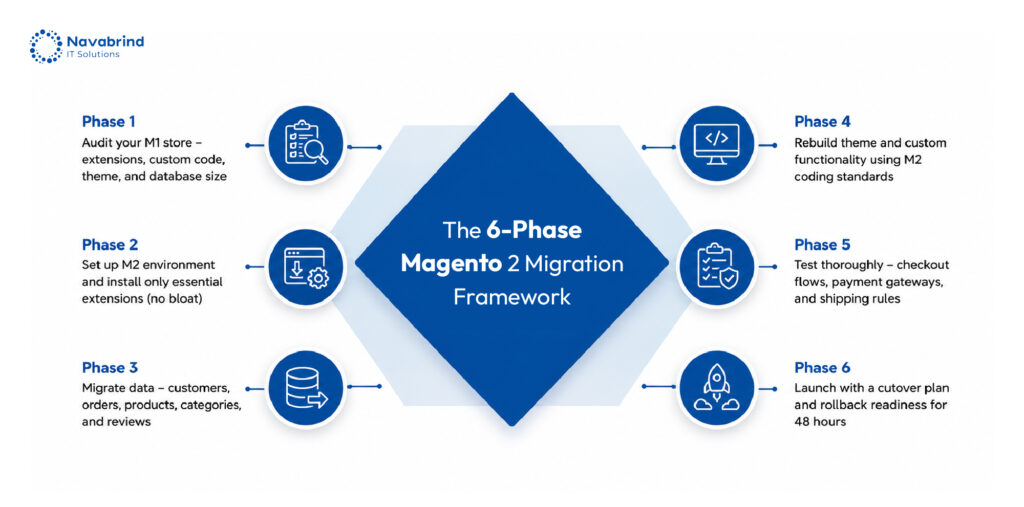
Successful Magento 2 migration begins with a detailed audit of catalog structure, customer records, third-party integrations, extensions, custom workflows, and backend dependencies. This discovery phase identifies compatibility issues early and helps businesses estimate redevelopment requirements before migration begins.
The next stage focuses on environment setup. Magento 2 requires updated hosting infrastructure, optimized server configuration, supported PHP versions, and installation planning that supports performance and scalability targets.
During data migration, businesses transfer products, customer accounts, order history, categories, CMS pages, and SEO elements using a Magento 2 migration tool or custom migration framework. Careful validation protects data integrity and storefront continuity.
Theme migration involves rebuilding storefront experiences through Luma, Hyva, or custom frontend frameworks. Since Magento 1 to Magento 2 migration uses a different architecture, legacy themes cannot move unchanged.
Magento 2 extension migration follows next, ensuring business functionality remains operational after launch. Testing covers user acceptance, checkout validation, speed benchmarking, regression checks, and security verification.
After deployment, post-launch monitoring tracks search visibility, storefront performance, indexing, payment flow, and customer activity to stabilize operations quickly.
Magento 2 Extension Migration: The Most Overlooked Challenge
Magento 2 extension migration creates one of the largest technical hurdles during platform transition. Magento 1 extensions cannot transfer into Magento 2 because the framework architecture, database structure, dependency handling, and frontend systems changed significantly. Attempting to reuse outdated modules can create security gaps, checkout failures, broken integrations, and storefront instability.
A successful Magento 2 migration starts with a detailed extension audit. Businesses must evaluate which modules remain valuable, which require replacement, and which functions deserve redevelopment. Removing outdated plugins reduces unnecessary complexity and improves platform performance after launch.
The Magento Marketplace offers Magento 2-compatible alternatives for payment gateways, shipping tools, search functionality, ERP connections, and marketing automation. During Magento 1 to Magento 2 migration, selecting optimized extensions improves scalability and storefront responsiveness.
Custom extension redevelopment requires careful planning, especially for brands managing unique workflows or third-party integrations. Poorly migrated code can affect indexing, order processing, page loading, and admin operations. A professional Magento 2 migration service combined with experienced developers helps maintain stability, functionality, and long-term platform reliability throughout the migration process.
Choosing the Right Magento 2 Migration Tool
Selecting the right Magento 2 migration tool plays a major role in migration accuracy, data integrity, and launch timelines. Adobe’s official Magento Data Migration Tool supports Magento 1 to Magento 2 migration by transferring products, categories, customer accounts, order history, store settings, and selected configurations. This option works well for businesses operating within standard Magento environments.
Third-party platforms such as Cart2Cart and LitExtension support WooCommerce to Magento 2 migration, Shopify to Magento 2 migration, and multi-platform commerce transfers. These tools simplify data mapping and reduce migration workload for product catalogs and customer databases.
Magento 2 migration tools handle structured data transfer effectively, though custom themes, extension compatibility, checkout workflows, and API integrations still require development expertise. Automated tools cannot fully recreate custom business logic or storefront experiences.
Businesses with complex catalogs, B2B operations, multi-store environments, or custom integrations benefit from a professional Magento 2 migration service. Combining automation with expert migration planning reduces operational risks, protects SEO value, and supports stable post-launch performance.
Should You DIY or Use a Magento 2 Migration Service?
Magento 2 migration complexity depends on catalog volume, custom development, third-party integrations, multi-store architecture, ERP connectivity, and frontend customization requirements. Small stores with limited extensions may complete migration using a Magento 2 migration tool, though larger businesses face higher technical demands that require experienced migration specialists.
A professional Magento 2 migration service covers discovery analysis, infrastructure setup, data transfer, theme redevelopment, Magento 2 extension migration, SEO preservation, testing, deployment, and post-launch support. Service providers also handle performance optimization, payment gateway validation, API integration checks, and rollback planning to reduce operational disruption.
Businesses evaluating migration partners should watch for unrealistic timelines, vague pricing models, missing testing processes, or agencies lacking certified Magento expertise. Weak communication and limited post-launch support can create long-term stability issues after migration.
Magento 1 to Magento 2 migration timelines vary based on project scope. Smaller stores may require a few weeks, whereas enterprise commerce environments with custom workflows and integrations can extend across several months. Shopify to Magento 2 migration and WooCommerce to Magento 2 migration costs also vary according to data complexity, frontend redevelopment, and extension requirements.
Common Pitfalls to Avoid
Magento 2 migration failures frequently begin with poor planning. Skipping a detailed pre-migration audit creates hidden risks across extensions, integrations, custom code, product data, and backend workflows. Without early discovery, businesses face unexpected downtime, broken functionality, and rising redevelopment expenses during later migration stages.
SEO disruption remains another major issue during Magento 1 to Magento 2 migration. Changes in URL structure, metadata, redirects, and category paths can damage search rankings and organic traffic if migration teams fail to preserve indexing signals properly. Redirect mapping and technical SEO validation should remain part of Magento 2 migration steps from the beginning.
Post-launch support receives far less attention than required. Payment errors, indexing delays, extension conflicts, and checkout issues may appear after deployment, making continuous monitoring essential during the stabilization phase.
Performance testing should never remain an afterthought. Stores handling high traffic volumes must complete load testing before launch to validate server response, checkout stability, database performance, and caching behavior. A professional Magento 2 migration service helps businesses reduce these risks and maintain storefront reliability after go-live.
Frequently Asked Questions:
1.What is Magento 2 migration and why is it important?
Magento 2 migration refers to transferring an eCommerce store from Magento 1 or another commerce platform into Magento 2. The process includes data transfer, theme redevelopment, Magento 2 extension migration, infrastructure setup, testing, and deployment. Businesses invest in Magento 2 migration to improve storefront speed, strengthen security, support mobile commerce, and handle growing traffic volumes. Outdated platforms can create security vulnerabilities, poor checkout experiences, and operational limitations that affect revenue growth.
2.How long does it take to migrate from Magento 1 to Magento 2?
Magento 1 to Magento 2 migration timelines depend on catalog size, custom functionality, integrations, extension complexity, and frontend redesign requirements. Smaller stores may complete migration within a few weeks, though enterprise-level projects can require several months. Proper planning, testing, and staged deployment reduce delays during migration execution.
3.What are the steps involved in Magento 2 migration?
Magento 2 migration steps include discovery analysis, server preparation, Magento 2 installation, data migration, theme redevelopment, Magento 2 extension migration, integration validation, testing, deployment, and post-launch monitoring. Businesses may use a Magento 2 migration tool for data transfer, though custom functionality and storefront design frequently require development support.
4.Is it possible to migrate from WooCommerce to Magento 2?
Yes. WooCommerce to Magento 2 migration helps growing businesses manage larger catalogs, advanced customer segmentation, multi-store operations, and custom commerce workflows. Product data, customer accounts, categories, and order history can transfer into Magento 2 through migration tools or professional migration services.
5.What data can be migrated from Magento 1 to Magento 2?
Magento 1 to Magento 2 migration supports transfer of products, categories, customer profiles, passwords, order history, CMS pages, SEO metadata, store configurations, and selected extensions. A professional Magento 2 migration service validates data integrity and checks compatibility across integrations, themes, and custom functionality before launch.
Related Articles









 Post
Post