For thousands of small businesses across the US, QuickBooks started as the accounting platform that helped owners gain control over invoices, expenses, payroll, and taxes. Then growth arrived. Operations expanded, teams increased, inventory became harder to track, and disconnected spreadsheets started filling the gaps QuickBooks could no longer handle. That turning point pushes companies to explore a Quickbooks replacement that supports accounting, operations, sales, inventory, purchasing, and reporting from one environment.
The challenge is not deciding to migrate from Quickbooks. The challenge is fear. Business owners worry about missing invoices, damaged financial records, broken tax history, or transaction mismatches during Quickbooks data Migration. That fear delays progress and keeps businesses tied to slow workflows, duplicate entries, and fragmented reporting.
This guide explains how businesses execute Quickbooks migration without losing transaction history. You will learn how Quickbooks data Migration services reduce risk, how Quickbooks to Odoo Migration works step by step, and why Odoo has become a preferred platform for manufacturing, distribution, and service companies seeking operational control alongside accounting visibility.
Why Businesses Outgrow QuickBooks And Why the Decision Gets Delayed
QuickBooks works well during the early stages of business growth. Problems begin when accounting turns into operations management. Inventory spreads across warehouses, departments demand connected reporting, and finance teams rely on spreadsheets to bridge gaps the software cannot handle. At that stage, Quickbooks migration becomes less of a technology upgrade and more of a business survival decision.
The warning signs appear gradually. Teams start re-entering data between disconnected applications. Reporting depends on Excel exports instead of live dashboards. Month-end closing stretches longer because reconciliations consume hours of staff effort. Manufacturing businesses struggle with job costing, distributors lose visibility across locations, and service companies cannot track profitability with confidence. Finance leaders begin questioning whether QuickBooks still supports growth or blocks it.
Performance issues create another layer of pressure. Slow file processing, user restrictions, instability risks, and integration limitations reduce productivity across departments. Businesses that delay Quickbooks data Migration usually spend far more later correcting fragmented processes and damaged reporting structures.
QuickBooks Replacement: Choosing a Platform That Supports Long-Term Growth
Selecting a Quickbooks replacement is not just an accounting decision. The platform chosen today shapes reporting, operations, inventory control, sales workflows, manufacturing visibility, and management decisions for years ahead. Businesses planning to migrate from Quickbooks need to evaluate operational fit, scalability, integration capability, and long-term ownership costs before committing to any platform.
The evaluation process starts with practical questions. What limitations inside QuickBooks slow the business today? Which applications require integration with accounting data? How many departments need access? Does the company need accounting software alone, or a connected operational platform? These answers determine whether the business requires an accounting upgrade or a complete operational transformation.
Several Quickbooks replacement options exist across the market. Xero and FreshBooks suit accounting-focused businesses. Sage Intacct and NetSuite Financials support multi-entity financial management. ERP platforms such as Odoo, Microsoft Dynamics 365 Business Central, SAP Business One, and NetSuite ERP combine accounting with operations, inventory, CRM, purchasing, and manufacturing.
Among these platforms, Quickbooks to Odoo Migration continues gaining momentum because Odoo replaces fragmented software ecosystems instead of replacing accounting alone. Businesses adopting Odoo through Quickbooks data Migration services gain operational visibility, inventory management, manufacturing workflows, multi-currency accounting, and connected reporting from one environment.
QuickBooks Data Migration: What Must Move and What Requires Rebuilding
Quickbooks data Migration carries far greater complexity than standard software migration projects because financial records are tied to taxation, compliance, payroll, audits, vendor obligations, and revenue history. One incorrect balance can create reporting failures that affect decision-making across the business. Companies planning to migrate from Quickbooks must understand that migration is not limited to exporting spreadsheets and importing transactions.
A successful Quickbooks migration starts with identifying the full financial ecosystem inside QuickBooks. That includes chart of accounts, customers, vendors, products, payment terms, tax structures, employee records, invoices, bills, credits, payroll history, reconciliations, journal entries, and fixed assets. Open invoices, unpaid bills, and outstanding balances require accurate migration to maintain operational continuity after go-live.
Not everything transfers perfectly. Report templates, recurring transaction logic, audit history, and custom workflows usually require rebuilding inside the destination platform. That is why businesses rely on Quickbooks data Migration services to map, validate, reconcile, and verify records before launch.
During Quickbooks to Odoo Migration, the cutover date becomes a critical decision. Year-end migration creates cleaner opening balances and simpler reconciliation, though mid-year transitions remain possible with disciplined validation procedures. Successful migration means every balance matches QuickBooks without discrepancies, omissions, or reporting gaps.
Migrate from QuickBooks: The Migration Roadmap That Prevents Financial Disruption
A successful Quickbooks migration follows a disciplined sequence. Businesses that skip planning, testing, or validation usually encounter reconciliation failures, broken integrations, reporting inconsistencies, and operational downtime. Companies that migrate from Quickbooks successfully treat migration as a business transformation project instead of a software import exercise.
- The process starts with a pre-migration audit. Finance leaders document how QuickBooks supports invoicing, payroll, inventory, reporting, purchasing, and operational workflows. Connected applications such as payment gateways, payroll systems, eCommerce platforms, and inventory software must be identified before Quickbooks data Migration begins.
- Next comes destination platform preparation. During Quickbooks to Odoo Migration, the accounting structure, taxes, permissions, integrations, and workflows must exist before data import starts. Businesses then export master records, transactional history, and financial balances from QuickBooks for cleansing and mapping.
- After transformation and validation, a staging migration tests balance accuracy, relationship integrity, and reporting consistency. Finance teams review records before approving production cutover. Once migration completes, reconciliation checks confirm opening balances, receivables, payables, and transaction history match QuickBooks records.
- The final stage focuses on stabilization. Quickbooks data Migration services support finance teams during the first operational weeks, resolve discrepancies rapidly, and help businesses transition into the new environment without reporting interruptions or operational confusion.
QuickBooks to Odoo Migration: Moving from Accounting Software to Business Control
- Quickbooks to Odoo Migration changes far more than financial software. Businesses moving to Odoo replace disconnected applications, spreadsheet-driven processes, and fragmented reporting with one operational environment connecting accounting, inventory, purchasing, CRM, manufacturing, sales, and project management. That shift makes Odoo one of the fastest-growing Quickbooks replacement platforms for companies preparing for operational expansion.
- The transition becomes valuable for manufacturers managing production planning, distributors handling warehouse operations, and service businesses requiring project tracking linked with financial reporting. Companies running multiple disconnected systems around QuickBooks gain stronger visibility after Quickbooks migration because operational data and financial data begin flowing through one platform.
- During Quickbooks data Migration, charts of accounts, tax configurations, customers, vendors, invoices, bills, balances, and payment terms are mapped into Odoo structures. Businesses can choose full historical migration, summarized financial migration, or opening-balance migration depending on reporting requirements and transaction volume.
- Another advantage of Quickbooks to Odoo Migration is phased adoption. Businesses activate accounting first, then expand into inventory, purchasing, manufacturing, CRM, or analytics based on operational priorities. This staged rollout reduces disruption and creates faster user adoption across departments.
- For growing companies seeking scalability without fragmented software costs, Quickbooks data Migration services combined with Odoo ERP create a long-term operational foundation instead of another temporary accounting upgrade.
QuickBooks Data Migration Services: Knowing When Expert Support Becomes Critical
Not every Quickbooks migration requires outside consultants. Small businesses with limited transaction history, uncomplicated accounting structures, and minimal integrations can sometimes migrate from Quickbooks internally using standard import tools and finance team oversight. Tasks such as chart of accounts setup, customer imports, vendor records, and low-volume open invoice migration usually remain manageable for smaller organizations.
The challenge changes when transaction complexity increases. Multi-year financial history, QuickBooks Desktop environments, multi-entity accounting, manufacturing operations, inventory dependencies, and custom reporting structures create risks that internal teams rarely have the experience to manage safely. In these cases, Quickbooks data Migration services become essential because financial continuity, reconciliation accuracy, and reporting integrity cannot tolerate errors.
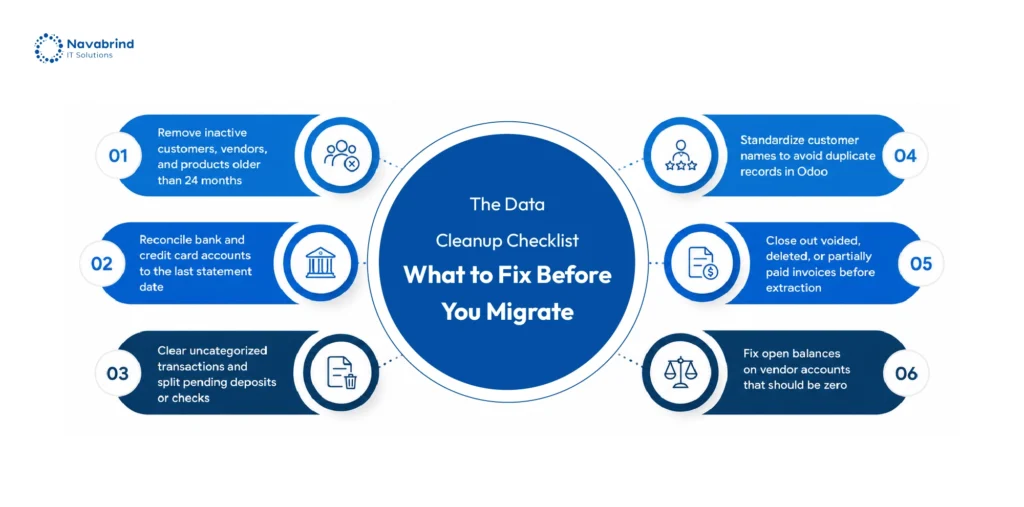
Professional migration teams handle far more than data transfer. They conduct financial audits, map source and destination fields, cleanse duplicate records, validate opening balances, execute staging migrations, and reconcile receivables, payables, and bank balances before go-live. During Quickbooks to Odoo Migration, experienced consultants rebuild workflows, reporting structures, and operational configurations that QuickBooks could never support effectively.
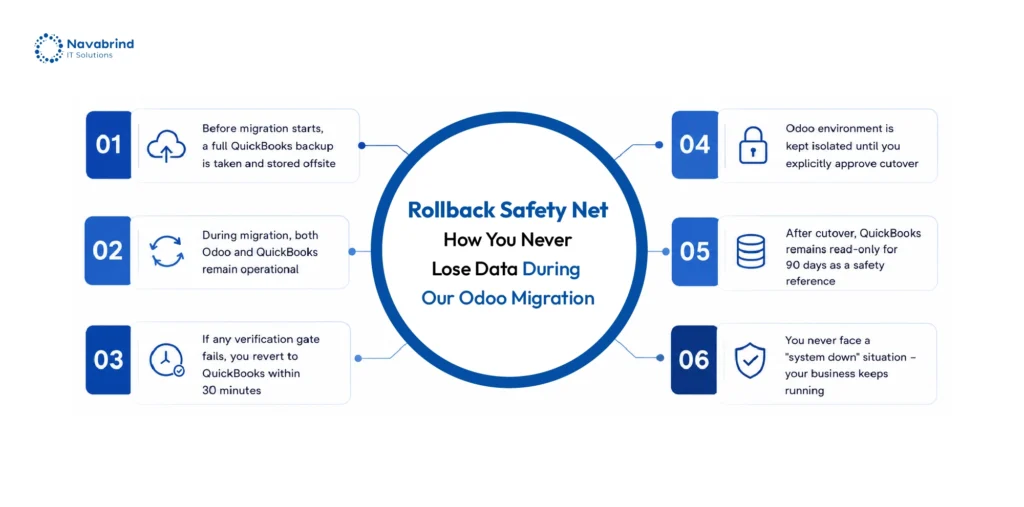
Choosing the wrong migration partner creates serious financial exposure. Businesses evaluating Quickbooks data Migration services should look for proven accounting migration experience, destination platform expertise, documented validation procedures, rollback planning, and successful migrations involving companies with similar operational complexity.
Industry-Specific QuickBooks Migration Considerations
Quickbooks migration requirements vary significantly across industries because operational workflows, reporting demands, inventory structures, and financial dependencies differ from one business model to another. A migration strategy that works for a small service company may fail completely for a manufacturer or distributor managing operational complexity across locations and departments.
Manufacturing companies usually migrate from Quickbooks after spreadsheets begin controlling production, bill of materials, routing, and job costing. QuickBooks cannot support production planning natively, forcing teams into disconnected systems and inaccurate costing methods. During Quickbooks to Odoo Migration, manufacturers gain integrated inventory, production management, procurement, and live job costing from one environment.
Distribution businesses encounter pressure through warehouse management and pricing complexity. Multi-location inventory tracking, procurement workflows, and customer pricing structures quickly exceed QuickBooks limitations. Quickbooks data Migration for distributors focuses heavily on inventory accuracy, purchase orders, supplier records, and pricing continuity across warehouse operations.
Service businesses face a different challenge. Project profitability, recurring billing, resource allocation, and timesheet management become difficult to manage through disconnected applications. Quickbooks replacement through Odoo connects project tracking with accounting, enabling live profitability reporting without spreadsheet calculations.
The most demanding scenario involves businesses operating multiple QuickBooks company files. Quickbooks data Migration services help consolidate entities into one ERP platform, align account structures, manage intercompany transactions, and deliver consolidated reporting without relying on manual financial aggregation.
Financial and Operational ROI of Migrating from QuickBooks
Businesses rarely pursue Quickbooks migration because of software frustration alone. The decision gains momentum when leadership recognizes how much revenue, productivity, and management capacity disappear into disconnected workflows, spreadsheet reporting, duplicate entries, and delayed financial visibility. The return from a successful Quickbooks replacement extends far beyond accounting efficiency.
One of the first gains appears through time recovery. Finance teams spend fewer hours preparing Excel reports, reconciling transactions, processing vendor bills, and re-entering information between disconnected systems. Quickbooks data Migration combined with ERP automation reduces invoicing mistakes, improves inventory accuracy, lowers payroll discrepancies, and strengthens financial reporting reliability.
Operational visibility creates another layer of ROI. Businesses that migrate from Quickbooks gain access to live dashboards, connected purchasing, integrated inventory tracking, project profitability monitoring, and cash flow forecasting from one platform. Managers stop waiting for month-end reports to identify operational problems or margin leakage.
Quickbooks to Odoo Migration creates long-term operational flexibility as well. Companies gain the ability to scale into multiple locations, manage larger customer requirements, support supplier integrations, and prepare for audits or investment reviews without expanding administrative overhead at the same pace.
The financial impact compounds over time. Early months focus on adoption and stabilization. Within the first year, automation savings, reporting visibility, and operational control begin generating measurable business returns that continue expanding as data quality improves across the organization.
Post-Migration: Turning Your Platform Into a Growth Engine
Quickbooks migration does not end at go-live. That milestone marks the beginning of operational transformation. Businesses that migrate from Quickbooks sometimes underuse their destination platform by recreating old habits, spreadsheet dependence, and disconnected workflows inside a stronger system. As a result, the organization never captures the operational value the migration was meant to deliver.
Companies completing Quickbooks to Odoo Migration gain the strongest results when adoption continues in phases. After accounting stabilizes, teams expand into inventory, CRM, manufacturing, project tracking, procurement, analytics, and workflow automation. This phased expansion allows departments to improve processes without overwhelming users during the initial transition period.
Another major opportunity comes from reporting and automation. Businesses use Odoo dashboards to track profitability, purchasing trends, operational costs, fulfillment performance, and cash flow visibility from one environment. AI-driven forecasting, automated replenishment, and document processing reduce repetitive administrative effort and strengthen operational decision-making.
Long-term success after Quickbooks data Migration depends heavily on data governance. Businesses need defined data entry standards, duplicate prevention controls, periodic quality audits, and role-based permissions that evolve alongside organizational growth. Quickbooks data Migration services support these governance practices to protect reporting integrity and operational accuracy long after the migration project closes.
Frequently Asked Questions
1.How do I migrate from QuickBooks to Odoo ERP?
Quickbooks to Odoo Migration starts with a financial and operational audit of the existing QuickBooks environment. Businesses export chart of accounts, customers, vendors, invoices, bills, balances, inventory records, and transaction history before mapping that data into Odoo structures. The process includes data cleansing, staging validation, reconciliation testing, and production cutover. Companies using professional Quickbooks data Migration services reduce reporting risks, reconciliation issues, and operational downtime during transition.
2.Can QuickBooks historical transactions be fully moved to Odoo?
Yes, businesses can migrate from Quickbooks with full historical transaction records, summarized balances, or opening-balance-only approaches depending on reporting needs and transaction volume. Full Quickbooks data Migration preserves invoices, bills, journal entries, and payment history inside Odoo. Large databases sometimes use summarized migration models to reduce project complexity and implementation timelines.
3.Is Odoo a good replacement for QuickBooks for small businesses?
Odoo works as a strong Quickbooks replacement for growing small businesses needing inventory control, CRM, purchasing, manufacturing, project tracking, or multi-location operations alongside accounting. Unlike accounting-only platforms, Odoo connects financials with operational workflows, helping businesses scale without relying on disconnected software and spreadsheets.
4.What is the cost of migrating from QuickBooks to Odoo?
Quickbooks migration costs depend on transaction volume, QuickBooks version, operational complexity, historical data scope, integrations, and ERP modules included in the rollout. Small businesses with limited accounting history may complete Quickbooks to Odoo Migration at a lower investment, while manufacturers, distributors, and multi-entity companies usually require broader implementation and reconciliation support.
5.How long does a QuickBooks to Odoo data migration take?
Migration timelines vary based on business size and historical data volume. Small organizations with straightforward accounting structures may complete Quickbooks data Migration within several weeks. Mid-sized companies managing inventory, manufacturing, CRM, or multiple operational modules usually require several months for testing, validation, training, and phased deployment.
6.Will my QuickBooks invoices and vendor bills transfer to Odoo?
Yes. Open invoices, unpaid vendor bills, customer balances, credits, payment terms, and outstanding receivables typically transfer during Quickbooks data Migration. Historical paid invoices and bills can migrate as well depending on the chosen migration strategy and reporting requirements.
Schedule a conversation with us now!
Related Articles










 Post
Post Post
Post