Across the U.S. mid-size segment in 2026, a noticeable shift is underway. Organizations that completed ERP system implementation with platforms like SAP ERP, NetSuite, or Microsoft Dynamics 365 five to ten years ago are reassessing that decision with sharper financial scrutiny. What once appeared as a long-term solution is now under pressure to justify its cost, flexibility, and alignment with current operational demands. This shift is driving a sharp rise in Odoo ERP migration conversations, where leadership teams are no longer asking if change is needed but how fast it can deliver measurable returns.
Three triggers consistently push companies toward ERP Migration: When these forces converge, ERP migration shifts from an option to a financial necessity.
- The first is a Failed NetSuite implementation or Failed SAP implementation projects that consumed capital yet fell short on usability, adoption, or measurable outcomes.
- The second is the strain of a Legacy ERP that cannot keep pace with expanding operations, fragmented workflows, and data silos.
- The third is financial pressure, where escalating licensing, customization, and maintenance costs no longer align with business value. When these forces converge, ERP migration shifts from an option to a financial necessity.
Despite this urgency, hesitation persists. ERP Migration has long been associated with risk of data loss, operational downtime, and the fear of repeating a flawed ERP system implementation. These concerns have historically delayed decisions, even when the existing system limits growth and profitability. For many organizations, the cost of inaction quietly exceeds the perceived risk of change.
The equation has changed with the rise of Cloud ERP software, led by platforms like Odoo. Lower ownership costs, faster deployment cycles, and open data architecture have redefined what ERP Migration looks like. Instead of long, uncertain transitions, companies now execute Odoo ERP migration with controlled timelines, validated data strategies, and experienced implementation partners who specialize in replacing failed systems without disrupting operations.
This guide breaks down what decision-makers need to know before making the shift. It explains how to move from SAP, NetSuite, Microsoft Dynamics, or any Legacy ERP to Odoo without data loss, outlines realistic timelines, clarifies cost structures, and shows how to manage risk with confidence. The goal is simple: turn ERP Migration into a turning point where performance, cost control, and scalability finally align.
Why US Companies Are Migrating Away From Their Current ERP Systems:
US companies are exiting legacy platforms after repeated ERP system implementation setbacks. The pattern stays consistent: selection confidence fades into operational friction, rising costs, and stalled ROI. This cycle drives renewed focus on Odoo ERP migration as a practical reset.
A failed NetSuite implementation starts with promise yet shifts under pressure. NetSuite earns attention for finance depth and brand trust, then costs expand as features expand. Licensing tiers climb with each added function, locking growth behind invoices. Customization demands vendor reliance, slowing change cycles. Partners deliver generic rollouts that miss operational nuance. Over time, reporting requires workarounds, inventory visibility breaks across locations, and support responsiveness declines. Teams feel the system dictates the process, not the other way around.
A failed SAP implementation follows a different path with similar outcomes. SAP ERP brings enterprise credibility, yet timelines stretch across years, draining momentum. Budget allocation tilts toward licenses and maintenance, limiting innovation. Daily operation needs dedicated administrators, raising overhead. Custom code created during ERP system implementation becomes a liability during upgrades. Non-technical teams resist adoption due to complexity, weakening data quality and decision speed.
Legacy ERP compounds the issue. Aging infrastructure, unsupported versions, and scarce expertise inflate risk. Cloud ERP software closes these gaps with device-agnostic reporting, continuous updates, connected tools, and elastic scale. The tipping point arrives when sustaining legacy ERP costs exceeds the investment in Odoo ERP migration by turning ROI from aspiration into measurable gain.
What Is Odoo ERP Migration and How Does It Work?
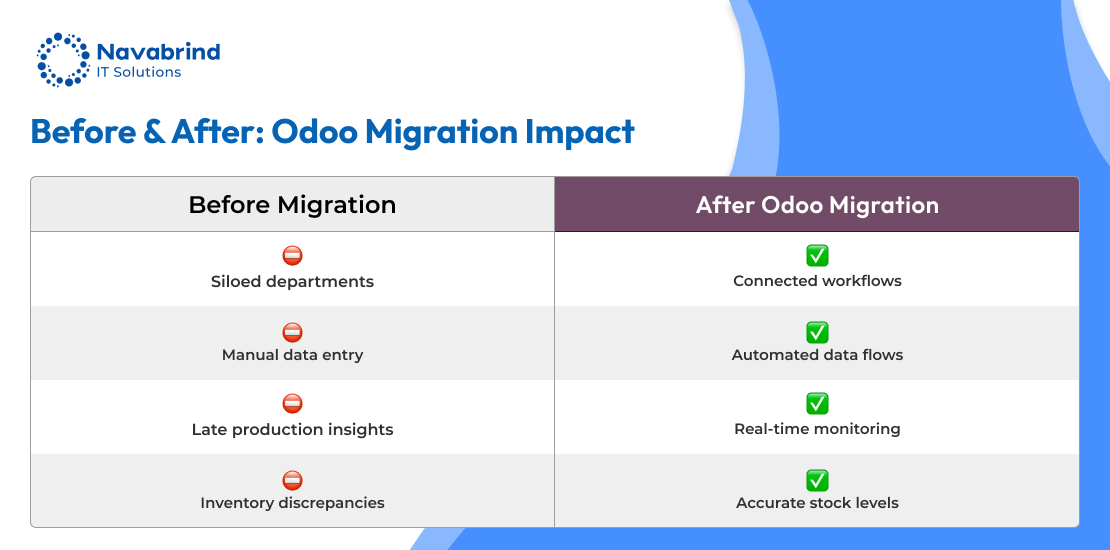
Odoo ERP migration is the transfer of business data, workflows, and operating logic from a Legacy ERP or a system affected by a failed NetSuite implementation or failed SAP implementation into Odoo. This shift replaces constrained platforms with Cloud ERP software designed for speed, visibility, and cost control. ERP Migration focuses on continuity and uplift at once by protecting historical data while improving how teams operate.
ERP Migration differs from a fresh ERP system implementation. A greenfield rollout begins with clean datasets and undefined processes. Migration starts with years of accumulated records shaped by another platform’s rules, plus teams accustomed to existing routines. The program must handle data transfer and operational change in parallel, reducing disruption and protecting revenue.
An Odoo ERP migration project moves through coordinated phases. Data migration extracts, transforms, and loads records into Odoo with accuracy. Configuration recreates workflows with tighter controls and fewer workarounds. Integration reconnects external tools used before the move. Testing validates data integrity and process fit. Training equips teams to switch systems with confidence. Cutover transitions operations to Odoo with minimal downtime.
Odoo suits ERP Migration from Legacy ERP, NetSuite, or SAP. Open data architecture simplifies imports. Flexible modules mirror existing workflows without rigid constraints. Total cost drops versus SAP or NetSuite, turning Odoo ERP migration into a fast ROI milestone. Cloud ERP software options remove infrastructure burden and support scale without capital spend.
How Do You Migrate From SAP or NetSuite to Odoo ERP Without Losing Data?
Data loss fears stall ERP Migration, even after a failed NetSuite implementation or failed SAP implementation. In a disciplined Odoo ERP migration, loss indicates weak execution, not an inherent risk. A rigorous framework preserves records, relationships, and financial truth from extraction to sign-off, converting Cloud ERP software adoption into a measurable ROI shift.
Phase 1: Data Discovery and Audit
Build a complete inventory across the Legacy ERP: customers, vendors, items, BOMs, price lists, open orders, invoices, payments, GL entries, and historical ledgers. Profile data quality with rules for duplicates, missing attributes, and inconsistent codes. Define scope of migrate, cleanse, or archive which is aligned with compliance and reporting needs. Establish control totals for later reconciliation.
Phase 2: Data Mapping
Translate source fields into Odoo models. Align SAP controlling areas, profit centers, and cost elements or NetSuite subsidiaries and classes with Odoo structures. Define field-level transformations, defaults, currency handling, and date logic. Freeze mapping with stakeholder approval to prevent scope drift during ERP system implementation.
Phase 3: Test Migration
Execute a full load in a sandbox. Validate record counts, parent–child links, stock quantities by location, AR/AP aging, and trial balances. Business users reconcile reports against the source system and sign off on acceptance criteria. Defects are logged, fixed, and retested.
Phase 4: Data Cleansing
Resolve issues surfaced in testing: merge duplicates, standardize item masters, complete tax and UoM data, and correct reconciliation gaps. Clean inputs determine outcome quality and speed of user adoption.
Phase 5: Live Migration
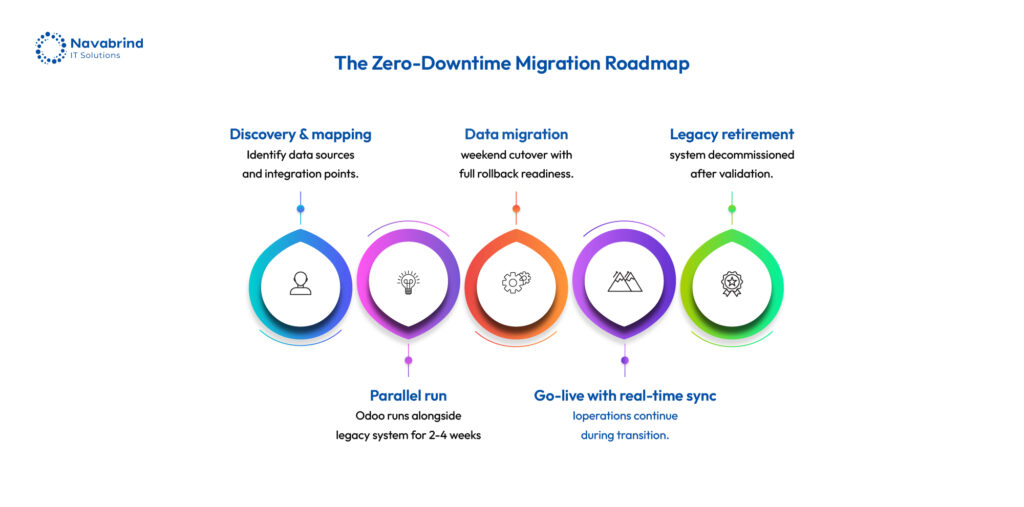
Run a controlled cutover typically over a weekend. Freeze transactions, extract final datasets, apply transformations, and import to production. Reconcile opening balances, open documents, and inventory valuations to the source closing position before go-live approval.
Phase 6: Parallel Run and Validation
Operate Odoo and the source system in tandem for 2–4 weeks. Cross-check postings, inventory movements, and financial reports. Close discrepancies, confirm audit trails, and finalize decommission of the Legacy ERP.
SAP Considerations
Complex finance models and prior custom code demand specialists fluent in SAP data architecture and Odoo imports to ensure accurate extraction and mapping.
NetSuite Considerations
Use saved searches for clean exports, handle multi-book accounting with careful mapping, and align subsidiary structures with Odoo multi-company. A methodical Odoo ERP migration eliminates data risk, accelerates Cloud ERP software value, and turns recovery from a failed SAP implementation or failed NetSuite implementation into a decisive ROI inflection point.
What Data Can Be Migrated When Switching to Odoo ERP?
In an Odoo ERP migration, nearly any structured business data from a Legacy ERP or from a failed NetSuite implementation or failed SAP implementation can move into Odoo. The constraint is not feasibility; it is effort and cost by data type. A disciplined ERP Migration plan defines scope early, protects continuity at cutover, and converts Cloud ERP software adoption into measurable ROI.
Master Data: the foundation
Customer and vendor masters transfer with contacts, terms, tax IDs, limits, bank details, and full account history. Product masters include SKUs, descriptions, UoM, categories, pricing, and cost layers. The chart of accounts moves with codes, types, and opening balances. Employee records migrate when HR is in scope, preserving departments and compensation structures.
Transactional Data: continuity at go-live
Open sales and purchase orders move to keep fulfillment and procurement uninterrupted. Open invoices and vendor bills carry forward to protect AR/AP aging and cash flow tracking. Inventory on hand transfers by warehouse and location. Bank reconciliation positions align to the closing state of the source system.
Historical Data: audit and analytics
Closed orders, invoices, bills, GL entries, and inventory movements migrate for service history, compliance, and comparative reporting across periods.
What does not move and why
Platform-bound artifacts (SAP transports, NetSuite scripts) lack equivalents in Odoo. A defined historical cutoff limits volume. Known bad or redundant records are excluded to raise data quality.
Decision framework:
For each dataset, choose full migration, partial migration, or fresh start. Each option carries cost and operational impact; aligning this choice early sharpens timelines and ROI in the ERP system implementation.
Is It Possible to Migrate From Microsoft Dynamics to Odoo ERP?
Yes. Microsoft Dynamics to Odoo is a common ERP Migration for US mid-size companies, and an experienced Odoo ERP migration partner can execute it with predictable timelines and outcomes. Teams moving after a failed SAP implementation or failed NetSuite implementation see faster ROI with Cloud ERP software that reduces licensing pressure and simplifies operations.
Why businesses move from Dynamics to Odoo:
Microsoft Dynamics carries rising subscription costs, especially across finance, supply chain, and sales modules. Dependence on the Microsoft stack increases integration effort for companies running mixed ecosystems, adding ongoing expense. Many ERP system implementation projects become over-scoped and over-customized, mirroring patterns seen in SAP. Post go-live, support gaps, slow change cycles. Adoption lags among non-technical teams due to interface friction. In contrast, Odoo ERP migration reduces total cost over a three-year horizon and improves day-to-day usability.
Dynamics-specific migration considerations:
Dynamics GP (on-premise) maps cleanly from a Legacy ERP with known schemas. Dynamics 365 Business Central exports structured datasets that load into Odoo with defined transformations. Dynamics 365 Finance and Operations introduces a denser model that needs detailed mapping and staged loads. Power BI and Power Automate flows may be re-created using Odoo reporting and automation, aligning analytics and workflows within the new platform.
What teams gain after Odoo ERP migration:
Immediate licensing reduction, faster user adoption, flexible app configuration without per-module cost spikes, and open architecture that connects third-party tools without vendor lock-in turning ERP Migration into a clear ROI inflection point.
What Are the Risks of Migrating to a New ERP System and How Does Odoo Minimize Them?
ERP Migration carries risk, yet the larger threat lies in staying on a Legacy ERP or persisting after a failed NetSuite implementation or failed SAP implementation. Odoo ERP migration reduces exposure through disciplined execution and Cloud ERP software advantages that convert risk into controlled milestones and measurable ROI.
Risk 1: Data Loss or Corruption
The risk: incomplete extracts, faulty transformations, or import errors break data integrity.
How Odoo reduces it: Odoo offers open data structures and documented import pipelines. Full test migrations validate record counts, relationships, and trial balances before cutover. Parallel runs confirm outputs against the source system, ensuring zero-gap continuity before decommissioning.
Risk 2: Operational Disruption During Cutover
The risk: extended downtime halts order processing, procurement, and billing.
How Odoo reduces it: phased go-live sequences move non-critical areas first, followed by finance and inventory. Cutover playbooks are rehearsed with timed drills, and a rollback path protects business continuity if thresholds are not met.
Risk 3: User Adoption Failure
The risk: teams revert to spreadsheets, eroding the value of the ERP system implementation.
How Odoo reduces it: role-based training aligns tasks with screens and permissions. Early involvement of key users builds ownership. A cleaner interface reduces friction versus legacy platforms, accelerating adoption across operations.
Risk 4: Financial Reporting Discontinuity
The risk: opening balances and ledgers fail to reconcile, impacting audit and compliance.
How Odoo reduces it: strict reconciliation gates by opening balances, AR/AP aging, inventory valuation must match the source closing position. Finance signs off before go-live, parallel reporting validates period outputs.
Risk 5: Integration Failure
The risk: connected systems break, disrupting order flow, logistics, or analytics.
How Odoo reduces it: integration mapping runs alongside migration. APIs and connectors are rebuilt and tested during UAT, with end-to-end scenarios covering order-to-cash and procure-to-pay before release.
Risk 6: Cost Overrun
The risk: budgets expand, weakening the business case.
How Odoo reduces it: lower subscription costs create financial headroom. Fixed-scope engagements and phased delivery control spend, turning Odoo ERP migration into a predictable investment with a fast ROI inflection point.
How Long Does an Odoo ERP Migration Take for a Mid-Size US Company?
Timelines vary because ERP Migration blends data work, process redesign, and change management. For a mid-size US company, a disciplined Odoo ERP migration reaches go-live in 3 to 9 months, far shorter than cycles seen after a failed NetSuite implementation or failed SAP implementation. Cloud ERP software shortens delivery by removing infrastructure constraints and simplifying deployment.
Timeline ranges by source system:
- NetSuite → Odoo: 12–20 weeks
- SAP Business One → Odoo: 16–28 weeks
- SAP S/4HANA → Odoo (multi-entity): 24–40 weeks
- Microsoft Dynamics GP → Odoo: 10–18 weeks
- Microsoft Dynamics 365 → Odoo: 14–24 weeks
- Legacy ERP (heavily customized) → Odoo: 16–32 weeks
Where time is spent:
Data audit and mapping (3–6 weeks) set the foundation; rushing this stage creates rework. Data cleansing (2–6 weeks) depends on source quality. Configuration and extensions (4–10 weeks) align workflows with operations. Testing and parallel run (3–6 weeks) validate accuracy and continuity. Training (1–3 weeks) prepares teams close to cutover.
What extends timelines:
Hidden data issues, SAP or NetSuite customizations that alter structures, scope creep during configuration, slow decisions on chart of accounts or org design, and US compliance factors such as multi-state sales tax or revenue recognition.
What compresses timelines without risk:
A decisive internal project lead, well-maintained source data, phased go-live (finance and operations first), and a partner experienced in the exact source-to-Odoo path by turning ERP system implementation into a predictable, ROI-driven transition.
What Is the Average Cost of Migrating to Odoo ERP From a Legacy System?
Cost is the second major question in any ERP Migration and the answer depends on scope, data quality, and source platform. For a mid-size US company, Odoo ERP migration delivers a controlled investment with a fast ROI shift, especially after a failed NetSuite implementation or failed SAP implementation. Cloud ERP software reduces long-term spend, making the transition financially viable from the start.
The four cost components:
- Licensing: Odoo Enterprise runs on a per-user subscription with access to business apps without per-module pricing.
- Migration services: data extraction, transformation, cleansing, and import this varies based on data volume and condition.
- Configuration and extensions: aligning Odoo with operational workflows across finance, inventory, sales, and production.
- Training and change management: enabling teams to operate confidently from day one.
Realistic cost ranges (mid-size US companies):
- NetSuite → Odoo (20–50 users): $40K–$100K
- SAP Business One → Odoo (20–75 users): $60K–$150K
- SAP S/4HANA → Odoo (50–150 users): $120K–$350K
- Microsoft Dynamics GP → Odoo (15–50 users): $35K–$90K
- Microsoft Dynamics 365 → Odoo (20–75 users): $50K–$130K
- Legacy ERP → Odoo (customized systems): $50K–$200K
ROI that changes the equation:
Licensing savings versus SAP or NetSuite can reach $50K–$300K per year. Many companies recover migration spend within 6–18 months from subscription savings alone. Gains from faster reporting, reduced reconciliation effort, and improved inventory control compound the return.
What increases cost:
Poor data quality, undocumented customizations, US compliance complexity (multi-state tax, revenue recognition), and scope expansion during ERP system implementation.
The cost of not migrating:
Ongoing license and maintenance fees for a Legacy ERP, staff time lost to workarounds, decisions based on unreliable data, and growing technical debt—costs that compound year after year without delivering value.
How Navabrind IT Solutions Manages Odoo ERP Migration for US Businesses:
Choosing a migration partner shapes outcomes as much as platform choice. After a failed NetSuite implementation or failed SAP implementation, execution discipline determines whether ERP Migration delivers ROI or repeats past issues. Navabrind IT Solutions anchors Odoo ERP migration on a data-first model, tight scope control, and US compliance alignment turning Cloud ERP software adoption into a predictable business outcome.
What sets Navabrind IT Solutions apart:
A proven framework refined across SAP, NetSuite, and Dynamics transitions reduces uncertainty in ERP system implementation. Work begins with a rigorous data audit, not configuration ensuring accuracy before design decisions. Teams understand US sales tax, multi-state compliance, and US GAAP reporting, preventing rework late in the project. Fixed-scope engagements define deliverables, milestones, and acceptance criteria upfront, protecting budgets. Post-go-live support sustains momentum so value is captured from day one in Odoo.
Navabrind migration process:
Step 1: Migration assessment: Evaluate the source system, data volume, module scope, and compliance needs; produce a clear plan and cost range.
Step 2: Data audit and mapping: Build the migration blueprint with field-level mapping and reconciliation controls.
Step 3: Sandbox migration: Execute full test loads and validate records, relationships, and financials.
Step 4: Configuration and compliance: Set up finance, inventory, and operations with US tax and reporting requirements.
Step 5: User acceptance testing: Business teams validate workflows and outputs.
Step 6: Cutover and parallel run: Controlled go-live with cross-checks against the source.
Step 7: Post-go-live support: Stabilization, optimization, and KPI tracking to lock in ROI.
Frequently Asked Questions
1.How do you migrate from SAP or NetSuite to Odoo ERP without losing data?
A disciplined Odoo ERP migration protects data through audit, mapping, testing, and validation. Records from SAP or NetSuite are catalogued, cleansed, and mapped into Odoo structures. A full sandbox migration validates counts, relationships, and financial balances before cutover. Live migration follows a controlled window with reconciliation against the source closing position. A short parallel run confirms outputs before decommissioning the old system, eliminating data risk in ERP Migration.
2.What is the average cost of migrating to Odoo ERP from a Legacy ERP?
Costs vary by users, scope, and data quality. Mid-size US companies invest between $35K and $350K depending on source systems such as SAP, NetSuite, Dynamics, or Legacy ERP. Odoo ERP migration reduces licensing spend versus SAP or NetSuite, with savings that can reach $50K–$300K annually, allowing recovery of migration investment within 6–18 months in many ERP system implementation scenarios.
3.How long does an Odoo ERP migration take for a mid-size US company?
A structured ERP Migration completes in 3 to 9 months. Simpler moves like Dynamics GP or NetSuite fall near the lower end, whereas SAP S/4HANA or heavily customized Legacy ERP projects extend timelines. Data audit, mapping, configuration, testing, and training define the schedule. Clean data and decisive project leadership compress timelines without compromising quality.
4.What data can be migrated when switching to Odoo ERP?
Master data (customers, vendors, products, chart of accounts), transactional data (open orders, invoices, inventory), and historical records (GL entries, closed transactions) can be migrated. Platform-bound configurations from SAP or NetSuite are excluded. ERP Migration scope is defined early to balance cost, compliance, and reporting needs within Cloud ERP software.
5.Is it possible to migrate from Microsoft Dynamics to Odoo ERP?
Yes. Dynamics GP and Dynamics 365 migrations to Odoo are common. Data exports from Dynamics are mapped and transformed into Odoo with validation cycles. Companies move to reduce licensing pressure, simplify integrations, and improve adoption. Odoo ERP migration delivers a lower total cost and faster operational alignment than remaining on Dynamics.
6.What are the risks of migrating to a new ERP system and how does Odoo minimize them?
Key risks include data loss, cutover disruption, adoption gaps, financial mismatches, integration breaks, and cost overruns. Odoo reduces these through open data structures, full test migrations, phased cutover, role-based training, strict financial reconciliation, and integration testing during UAT. A structured methodology converts ERP Migration risk into controlled checkpoints, ensuring continuity and ROI.
Schedule a conversation with us now!
Related Articles









 Post
Post Post
Post