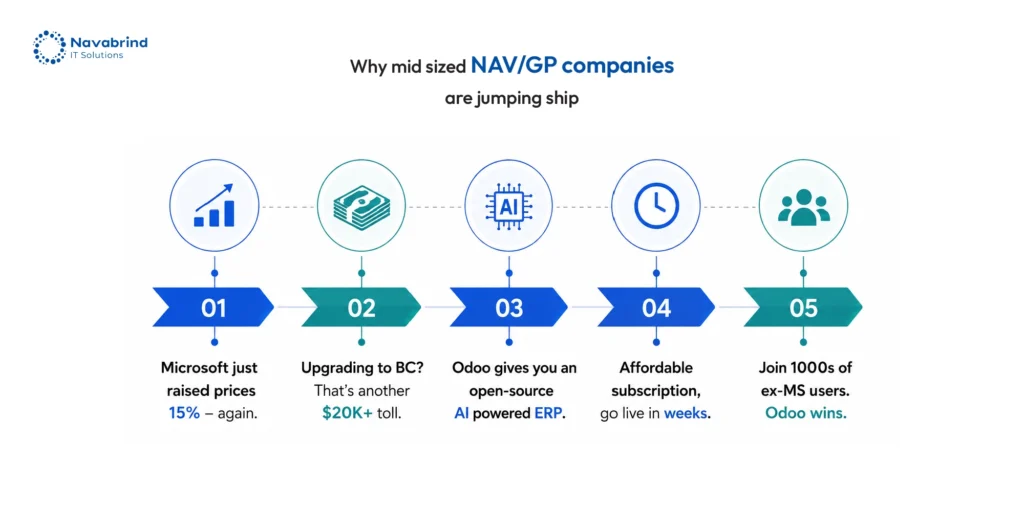
Microsoft Dynamics has shaped the ERP landscape for years, yet a shift is underway. Rising licensing fees are now increased by 15% combined with enforced cloud transitions forcing leadership teams to reassess long-term value. What once felt like a stable investment now demands closer scrutiny, as operational costs climb without a matching lift in agility or control. This change is accelerating interest in Dynamics 365 migration, not as an upgrade, but as a cost-reset decision.
Across 2025–2026, businesses are exploring multiple routes: Microsoft dynamics migration within the ecosystem, Dynamics AX to Dynamics 365 migration, GP to Business Central migration, NAV to Business Central migration, and Business Central data migration. Each path carries implications for cost structure, data integrity, and operational continuity. The margin for error is narrow, and missteps can lock companies into higher spend cycles.
This blog post breaks down migration paths, tools, timelines, risks, and cost variables, along with a growing alternative Odoo. The direction you choose matters, yet execution matters even more. A well-planned Dynamics 365 migration anchored in a strong data strategy can unlock flexibility and control. Poor planning, on the other hand, leads to delays, data loss, and escalating expenses.
Understanding the Microsoft Dynamics Migration Landscape
The Microsoft Dynamics portfolio spans AX, GP, NAV, Business Central, and Dynamics 365 with each created in different eras, with different architectures and upgrade paths. This layered evolution creates confusion during Dynamics 365 migration decisions, as systems that appear related demand entirely different transition approaches. Microsoft dynamics migration is not a linear upgrade, it is a shift shaped by product history, licensing models, and data structures.
Microsoft is accelerating this shift by phasing out legacy systems and tightening its cloud-first direction. With a 15% rise in licensing costs, businesses are under pressure to move, whether the timing aligns with operational readiness or not. This has turned Dynamics AX to Dynamics 365 migration, GP to business central migration, and NAV to business central migration into forced decisions rather than planned transformations.
Three distinct paths define today’s landscape. Some companies stay within the ecosystem through Business central data migration or upgrades across Dynamics platforms. Others exist toward cloud ERPs like Odoo, SAP, or Workday to regain cost control and flexibility. A third group adopts a hybrid model, retaining Microsoft CRM while replacing ERP with Odoo. “Migration” carries different implications in each case. The starting system determines complexity, risk exposure, and cost trajectory, making upfront clarity non-negotiable.
Legacy Microsoft Dynamics Migration Paths Explained:
- Dynamics AX to Dynamics 365 Migration:
Enterprises still running AX with large manufacturers, distributors, and public sector organisations face a major shift during Dynamics 365 migration. The move introduces a cloud-first architecture, a revised licensing model impacted by a 15% cost increase, and a redesigned interface that alters day-to-day workflows. Dynamics AX to Dynamics 365 migration is rarely straightforward because AX environments carry extensive X++ customisations that fail to map cleanly into the newer framework. Business central data migration concepts do not apply here due to structural differences. The common route involves Microsoft’s Data Migration Framework (DMF), yet code elements require redevelopment rather than transfer. Timelines stretch from 6 to 18 months, with risk concentrated around redevelopment effort, data validation, and operational disruption during transition.
- GP to Business Central Migration:
GP remains active across small to mid-size organisations in North America, including professional services and nonprofits. Microsoft’s roadmap confirms mainstream support ending in 2025, with extended coverage until 2029, pushing urgency around GP to Business Central migration. Financial data such as general ledger, customer and vendor records, and open transactions transfer with relative ease. Customisations built through Dexterity, third-party integrations, and complex payroll setups face compatibility gaps. Microsoft dynamics migration tools like the GP-to-BC toolkit assist with baseline transfer, though limitations surface when handling customised environments. With licensing costs rising, many organisations are reassessing ROI and exploring Odoo as an alternative to avoid repeated upgrade cycles and cost escalation tied to Microsoft Dynamics migration.
- NAV to Business Central Migration:
NAV’s journey from Navision to NAV to Business Central creates the impression of continuity, yet NAV to Business Central migration introduces notable changes. The shift to AL language from C/AL, along with cloud deployment expectations and rising subscription costs, alters how systems are maintained and extended. European SMBs, retail businesses, and light manufacturing firms still on NAV must choose between an upgrade path or a fresh Business central data migration. Customisations present the largest obstacle, as legacy code structures do not translate cleanly into extension-based models. This forces redevelopment decisions that impact cost and timelines. Migration duration ranges from 3 to 9 months, depending on the level of custom logic embedded within the existing NAV system.
Business Central Data Migration: What You Need to Know
Business Central data migration sits at the center of a Dynamics 365 migration decision. The system holds financial and operational records that define how a business runs day to day. Chart of accounts and historical ledgers shape reporting accuracy. Customer, vendor, and item masters drive transactions. Open sales and purchase orders reflect active commitments. Inventory valuation and warehouse setups control stock visibility, and fixed assets with depreciation schedules influence compliance and financial planning. Losing structure or context in these areas leads to reporting gaps and operational friction.
Microsoft dynamics migration tools such as the Business Central Data Migration Wizard, supported by RapidStart Services, simplify master data transfer. They handle foundational records with consistency, which helps during NAV to Business Central migration and GP to Business Central migration. Transactional history presents a challenge.
The critical rule remains non-negotiable: clean and validate Business Central data before any Dynamics 365 migration or system exit. Poor data quality compounds risk, increases costs, and slows down transitions especially as rising licensing fees push businesses to rethink long-term platform strategy.
Why Businesses Are Replacing Microsoft Dynamics with Odoo ERP
The cost structure behind Dynamics 365 migration has become a breaking point for growing companies. Per-user licensing expands as teams scale, and Azure hosting adds another layer of recurring expense. On top of this, Microsoft dynamics migration projects frequently exceed initial budgets by 24–30%, driven by customisation rebuilds and extended timelines. With a 15% increase in licensing costs and recurring upgrade cycles, businesses find themselves locked into repeated spending through Dynamics AX to Dynamics 365 migration, GP to Business Central migration, and NAV to Business Central migration.
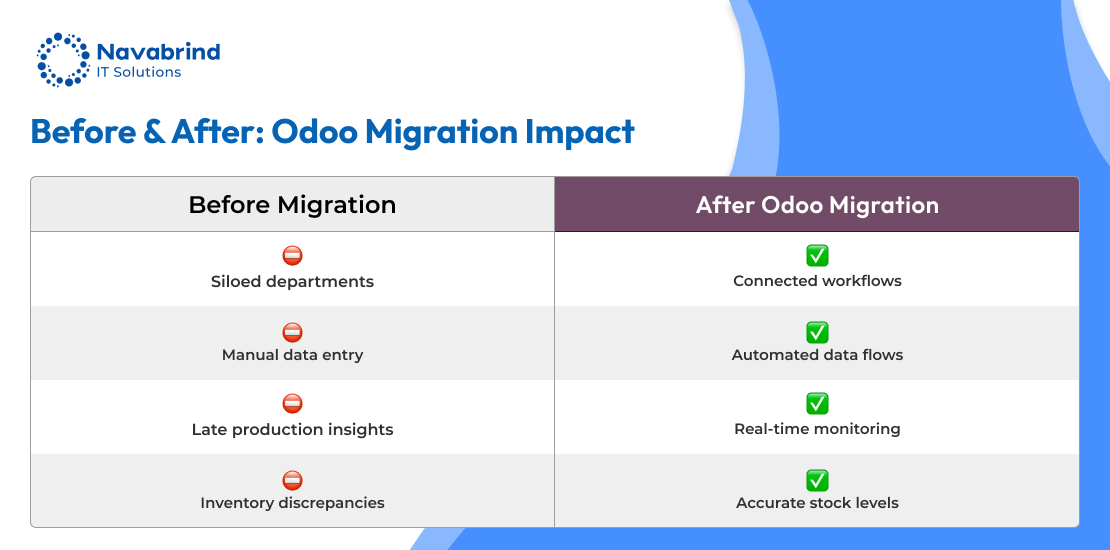
Odoo presents a different path. Its open-source foundation removes per-module licensing pressure, allowing organisations to scale without unpredictable cost spikes. A single platform supports CRM, ERP, eCommerce, HR, and manufacturing within one environment, reducing dependency on multiple systems. Implementation cycles move faster compared to traditional Business Central data migration projects, which translates into quicker time-to-value.
Adoption is accelerating across manufacturing, wholesale distribution, professional services, retail, and logistics. The tipping point comes when companies face a forced upgrade especially in GP to Business Central migration or NAV to Business Central migration scenarios where the cost of staying within the Microsoft ecosystem outweighs the effort of switching. For many mid-size businesses, moving to Odoo isn’t a downgrade, it’s an exit from a licensing treadmill.
Is Odoo Cheaper Than Microsoft Dynamics 365 for Mid-Size Businesses?
Cost pressure is the driving force behind many Dynamics 365 migration decisions, especially after a 15% rise in Microsoft pricing. For mid-size organisations, total cost of ownership reveals a sharp contrast. Microsoft Dynamics migration comes with per-user licensing ranging from $70 to $210 per month, layered with app-based add-ons and mandatory Azure hosting.
Odoo shifts the equation. The Community edition carries no licensing fee, and Enterprise is affordable and significantly lower than its nearest competitor. Hosting remains optional, giving businesses control over infrastructure spend. Implementation costs far below typical Business Central data migration projects. Customisation costs stay manageable due to an open Python and JavaScript stack, avoiding vendor lock-in.
Microsoft Dynamics retains value for large enterprises with strict compliance requirements and deep Microsoft 365 dependencies. For mid-size companies under 500 users focused on cost control and flexibility, Odoo stands out. The numbers are direct, many businesses moving from GP, NAV, or AX achieve a 60–70% reduction in total cost over three years, making the switch a financially driven decision rather than a technical one.
A Dynamics 365 migration from Business Central to Odoo focuses on data continuity, not tool replication. Business central data migration can carry critical records forward, though Microsoft-native layers require reconstruction.
- Data that transfers cleanly:
Financial structures such as charts of accounts and general ledger hierarchy move without friction. Customer and vendor master records retain relationships and transaction context. Open invoices, bills, and credit notes carry financial continuity. Product catalogues and inventory balances align well with Odoo’s structure. Purchase and sales order history remains intact, along with non-payroll employee records and bank configurations. These elements form the operational backbone, making Microsoft Dynamics migration toward Odoo viable from a data standpoint.
- Data that requires mapping and transformation:
Dimensions in Business Central translate into analytic accounts in Odoo, requiring careful mapping. Item variants shift into attribute-based product structures. Multi-location warehouse setups, fixed asset registers, and depreciation logic need restructuring. Recurring journals demand reconfiguration to match Odoo’s accounting flows. These steps add complexity during GP to Business Central migration exits or NAV to Business Central migration transitions heading toward Odoo.
- Data that does not transfer directly:
AL extensions, custom code, workflow approvals, Power BI reports, and Microsoft 365 integrations do not migrate. These components must be rebuilt within Odoo’s framework.
How to Migrate Data from Dynamics 365 to Odoo Without Losing Records:
A successful Dynamics 365 migration to Odoo depends on discipline, not tools. Rising costs including a 15% licensing increase make accuracy non-negotiable during Microsoft Dynamics migration, especially when exiting Business Central data migration environments.
Step 1: Data Audit & Inventory
Extract a complete dataset from Dynamics 365 or Business Central. Segment records into master data, active transactions, historical entries, and archived information. Flag inconsistencies early to avoid downstream failures.
Remove duplicate customer and vendor entries. Align tax codes, currencies, and naming conventions. Fix orphaned transactions and resolve imbalances within the general ledger before moving forward.
Define how Business Central fields translate into Odoo structures. Capture exceptions where transformation logic is required. Maintain a shared mapping document across functional and technical teams to prevent misalignment.
Step 4: Staging Environment Load
Import validated datasets into an Odoo staging setup. Run automated checks covering record counts, financial balances, and duplication risks to confirm integrity.
Step 5: User Acceptance Testing (UAT)
Finance teams verify ledgers and receivables. Operations confirm inventory and order flows. HR reviews employee records for completeness and accuracy.
Step 6: Delta Migration & Cutover
Capture transactions created after initial extraction. Load these into production and execute cutover during a low-activity window.
Step 7: Post-Go-Live Validation
Retain Dynamics access in read-only mode. Run parallel reconciliations across closing cycles and archive legacy data with controlled access.
What Are the Risks of Switching from Microsoft Dynamics to Odoo?
A Dynamics 365 migration toward Odoo brings cost relief, yet risk surfaces when planning lacks depth. With Microsoft Dynamics migration costs rising by 15%, businesses push for change though execution gaps can disrupt operations if not managed with discipline.
- Data & Technical Risks:
Incomplete mapping during Business central data migration can leave gaps in historical records, impacting reporting continuity. Custom logic within Business Central has no direct equivalent in Odoo, requiring redevelopment. Integrations connected through APIs break during transition and must be reconfigured. Delta migration errors create data integrity issues, especially when transactions generated after initial extraction are missed.
- Operational Risks:
Cutover windows can interrupt business flow if timing and preparation fall short. Finance teams may struggle with month-end closing in the new system without proper onboarding. Inventory mismatches arise when warehouse teams operate without training. Reporting gaps appear as familiar Dynamics 365 outputs are not instantly available in Odoo.
- Organizational Risks:
User resistance slows adoption, especially for teams accustomed to Microsoft interfaces. Internal IT teams may lack exposure to Odoo’s Python-based framework. Many organisations underestimate the internal effort required, which delays execution and increases dependency on external support.
- Risk Mitigation Approach:
Assign a migration owner with authority over decisions. Run a focused 4–6 week training and change program. Select an Odoo partner with proven Dynamics AX to Dynamics 365 migration, GP to Business Central migration, and NAV to Business Central migration experience. Establish a rollback plan before go-live to safeguard operations.
A Dynamics 365 migration to Odoo varies based on data volume, custom logic, and organisational readiness. With Microsoft dynamics migration costs rising by 15%, timelines now influence not just delivery but total spend across the transition.
- Timeline by Migration Scenario:
GP to Odoo projects with clean datasets and under 50 users finish within 8–14 weeks. NAV to Odoo transitions with moderate customisation needs run between 3–6 months. Business Central data migration for 50–200 users extends to 4–7 months due to validation and mapping layers. Large-scale Dynamics AX to Dynamics 365 migration exits involving multi-entity structures and over 200 users can take 8–14 months, driven by complexity in data and process alignment.
- What Causes Delays:
Poor data quality adds 4–8 weeks and remains the leading cause of overruns. Expanding scope mid-project increases workload across configuration and testing. Customisation rebuilds take longer than anticipated when legacy logic lacks documentation. Delays in user acceptance testing slow approvals. Integration dependencies create bottlenecks when underestimated. Weak change management reduces adoption speed, impacting readiness for go-live.
- Typical Mid-Size Timeline:
Discovery and data audit span the first 3 weeks. Data cleansing, Odoo setup, and mapping follow through week 8. Pilot migration and integration build extend to week 14. Testing, training, and parallel runs continue until week 19. Go-live and stabilisation complete by week 24, with decommissioning and archiving closing by week 28.
-
Execution Priorities:
Start with a data audit before selecting tools. Rebuild only necessary logic. Roll out modules in phases of finance first, followed by operations and HR. Keep Dynamics accessible in read-only mode for 60 days. Maintain a living mapping document. Allocate a 20% buffer in time and cost. Choose a partner experienced in Microsoft dynamics migration and Odoo. Treat go-live as the starting point of adoption.
Microsoft dynamics migration whether moving within the ecosystem or shifting to Odoo that carries high stakes. The outcome depends less on the platform and more on how well data is prepared, validated, and mapped. Weak data foundations lead to delays, cost overruns, and reporting gaps. A disciplined approach to Business central data migration, combined with clarity on custom logic and integrations, defines success across Dynamics AX to Dynamics 365 migration, GP to Business Central migration, and NAV to Business Central migration scenarios.
For organisations approaching GP or NAV end-of-life, this moment calls for a long-term decision. Instead of committing to another upgrade cycle within Microsoft, evaluate whether Odoo aligns with the next decade of growth, cost control, and operational flexibility especially as licensing costs continue to rise by 15%. Start with a data audit and migration readiness assessment before locking into any platform or timeline.
Frequently Asked Questions
1. Why are businesses replacing Microsoft Dynamics with Odoo ERP?
Rising costs are driving change. A 15% increase in licensing, combined with per-user pricing, Azure hosting, and repeated upgrade cycles, is pushing companies to rethink Microsoft Dynamics migration. Many organisations moving through Dynamics AX to Dynamics 365 migration, GP to Business Central migration, or NAV to Business Central migration find the cost trajectory unsustainable. Odoo offers a flexible pricing model, a single platform for multiple business functions, and faster deployment timelines, making the shift financially and operationally viable.
2. How do I migrate data from Dynamics 365 to Odoo without losing records?
A successful Dynamics 365 migration depends on a structured process. Start with a full data audit, followed by cleansing to remove inconsistencies. Map Business Central fields to Odoo equivalents, then load data into a staging environment for validation. Conduct user acceptance testing across finance, operations, and HR before executing delta migration and cutover. Retain Business Central in read-only mode after go-live to ensure reconciliation accuracy and avoid data loss.
3.Is Odoo cheaper than Microsoft Dynamics 365 for mid-size businesses?
Yes, in most cases. Microsoft dynamics migration involves licensing, hosting, and upgrade costs that increase over time, especially after recent price hikes. Odoo reduces this burden through lower subscription costs and flexible hosting options. Over a three-year period, businesses moving from GP, NAV, or AX commonly achieve 60–70% cost reduction compared to staying within the Microsoft ecosystem.
4. Can Business Central data be fully transferred to Odoo?
Business central data migration supports the transfer of financial records, master data, transactions, inventory, and operational history. Elements such as AL extensions, workflows, and Microsoft-integrated tools do not carry over and require redevelopment in Odoo. The data moves successfully, though Microsoft-native functionality does not.
5.What are the risks of switching from Microsoft Dynamics to Odoo?
Risks include incomplete data mapping, loss of custom logic, integration disruptions, and operational slowdowns during transition. User adoption challenges and internal resource constraints can delay progress. These risks increase during complex Microsoft dynamics migration scenarios if planning lacks depth.
6. How long does a Dynamics 365 to Odoo migration project take?
Timelines depend on system complexity and data quality. Smaller GP environments may complete within 8–14 weeks, whereas NAV and Business Central data migration projects can take 3–7 months. Large-scale Dynamics AX to Dynamics 365 migration exits with multi-entity structures may extend to 8–14 months. Data quality, customisation rebuilds, and internal readiness influence duration.
Schedule a conversation with us now!
Related Articles









 Post
Post Post
Post