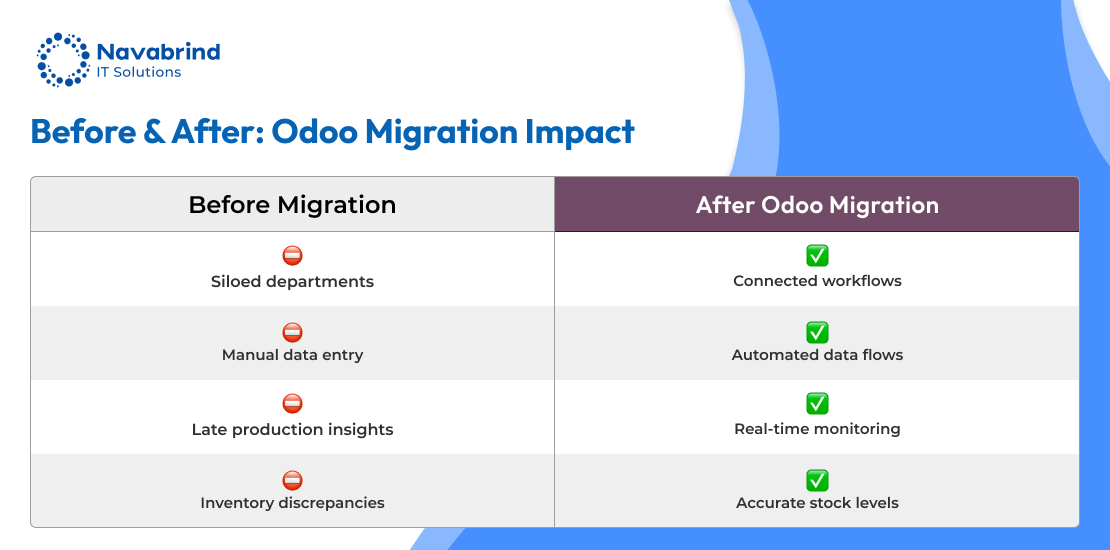
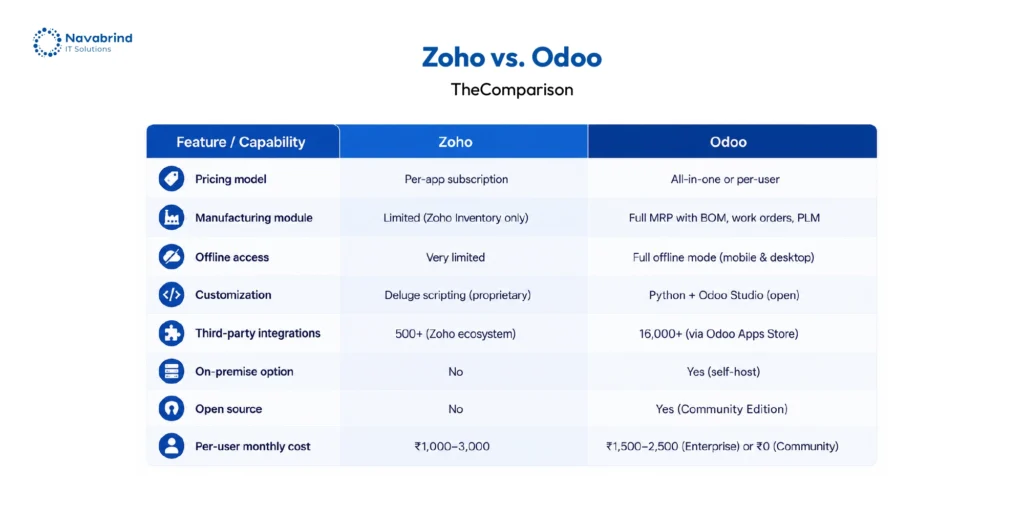
As businesses scale, operational gaps start surfacing across sales, finance, inventory, reporting, and cross-team coordination. What once worked smoothly inside Zoho begins creating friction during expansion. This is why companies are investing in Zoho CRM migration and shifting toward Odoo to gain wider operational control, stronger process alignment, and connected business management across departments. Growth demands flexibility, data visibility, and workflow continuity without platform limitations slowing execution.
A successful Zoho migration requires far beyond exporting spreadsheets and importing records. Years of customer history, finance entries, approvals, custom modules, automation logic, and user access layers remain deeply connected inside the platform. During Zoho CRM data migration, preserving relationships between records becomes critical to avoid sales disruption, reporting gaps, and broken business flows. The challenge increases further during Zoho books migration, where accounting accuracy, tax records, invoices, and transaction timelines must remain intact. Poorly executed Zoho data migration creates operational confusion, damaged reporting accuracy, integration failures, duplicate entries, and revenue delays that impact long-term business performance.
Understanding the Zoho Ecosystem Before You Migrate
Successful Zoho CRM migration starts with understanding how your business operates inside the Zoho ecosystem. Companies rarely use one application in isolation. Sales teams rely on Zoho CRM for leads, deals, activities, workflows, and custom modules. Finance departments manage invoices, payments, taxes, and accounting records through Zoho Books migration processes. Inventory teams depend on product records, warehouse tracking, purchase orders, and fulfillment timelines. Support departments manage ticket histories, SLAs, and agent activities through Zoho Desk.
The challenge during Zoho data migration comes from application dependencies. Customer records inside CRM connect with invoices in Books, campaigns in Zoho Campaigns, reports in Zoho Analytics, and employee actions across Zoho People. Moving data without preserving these relationships creates reporting inconsistencies, workflow failures, and disconnected operations.
This guide addresses three business-critical Zoho migration paths: restructuring data within Zoho applications, moving from Zoho toward platforms like Salesforce or HubSpot, and handling Zoho CRM data migration from external systems into Zoho without losing operational continuity.
Zoho Migration: Why Businesses Migrate and What Drives the Decision
Businesses begin evaluating Zoho CRM migration when operational complexity starts expanding beyond platform flexibility. Growing sales structures, layered approval flows, custom reporting demands, and enterprise integrations expose architectural limitations that slow execution. As data volume increases, reporting accuracy, analytics depth, and cross-department visibility become harder to manage inside fragmented systems. During Zoho books migration, finance teams frequently encounter challenges with multi-entity accounting, currency management, and consolidated financial reporting across expanding operations.
Business consolidation creates another major driver behind Zoho migration. Acquisitions, mergers, and parent-company standardization initiatives push organizations toward unified ERP and CRM environments like Odoo, Salesforce, HubSpot, or Microsoft Dynamics. Companies aim to reduce disconnected applications and centralize operations across sales, finance, inventory, and support functions.
Zoho data migration decisions are increasingly influenced by compliance, governance, and licensing structures. Security certifications, audit requirements, data lineage visibility, and residency regulations demand tighter operational control. Some organizations retain Zoho yet restructure data architecture, clean historical records, merge multiple Zoho environments, or redesign workflows to support long-term operational scalability.
Zoho to Odoo Data Migration: The Foundation Every Migration Is Built On
Zoho CRM migration becomes technically demanding because businesses are not transferring isolated records as they are moving years of operational history, workflows, permissions, integrations, and connected business relationships into Odoo. Successful Zoho data migration depends on preserving four critical elements: completeness, accuracy, integrity, and historical continuity. Missing attachments, broken deal relationships, incorrect field mapping, or lost activity history can disrupt sales operations, finance tracking, and reporting reliability across departments.
A structured pre-migration audit identifies standard modules, custom fields, automation rules, APIs, permissions, and external integrations connected to the Zoho ecosystem. During Zoho books migration, financial records, tax structures, invoice histories, and account hierarchies require validation before transfer begins. Cleansing duplicate records and correcting formatting inconsistencies before migration reduces operational risk and improves reporting quality after deployment.
Zoho CRM data migration relies heavily on field mapping accuracy. Parent-child relationships, dropdown values, custom objects, and ownership structures must align correctly inside Odoo. Testing remains critical before production cutover. Staging migrations, validation checks, user testing, and rollback planning protect business continuity during platform transition.
Zoho CRM Migration: Moving Your Business-Critical Data
Zoho CRM migration involves far beyond transferring contacts and sales records into Odoo. CRM systems contain years of relationship intelligence, pipeline behavior, customer interactions, activity timelines, and operational workflows that shape daily revenue generation. A poorly executed Zoho CRM data migration can disconnect sales history, damage reporting accuracy, and disrupt ongoing deals across the organization.
During Zoho migration, businesses must move contacts, accounts, leads, opportunities, notes, attachments, tasks, calls, meetings, products, quotes, and ownership structures without breaking record relationships. Custom modules create additional complexity because many organizations extend Zoho CRM to support unique approval flows, sales tracking structures, or operational processes. Pipeline stages, lead conversion paths, and picklist values frequently require transformation before fitting correctly into Odoo architecture.
Certain elements cannot transfer completely during Zoho data migration. Automation logic, blueprint workflows, and native integrations typically require recreation inside Odoo rather than direct transfer. Migration sequencing becomes critical to reduce operational risk. Accounts and contacts migrate first, followed by deals, activities, attachments, and product-linked records. Sales continuity remains a business priority throughout the transition. Controlled freeze periods, dual-system updates, user communication, and day-one support help teams maintain productivity during platform adoption.
Zoho to Odoo CRM Data Migration: Common Failure Points and How to Avoid Them
- Zoho CRM migration projects fail when businesses underestimate data complexity and operational dependencies hidden inside years of CRM usage. What appears manageable inside Zoho can become disruptive after migration into Odoo if preparation lacks technical and business validation.
- One of the largest Zoho data migration risks comes from transferring duplicate, incomplete, or inconsistent records into the destination platform. Sales teams may have adapted to flawed data structures inside Zoho, yet those weaknesses surface immediately after migration. Pre-migration cleansing reduces reporting errors, ownership confusion, and workflow disruption.
- Custom field handling creates another major challenge during Zoho CRM data migration. Businesses frequently rely on years of customized fields carrying operational logic, approval rules, or sales classifications. Without documented mapping decisions, valuable business intelligence disappears during migration. Relationship integrity creates equal risk. Contacts, accounts, deals, activities, and notes must remain connected throughout migration sequencing.
- Activity history creates heavy migration complexity due to volume and formatting inconsistencies across emails, calls, and meetings. During Zoho migration, businesses also require tested rollback procedures before production deployment begins.
- Successful migrations depend on business participation, not IT execution alone. Sales leaders, CRM administrators, and operational users must validate migrated records before cutover approval.
Building Your Zoho Migration Plan: A Universal Framework
Successful Zoho CRM migration starts with planning discipline long before records move into Odoo. Businesses that skip migration governance face delays, broken integrations, disconnected workflows, and operational confusion after deployment. A structured Zoho migration framework reduces uncertainty and protects business continuity across departments.
- The first step defines migration scope. Organizations must identify which Zoho applications, historical records, modules, integrations, and reporting periods remain inside project boundaries. During Zoho books migration, financial archives, reconciliations, and prior-period reporting require early planning decisions.
- Destination readiness becomes equally critical. Odoo configurations, workflows, user permissions, custom fields, and integration endpoints must exist before Zoho CRM data migration begins. Incomplete environments create mapping failures and deployment delays during cutover.
- Zoho data migration success depends heavily on data quality. Duplicate records, inconsistent formatting, missing fields, and poor ownership structures increase migration risk significantly. Cleansing before migration protects reporting accuracy after deployment.
- Businesses must then select migration tooling, define rollback conditions, document high-risk dependencies, and prepare communication plans for sales, finance, operations, and support teams. Strong change management reduces user resistance and accelerates adoption after go-live.
Choosing the Right Zoho Migration Partner
Zoho CRM migration projects succeed or fail based on the experience, planning discipline, and technical capability of the migration partner managing the transition into Odoo. Unlike standard software deployments, migration errors create immediate operational disruption across sales, finance, reporting, inventory, and customer management. Lost records, broken relationships, inaccurate balances, or failed integrations can impact revenue generation within days.
A qualified Zoho migration partner brings experience across Zoho CRM, Zoho Books, Inventory, Desk, Campaigns, and connected applications involved in the project scope. Strong technical capability includes field mapping expertise, transformation logic, relationship validation, API handling, and custom migration development for complex business requirements. During Zoho CRM data migration, partners must document mapping structures before execution begins.
Process rigor separates reliable migration teams from risky vendors. Structured audits, staging migrations, rollback planning, reconciliation testing, and post-cutover validation protect operational continuity throughout Zoho data migration projects. Zoho books migration demands even stricter financial verification, balance reconciliation, and reporting accuracy controls inside Odoo. Businesses should avoid partners promising unrealistic timelines, fixed pricing without audits, or migration execution without testing environments and rollback procedures.
Post-Migration Checklist: Verifying Success Before Declaring Done
Data Validation Checklist
- Record counts match between source and destination across all objects
- Relationship integrity verified: all parent-child links intact
- Custom field values present and accurately mapped
- Activity history attached to correct parent records
- Financial balances reconciled to the penny (for Zoho Books migrations)
- File attachments accessible and linked correctly
- User record ownership correctly assigned in destination
Operational Readiness Checklist
- All integrations reconnected and tested
- Automation workflows rebuilt and validated in destination
- Email templates recreated and tested
- Reports and dashboards rebuilt and validated
- User training completed for all affected roles
- Internal documentation updated to reflect new system workflows
- Support contact list distributed to all users
Governance Checklist
- Data quality standards defined for the new system
- Duplicate prevention rules activated
- Data entry standards documented and communicated
- Regular data quality audit schedule established
- Source Zoho system access restricted or decommissioned on schedule
Zoho CRM migration is far beyond exporting records from one platform and importing them into another. Whether the project involves Zoho books migration, large-scale Zoho data migration into Odoo, or a transition toward Salesforce, the migration process impacts revenue operations, financial continuity, reporting accuracy, compliance, and day-to-day business execution. Organizations that approach migration without planning discipline frequently spend months resolving preventable operational issues after go-live.
Successful businesses follow a different approach. They audit systems before making architectural decisions, cleanse records before migration begins, and validate relationships, balances, workflows, and reporting accuracy before production cutover. This level of rigor protects operational continuity and reduces disruption across sales, finance, support, and inventory teams during Zoho migration.
Years of customer relationships, accounting history, transaction records, pipeline intelligence, and operational knowledge live inside your Zoho ecosystem. During Zoho CRM data migration, preserving that business intelligence with accuracy and control determines whether the organization gains operational momentum after migration or inherits long-term system instability inside the destination platform.
Frequently Asked Questions
1.How do growing businesses migrate from Zoho CRM to Odoo?
Growing companies approach Zoho CRM migration through a phased process that starts with data auditing, field mapping, and workflow analysis. Businesses first identify contacts, leads, deals, activities, custom modules, attachments, and automation rules that must move into Odoo. During Zoho CRM data migration, records are validated inside a staging environment before production cutover begins. Successful Zoho migration projects include data cleansing, relationship validation, user testing, and rollback planning to reduce operational disruption after go-live.
2.What data can be moved from Zoho Books to Odoo Accounting?
Zoho books migration can transfer chart of accounts, invoices, bills, journal entries, taxes, customer records, vendor records, payment histories, bank transactions, products, expense records, and reconciliation data into Odoo Accounting. Businesses frequently migrate opening balances, receivable aging, payable aging, and historical financial records during Zoho data migration projects. Financial validation remains critical to maintain reporting accuracy after migration.
3.Is it possible to migrate all Zoho CRM contacts to Odoo without data loss?
Yes, businesses can complete Zoho CRM migration into Odoo without losing contact records when migration planning includes relationship mapping, duplicate cleansing, custom field validation, and structured testing. Zoho CRM data migration must preserve account associations, activities, notes, attachments, ownership records, and sales history connected to contacts. Migration quality depends on preparation, validation processes, and technical execution.
4.What Zoho modules can be fully replaced by Odoo ERP?
Businesses frequently replace Zoho CRM, Zoho Books, Zoho Inventory, Zoho Desk, Zoho Projects, Zoho Campaigns, and Zoho People through Odoo ERP implementation. Odoo centralizes sales, accounting, inventory, purchasing, manufacturing, HR, customer support, and reporting inside one operational environment. This consolidation reduces disconnected workflows and improves operational visibility after Zoho migration.
5.How long does a Zoho to Odoo data migration take?
Zoho data migration timelines depend on record volume, customization complexity, integrations, historical data depth, and testing requirements. Small Zoho CRM migration projects may complete within a few weeks, whereas enterprise-level Zoho books migration and multi-application ERP transitions can require several months. Data cleansing, staging migrations, reconciliation, and user validation significantly influence deployment timelines.
6.What are the benefits of switching from Zoho to Odoo for growing businesses?
Businesses moving through Zoho migration toward Odoo gain stronger operational control across CRM, accounting, inventory, purchasing, manufacturing, HR, and reporting. Odoo supports wider customization flexibility, centralized operations, scalable workflows, and connected business management inside one ERP ecosystem. Growing companies use Zoho CRM migration to reduce fragmented systems, improve reporting visibility, and support expansion without operational bottlenecks.
Schedule a conversation with us now!
Related Articles









 Post
Post Post
Post