


Enhancing Enterprise Security and Efficiency with Odoo–Azure AD Single Sign-On (SSO)

More and more users of Odoo ERP and Microsoft Azure Active Directory (Azure AD) are integrating their instances. This integration enables businesses to unify and secure their user authentication process while simplifying IT management. With a centralized login system, users can access Odoo ERP using their existing Azure AD credentials, eliminating the need for multiple passwords and improving the overall user experience.

This integration enhances security through features like Multi-Factor Authentication (MFA), Conditional Access Policies, and enterprise-grade zero-trust compliance. It also streamlines administration by allowing IT teams to manage user access directly through Azure AD, ensuring immediate revocation or provisioning of accounts. Centralized login logs and access records strengthen compliance, auditability, and data protection under frameworks such as GDPR, makes Odoo–Azure SSO a critical step toward secure, efficient, and compliant enterprise operations.

Are you planning to integrate your Odoo and Microsoft Azure Active Directory? Here is a step-by-step process of how it’s done.

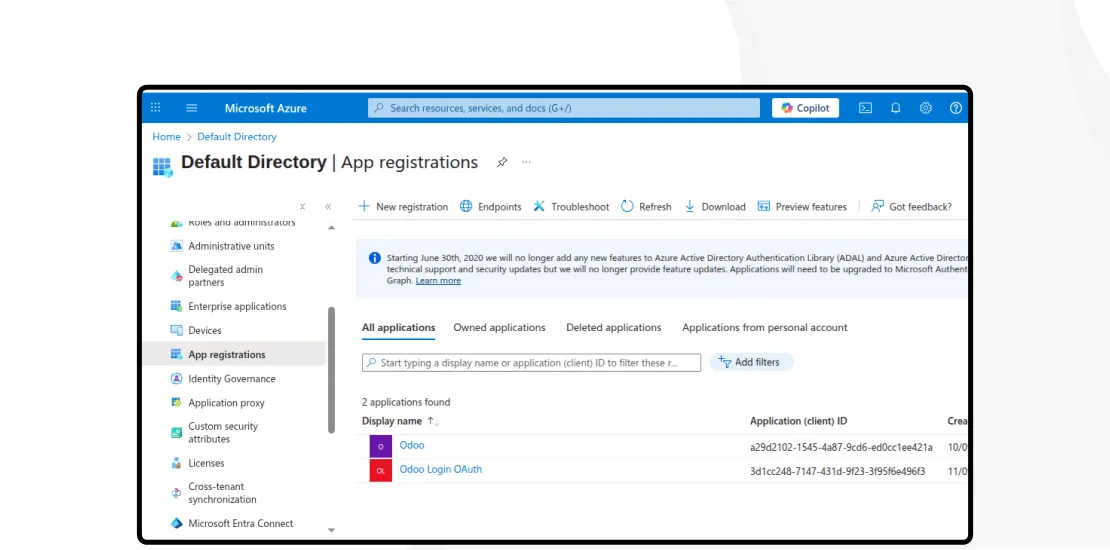
Step 1 - Create an app in Microsoft Azure:

  • Log in to the Microsoft Azure Portal using your Office 365 account.
  • Navigate to Manage Microsoft Entra ID (formerly Azure Active Directory).
  • Create a New Application:
  • Click the Add (+) icon → App registration.

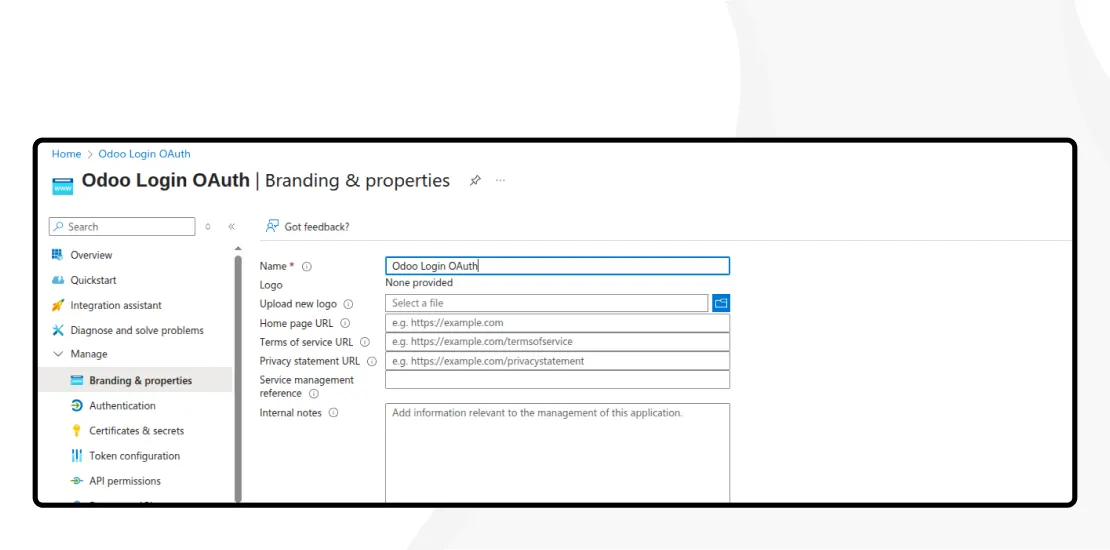
Step 2: Register the Application:

  • Name: Odoo Login OAuth
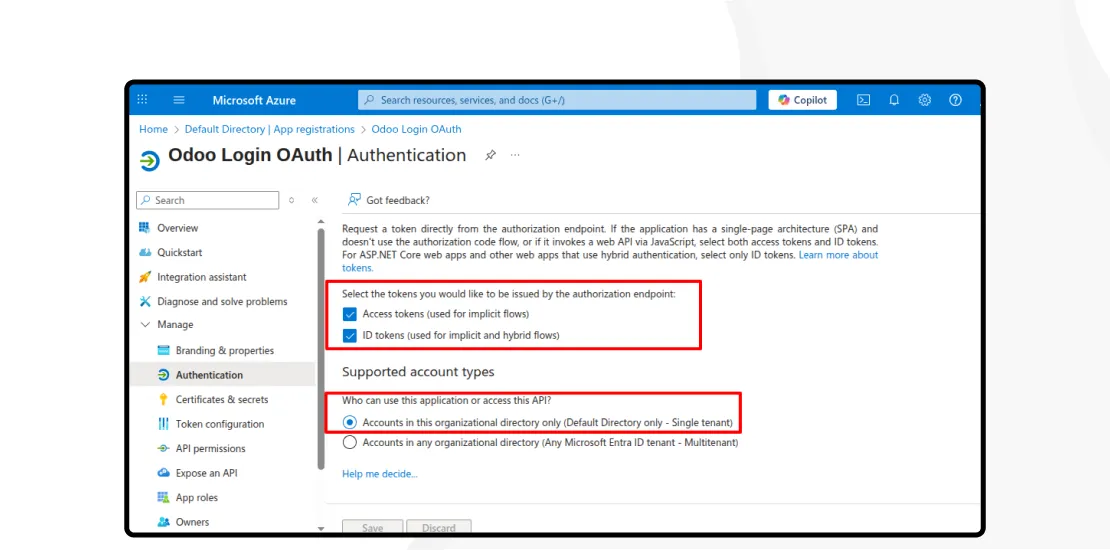
  • Supported account types: Accounts in this organizational directory only (Single tenant)
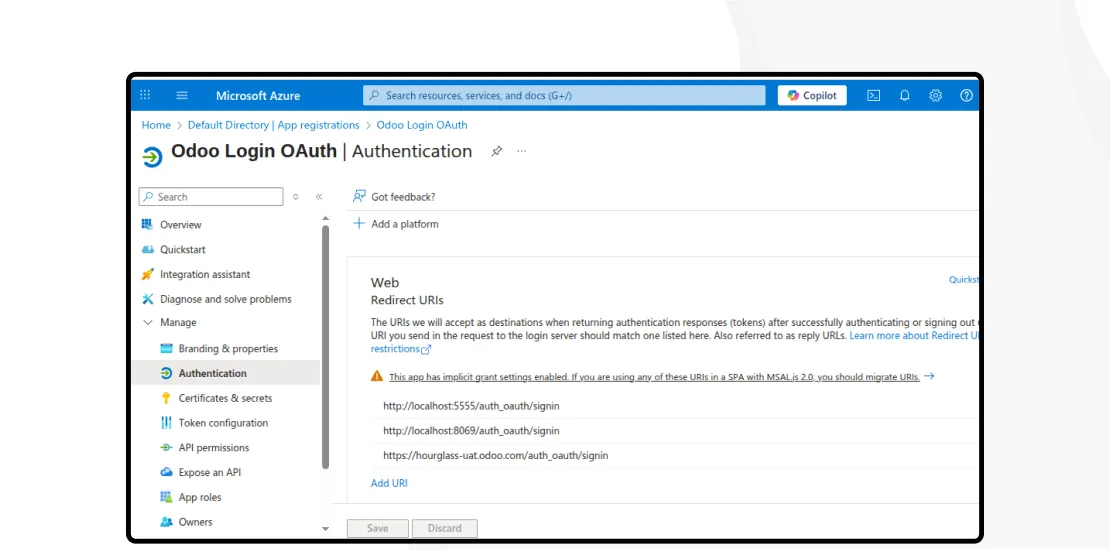
  • Redirect URI (Web): https://hourglass-uat.odoo.com/auth_oauth/signin or https://cyble-mar2025.odoo.com/auth_oauth/signin
  • Configure Authentication
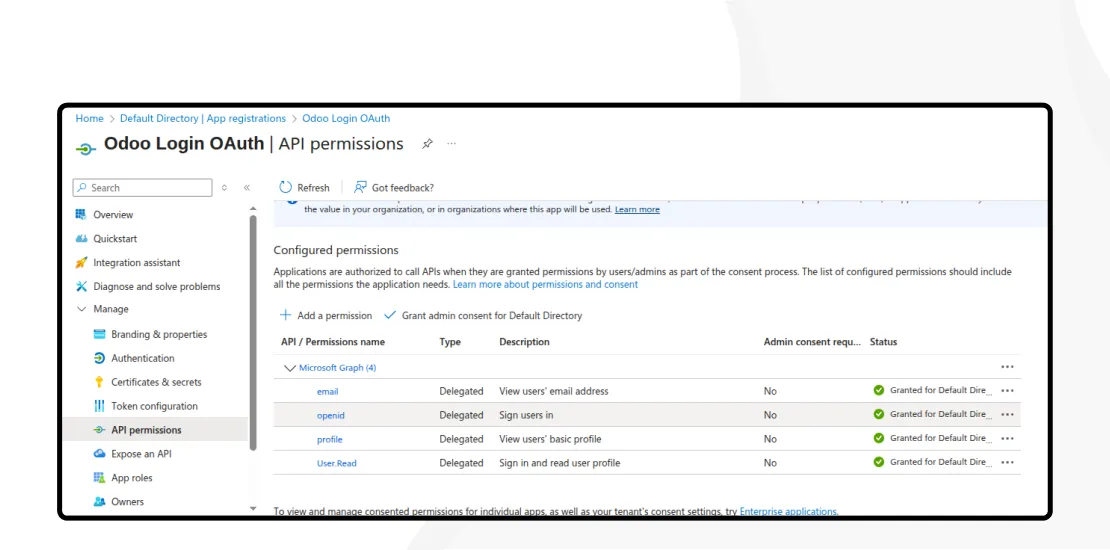
  • Provide API Permissions: Add permission – Request API Permissions – Microsoft Graph – Delegated Permissions.
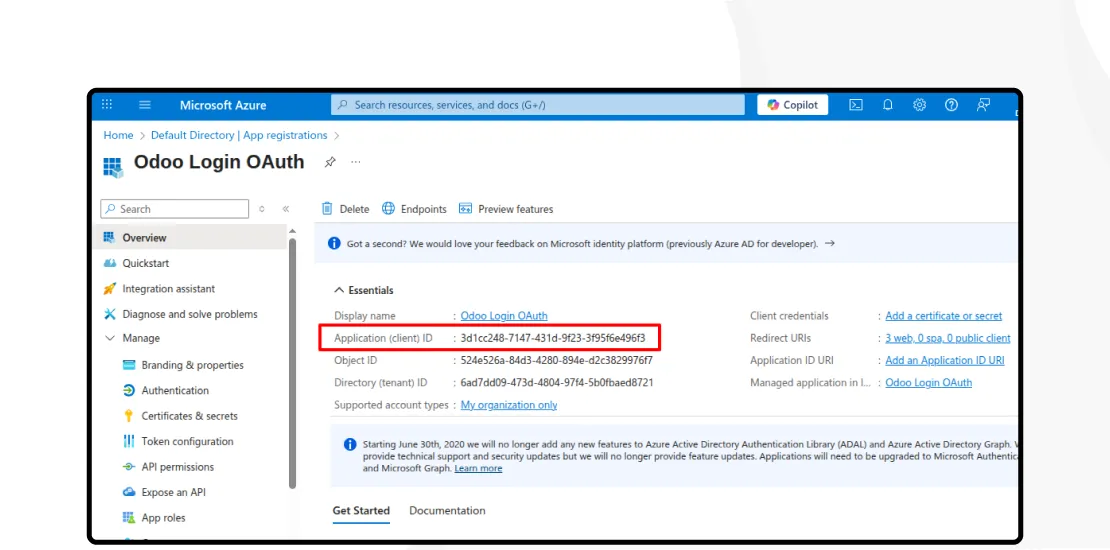
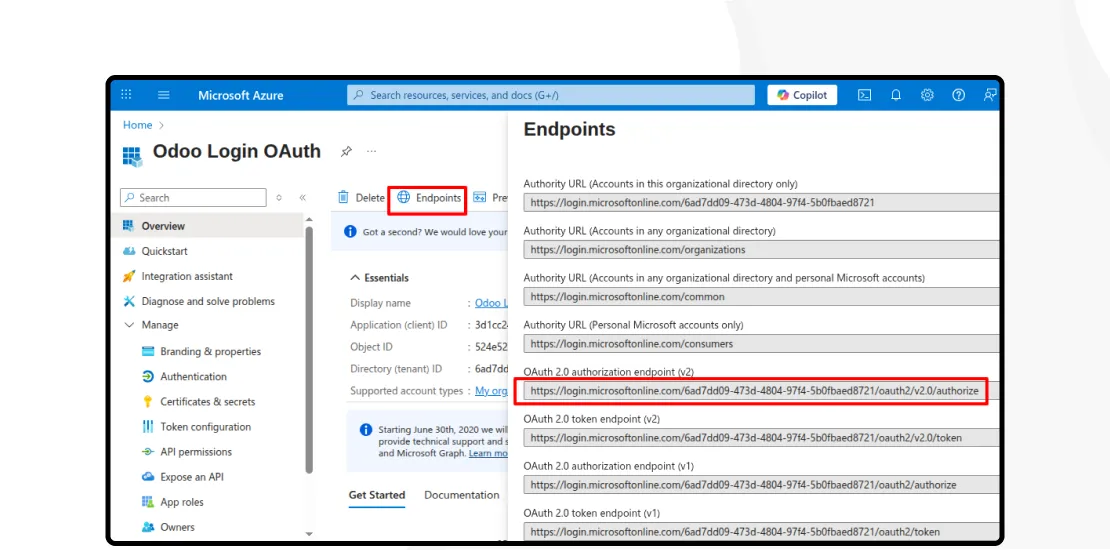
  • Credentials to note – Go to Overview → Copy Application (client) ID.
  • If users are restricted, add the list of users for Odoo SSO access.

Step 3: Odoo Setup :

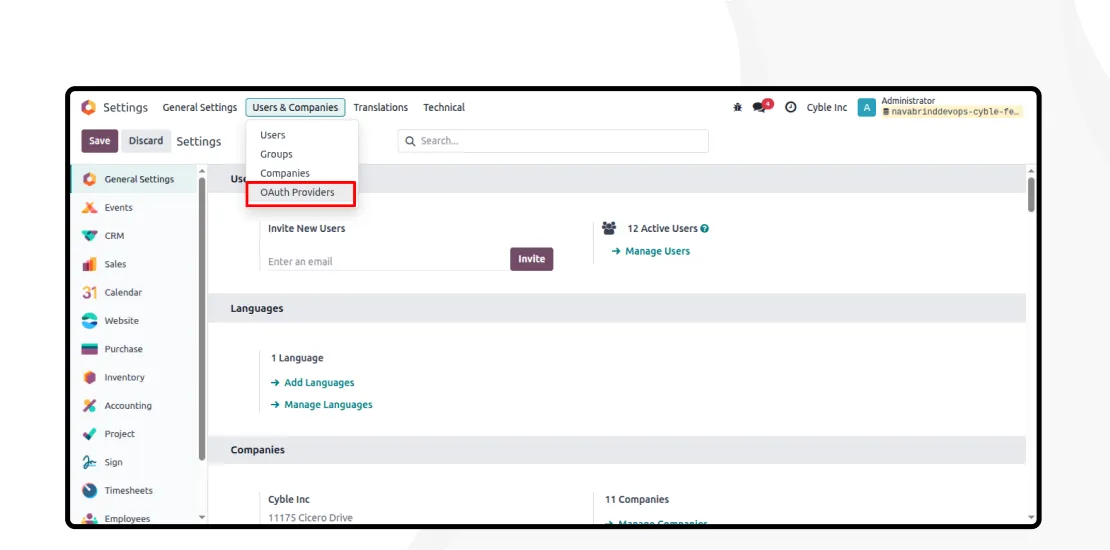
  1. Navigate to Settings → Integrations → OAuth Authentication.
  2. Check ‘Activate OAuth login’ and click ‘Save’.
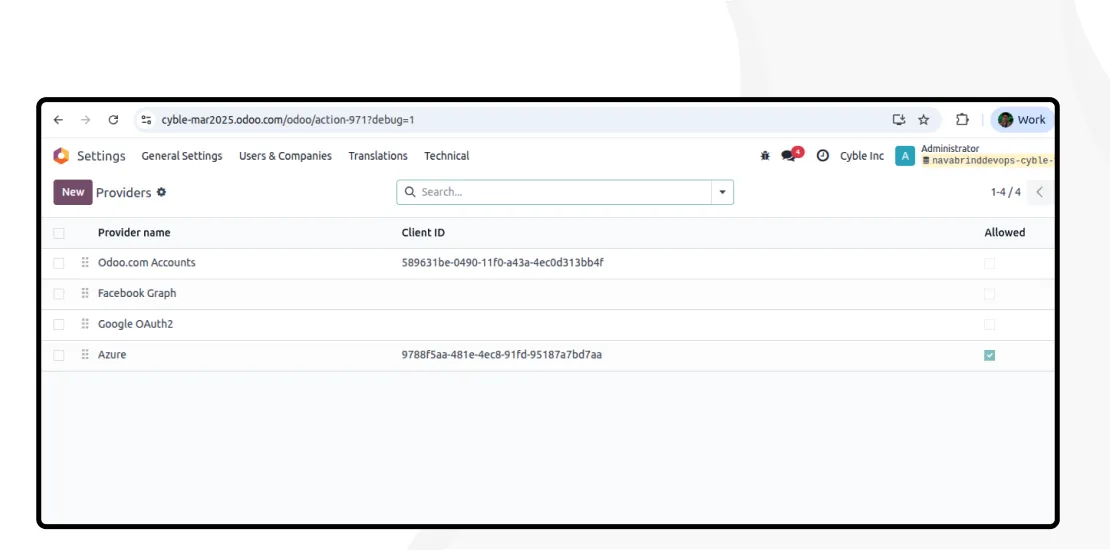
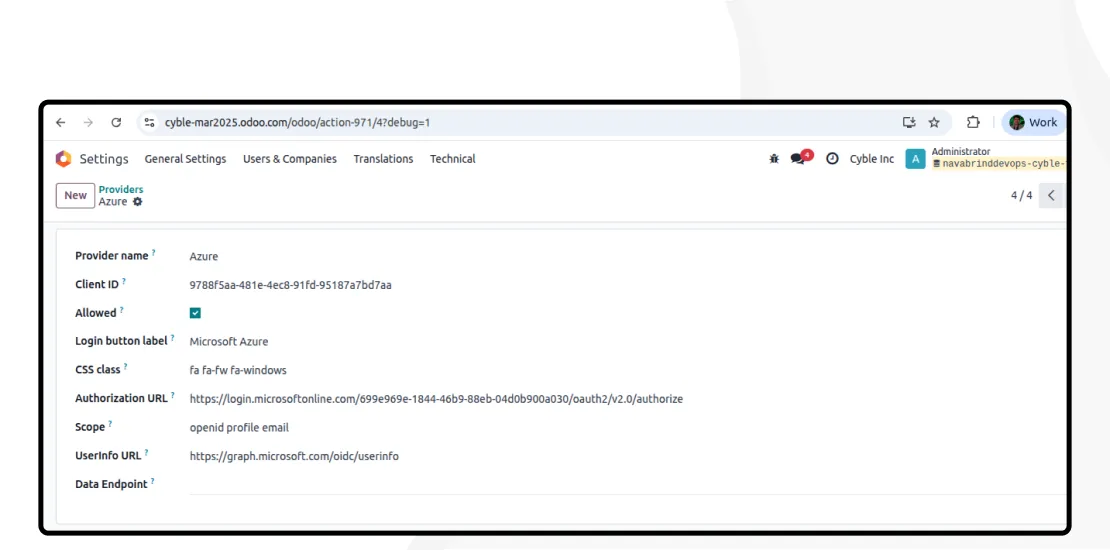
  3. Open OAuth Providers → Click New:
    a. Provider Name: Azure
    b. Client ID: Copied from Application (client) ID example: 5284f63a-d535-433b-8aec-            660cbd562e56
    c. Allowed: True
    d. Login Label Button: Microsoft Azure
    e. CSS Class: fa fa-fw fa-windows (or 2nd option – fa fa-fw fa-sign-in text-primary)
    f. Authorization URL: Copied from OAuth 2.0 authorization endpoint (v2) example: https://login.microsoftonline.com/699e969e-1844-46b9-88eb-04d0b900a030 /oauth2/v2.0/authorize
    g. Scope: openid profile email
    h. UserInfo URL: https://graph.microsoft.com/oidc/userinfo
    i. Data Endpoint for Token Exchange: Empty

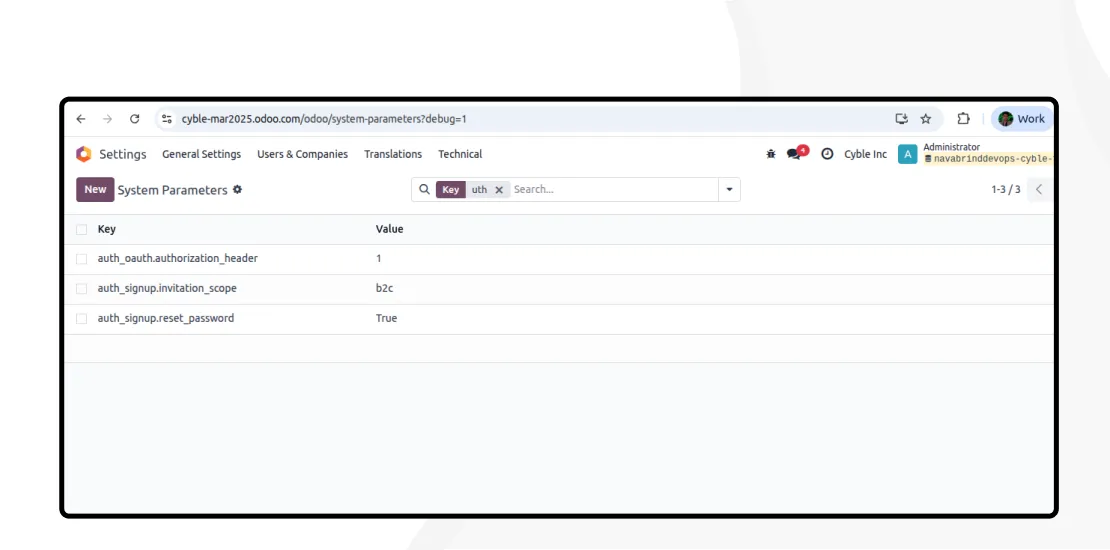
4. Setup System Parameters : auth_oauth.authorization_header : 1
5. After setting up the restart server.

Step 4: User Login :

  • Finally, send an invitation email for first-time users or send an email using the Send Password instructions :
  • The user receives an email, and by clicking the link, they will be redirected to the Odoo login page.
  • The user must log in through Azure, and then, if the Microsoft account is already logged in, it will automatically log in to Odoo.
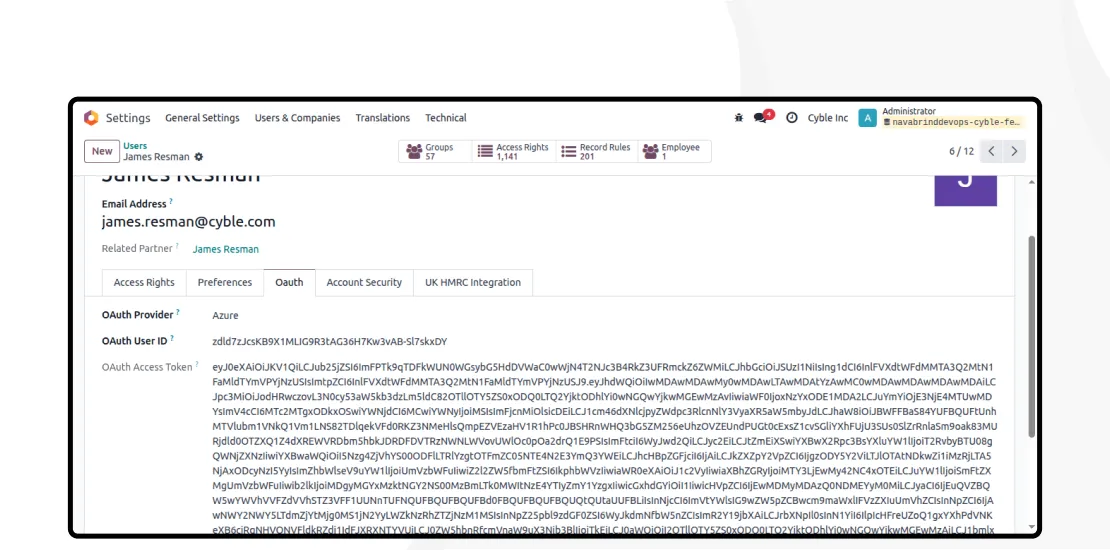
  • Once logged in Odoo will capture the OAuth User ID and OAuth User Access Token.
  • Odoo SSO can work for Portal Users also. (If not allowed as a portal, then the User can be changed to internal, and after getting access taken, it can be converted back to a Portal user.)

Need support integrating your Odoo ERP with your Microsoft Azure instance?

Drop us a note for a quick conversation. As Odoo Gold Partners we are happy to understand your requirements and help you leverage two powerful applications with ease and speed.

written by

Sumit Sinha

Associate Lead, Odoo

Sumit Sinha is an Associate Lead with over a decade of experience in enterprise software implementation. At Navabrind IT Solutions, he leads large and complex Odoo projects, consistently delivering world‑class Odoo implementations and integrations. He is recognized for his meticulous attention to detail, commitment to excellence, and dedication to going the extra mile to ensure successful project outcomes.

Related Articles

  • Post
    Is Odoo Worth It for Small Businesses in 2026?
    Is Odoo Worth It for Small Businesses in 2026? August 26, 2026 Posted by: Dania Sibionna Philemon Categories: Blog, ERP for Small Business, Odoo Reviews & Comparisons No Comments Why Odoo is a differentiator in 2026 For small businesses, choosing an ERP system is an investment that must deliver measurable value. Odoo has gained attention
  • Post
    Odoo Pros and Cons: An Honest 2026 Breakdown
    Odoo Pros and Cons: An Honest 2026 Breakdown August 24, 2026 Posted by: Dania Sibionna Philemon Categories: Blog, Odoo Buyer’s Guide No Comments Why an increasing number of businesses are evaluating Odoo in 2026 Odoo is one of the fastest-growing ERP platforms for businesses seeking an integrated solution to manage finance, sales, inventory, manufacturing, CRM,
  • Post
    Odoo AI Evolution: Comparing AI Capabilities from Legacy Versions to Odoo 19
    Odoo AI Evolution: Comparing AI Capabilities from Legacy Versions to Odoo 19 August 21, 2026 Posted by: Vasanth Anantharaman Categories: Blog, Odoo Product Updates No Comments Odoo's AI evolution and its benefits to users Artificial intelligence has evolved from a complementary business tool to a core capability within modern ERP platforms, enabling organizations to automate

written by

Sumit Sinha

Associate Lead, Odoo

Sumit Sinha is an Associate Lead with over a decade of experience in enterprise software implementation. At Navabrind IT Solutions, he leads large and complex Odoo projects, consistently delivering world‑class Odoo implementations and integrations. He is recognized for his meticulous attention to detail, commitment to excellence, and dedication to going the extra mile to ensure successful project outcomes.

Contact us to know more about our offerings and schedule a call.