





✦ Odoo Gold Partner · India
Migrate from
SAP, Tally, Zoho
to Odoo.
Move beyond the limitations of expensive point solutions. With Odoo, bring sales, inventory, purchasing, manufacturing, accounting, and more on one automated AI-enabled platform.
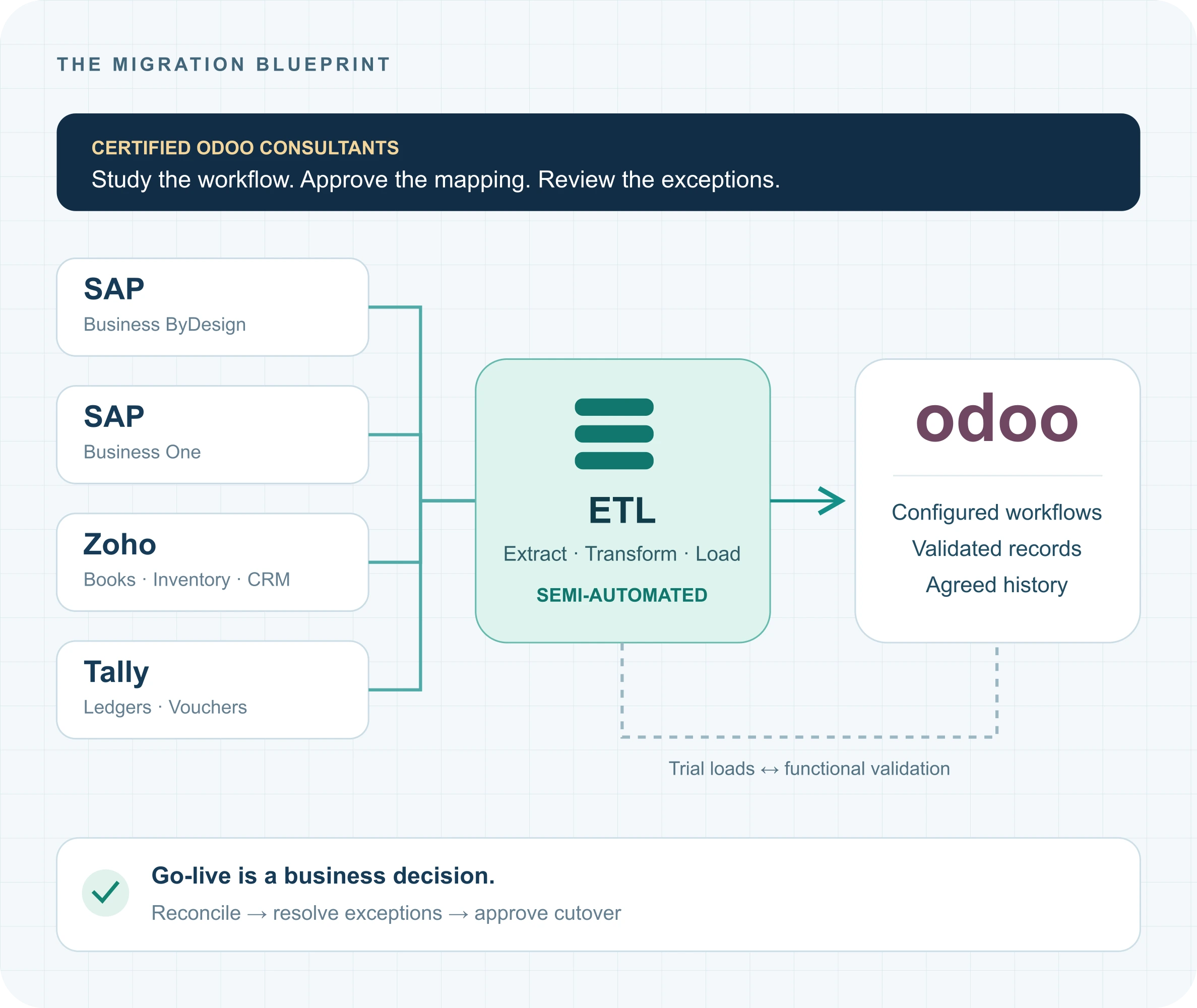
Our certified Odoo consultants make migration from SAP Business ByDesign, SAP Business One, Zoho, and Tally easier with a structured approach, semi-automated ETL tools, and process-driven migration of your business data, transactions, and workflows. The result is a connected, efficient, and deeply customized ERP built for your business growth.
Beyond Migration. Better Business Outcomes.
Your move to Odoo opens up new possibilities.
Four starting points. A considered route to Odoo.
Start with the system you run today.
The source system changes the extraction and mapping decisions. Your business process determines the destination.

SAP Business ByDesign → Odoo
Business workflows, financial records and agreed history.
Discuss your workflows and historical data scope.

SAP Business One → Odoo
Business partners, sales documents, stock, finance and add-on dependencies.
Review user-defined fields and existing add-ons.

Zoho → Odoo
Map the apps you use and the relationships between their records.
Define ownership where data exists in several apps.

Tally → Odoo
Map ledgers, vouchers, stock and outstanding items into Odoo.
Agree transaction history versus opening balances.
Your current ERP → Odoo
Choose a migration path to focus the assessment and preselect your source system in the enquiry form.
Successful ERP migrations
Our method, through our clients’ migrations.
Businesses from the manufacturing, distribution, and other industries have successfully migrated from SAP to Odoo with Navabrind IT Solutions. Explore their migration journeys with our team and discover how their experiences and lessons learned can guide your transition to open-source, modular, AI-powered Odoo ERP.
ERP migration.
Historical data.
Migration from SAP Business ByDesign to Odoo, covering the entire business operations workflow and historical data.
Business workflows.
Historical data.
A successful ERP migration delivered by Navabrind IT Solutions. Ask our team to walk through the engagement and the experience relevant to your business.
Tally to Odoo
ERP migration.
A successful ERP migration with Navabrind IT Solutions. Discuss the customer journey and how it can inform the planning of your own ERP transition.
SAP to Odoo
ERP migration.
A successful ERP migration supported by Navabrind IT Solutions. Speak to our team about the engagement and the aspects relevant to your migration requirements.
01 / Understand before building
The blueprint starts inside your modules.
Our certified Odoo consultants review the existing functional setup and technical dependencies with your process owners. Each module gets a target workflow, data scope and acceptance criteria.
Sales: follow the order beyond the quotation.
Review customer records, price rules, approvals, order status and the links to fulfilment and invoicing.
Blueprint output: sales workflow + document mapping + acceptance scenarios.
- Which open orders must continue after cutover?
- How are partial deliveries, returns and credits handled?
- Which fields and references must remain traceable?
Process map
Current steps, business rules and the agreed Odoo workflow.
Data mapping register
Source field, target field, transformation rule and dependency.
Gap & integration register
Standard fit, required extension, connected system and owner.
Acceptance plan
Test scenarios, reconciliation measures and business sign-offs.
02 / Build and migrate in parallel
Two workstreams.
One agreed blueprint.
The Odoo setup and the data migration develop alongside each other. Trial data tests the configuration; process testing exposes mapping issues early.
Build the Odoo business setup
01
Configure the foundation
Companies, roles, products, accounts, warehouses and agreed workflows.
02
Implement the approved gaps
Extensions and integrations tied to the blueprint, with test scenarios.
03
Validate with users
Run end-to-end business scenarios using trial migration records.
Prepare and migrate the data
01
Extract and profile
Assess source exports, required periods, missing fields and duplicates.
02
Transform and trial-load
Apply approved mapping rules and load records in dependency order.
03
Reconcile and refine
Check relationships and totals, resolve exceptions and repeat the trial.
Parallel workstreams describe delivery activities. Running both production ERPs at once is a separate decision that must be scoped.
03 / Semi-automated ETL, with consultant review
Repeatable data work.
Accountable business decisions.
ETL means Extract, Transform and Load. Our semi-automated tool supports repeatable migration runs; consultants define the rules and review the records that need business judgment.
Extract with context
Agree the source access method, cut-off, record types and history periods. Retain source references so trial results can be checked against the original records.
Review: record counts, missing values and available relationships.
Transform by approved rules
Map customer IDs, product codes, accounts, dates, currencies, units and tax references. Route ambiguous or incomplete records for review.
Review: mapping exceptions, duplicates and unresolved references.
Load in dependency order
Prepare the target configuration, then masters and dependent documents. Validate each trial before extending the scope or approving the final run.
Review: import results, business links and reconciliation differences.
04 / From sales to accounting
An invoice needs its business context.
We map documents as related records. A sales order, its fulfilment, its invoice and the payment position must make sense together in the agreed migration scope.
01 · SELL
Customer & sales order
Party, product, price, quantity and source reference.
02 · FULFIL
Delivery & inventory
Delivered quantities, warehouse, returns and stock position.
03 · BILL
Invoice & credit note
Invoice lines, accounts, taxes, currency and document links.
04 · RECONCILE
Payment & accounting
Paid or open amounts, ledger impact and agreed opening position.
| What we check | The migration question | The acceptance evidence |
|---|---|---|
| Open sales & purchases | What remains to deliver, receive, invoice or pay? | Agreed open-document lists and sample end-to-end checks. |
| Receivables & payables | Do customer and supplier outstanding amounts match? | Ageing and control-account reconciliation at the cut-off. |
| Inventory & valuation | Do quantities and values match by the agreed warehouse and product scope? | Stock comparison and valuation differences reviewed by owners. |
| Accounting history | Are we importing detailed transactions or carrying opening balances for each period? | Trial balance and ledger checks; rules to prevent double counting. |
| Historical access | Which years and record types belong in Odoo, and which remain in an archive? | Signed history scope, source references and sample retrieval checks. |
The blueprint defines supported documents, periods, dependencies
and source access. Not every legacy object can be recreated one-to-one in Odoo.
05 / Onsite + offshore
Close to your people.
Connected to the delivery work.
We combine business-facing onsite engagement with offshore configuration and migration work. Locations, visits and responsibilities are agreed in the project scope.
Work with the process owners.
- Walk through actual order, stock and finance processes.
- Resolve approval rules and exceptions with business users.
- Review the blueprint and key acceptance scenarios.
- Support agreed validation and cutover activities.
Execute against the same blueprint.
- Configure Odoo and implement approved extensions.
- Prepare mappings and semi-automated ETL runs.
- Run trial loads and investigate reconciliation differences.
- Maintain the issue list and readiness evidence.
go-live approval
Questions before you move
Questions to ask your Odoo Partner who is helping you activate your Odoo instance
Is the migration from other solutions to Odoo fully automated?
The migration from solutions such as Tally, Zoho, and SAP to Odoo cannot be fully automated. Though migration tools and ETL (Extract, Transform, Load) processes automate much data extraction, transformation, and transfer, there are several activities that require human intervention.
Partners like Navabrind IT Solution who help you migrate to Odoo first need to understand your business workflows, map data fields, clean and validate records, configure the Odoo modules, and test the integrations.
Migrations from systems such as SAP Business One, SAP Business ByDesign, Tally, or Zoho also need custom development and manual adjustments. We support our Odoo consultants with semi-automated migration tools to ensure a smooth transition to Odoo.
Can we migrate historical transactions, not just opening balances?
Users can migrate historical transactions to Odoo, not just opening balances. This includes data such as past sales orders, purchase orders, customer invoices, vendor bills, payments, inventory movements, and accounting entries.
At Navabrind IT Solutions, we plan a migration by first assessing our clients’ existing ERP data, identifying the historical records that need to be migrated, and using structured methodologies to transfer data into Odoo.
Our team handles data mapping, cleansing, reconciliation, and validation. The ease or difficulty of historical data migration depends on our client’s source system, data quality, and business requirements. The better the transaction history, the easier it is to access past records in Odoo.
How long does it take to streamline an Odoo instance during a rescue project?
The time required to streamline an Odoo instance during a rescue project can be determined after doing a detailed assessment of the instance.
An implementation partner such as Navabrind IT Solutions will need to evaluate the level of customization, review the configuration, workflows and performance.
Identify where errors workflow issues, or performance bottlenecks appear. These can be fixed quickly. However, complex challenges involving faulty customizations, integration failures, database issues, or incomplete implementations can take weeks.
At Navabrind IT Solutions, our Odoo Rescue experts begin with a system audit to identify the root causes, prioritize critical issues, and develop a recovery plan.
What happens to the customizations in our current ERP?
The Navabrind IT Solutions team looks at your existing customizations to understand what they’re for and how they support your business. We then determine whether Odoo’s standard functionality is sufficient to meet those requirements or whether the customization should be configured, re-built, integrated or dropped. We discuss our findings and suggestions with your team before deciding on the right course of action.
How is the final cutover controlled?
We go through a carefully planned cutover process to minimize disruption to your business. This involves agreeing on when we stop transactions in the old system, transferring the final data, checking that the data has transferred correctly and that Odoo is ready to go. We set clear ownership, put in place a fall back plan and provide support at go-live to deal with any issues that may arise.
Can you show us a migration similar to ours?
Yes. Navabrind IT Solutions has assisted a number of businesses across the manufacturing, distribution, retail, e-commerce and other sectors in migrating off their legacy ERP systems to Odoo. We can go through the various customer migration projects we’ve been involved in over a call and elaborate on the issues that were encountered and how we’ve dealt with data migration, customisations, integrations and business continuity.
We can also provide customer references that are relevant to your industry and your type of migration.
Start with your current system
Let’s map your move
before you commit.
Tell us what runs your business today and which records matter after go-live. Our India team will arrange a migration discovery discussion.
- Review your source ERP and module scope.
- Discuss history, integrations and data readiness.
- Explore the onsite/offshore delivery approach.
- Agree the next step toward a scoped migration blueprint.